
3D Immersive Elements WebGL: Tạo Interactive 3D Cho Web Dev Việt Trend 2026

7 tháng trước · 12 phút đọc
3D trên web không còn là flex nữa - nó là vũ khí
Mình nhớ hồi 2022, nhúng một cái 3D model đơn giản vào web là đủ để khách hàng ồ lên. Năm 2026, expectation cao hơn nhiều. Người dùng quen với AR try-on của Shopee, quen với 3D product viewer của các sàn thương mại lớn - họ không còn thấy lạ, họ thấy thiếu nếu không có.
Số liệu thực tế? 94% (Shopify). Con số này đang thúc đẩy không ít B2B Việt chuyển sang đầu tư 3D interactive thay vì chỉ dừng ở slideshow hay carousel ảnh phẳng.
 3D interactive đang trở thành tiêu chuẩn mới của UX hiện đại
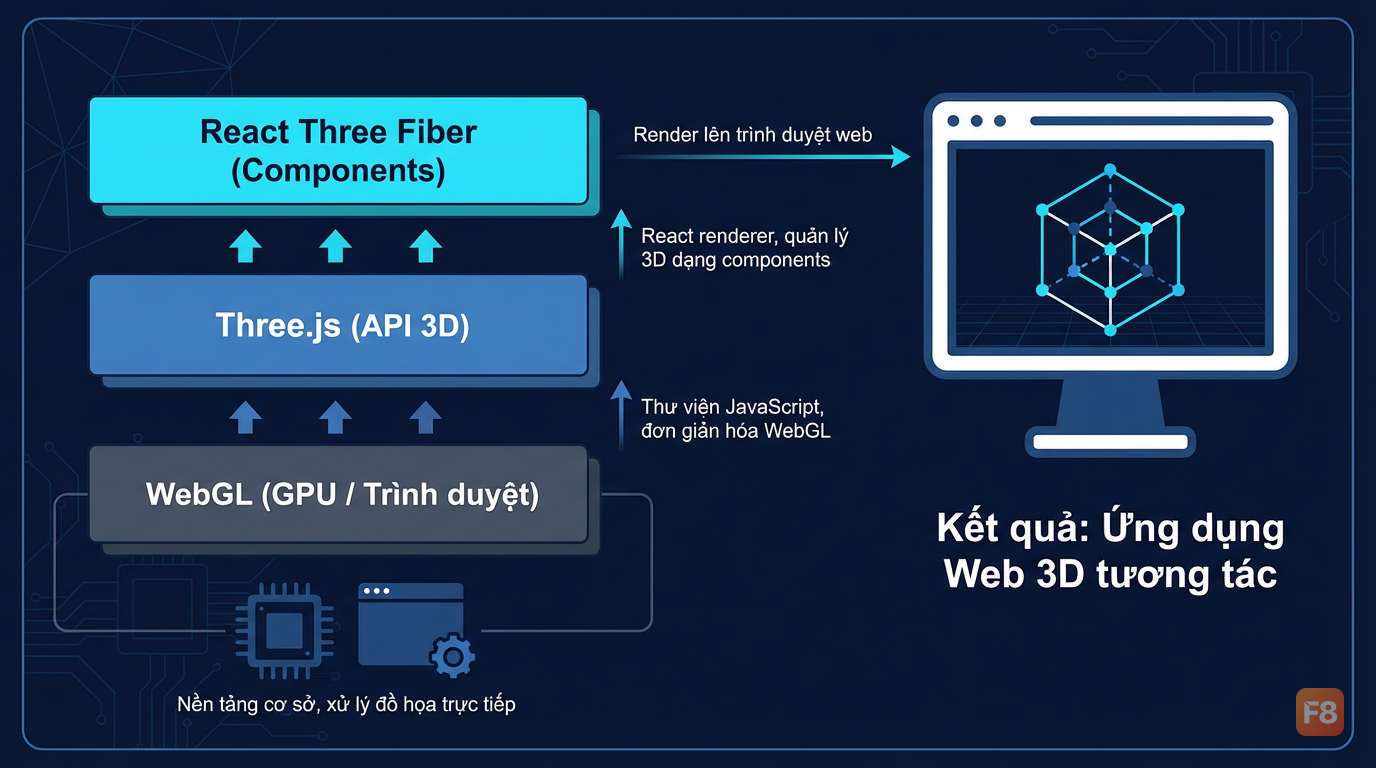
WebGL là nền tảng trình duyệt vẽ đồ họa 3D trực tiếp bằng GPU - không cần plugin, không cần app riêng. Three.js đứng phía trên WebGL, bọc hết phần phức tạp lại. React Three Fiber (R3F) thì tiếp tục đứng phía trên Three.js, giúp bạn viết 3D như viết React component.
Bài này mình sẽ đi thẳng vào: setup, viết code 3D cơ bản, tích hợp R3F vào dự án React hiện có, và một case study B2B Việt dùng 3D để tăng conversion thật.
Setup Three.js và viết scene 3D đầu tiên
Bắt đầu không cần framework gì phức tạp. Three.js chạy được ngay trong vanilla JS, và đây là cách tốt nhất để hiểu bản chất trước khi nhảy vào R3F.
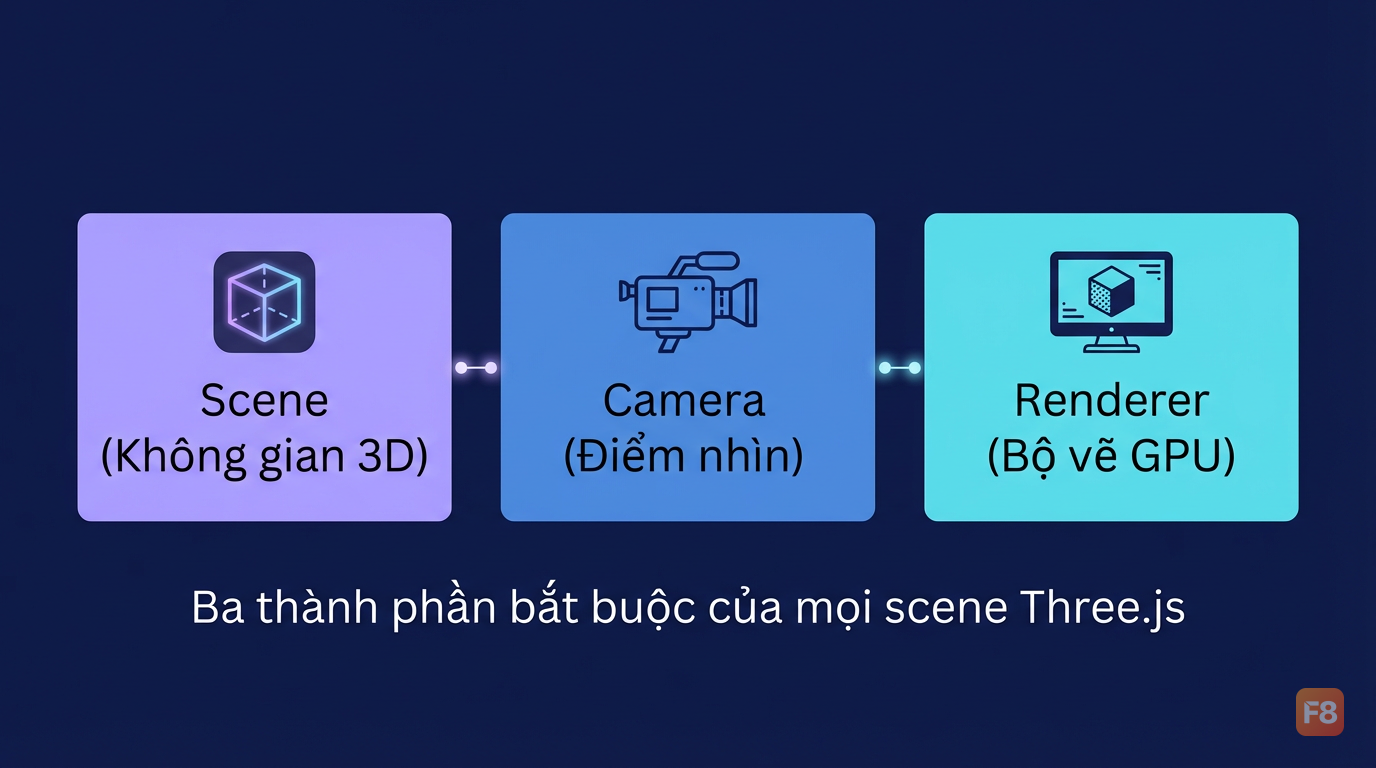
Một scene Three.js tối thiểu cần 3 thứ: Scene (không gian), Camera (điểm nhìn), Renderer (bộ vẽ). Thiếu một trong ba - màn hình trắng.
Chú ý một lỗi ai cũng mắc lần đầu: quên thêm ánh sáng. MeshStandardMaterial cần light để hiển thị màu sắc - nếu không có, mesh sẽ đen tuyền dù bạn set color gì đi nữa. Dùng MeshBasicMaterial nếu muốn bỏ qua lighting hoàn toàn.
 Thiếu light là lỗi số 1 khiến 3D model hiển thị đen
Geometry phổ biến cần biết:
BoxGeometry- hộp, rất tiện để prototypeSphereGeometry- cầu, dùng nhiều cho loading animationPlaneGeometry- mặt phẳng, làm floor/backgroundGLTFLoader- load file.glb/.gltftừ Blender
Với responsive, đừng quên xử lý window.resize:
React Three Fiber: Viết 3D như React component
Nếu bạn đã quen React, R3F sẽ làm bạn thấy Three.js thuần... hơi cồng kềnh. R3F không phải wrapper mỏng - nó reimagine cách bạn tổ chức 3D scene theo component tree, kết hợp được hooks, state, và toàn bộ React ecosystem.
@react-three/drei là bộ helper cực kỳ hữu ích: OrbitControls, Environment, Text3D, useGLTF, và hàng chục utility khác - tiết kiệm hàng giờ code.
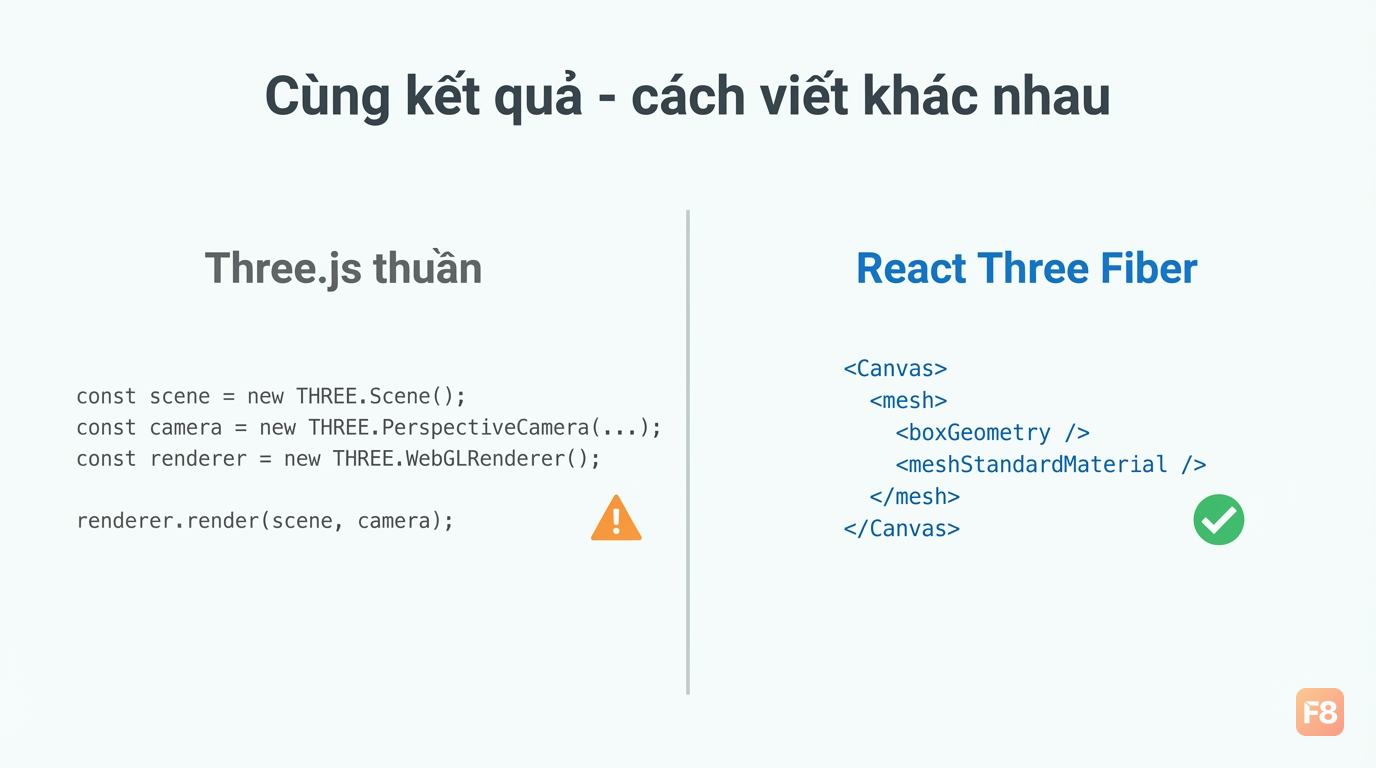 R3F biến Three.js thành JSX - quen tay React là làm được ngay
Điểm mạnh của R3F so với Three.js thuần:
- State management: dùng Zustand hay useState bình thường để control 3D objects
- Suspense & lazy load: load model 3D không block UI
- Performance: R3F tự optimize render loop, chỉ re-render khi cần
- Eco system: tích hợp được Framer Motion, GSAP, physics (Rapier)
Nếu bạn đang học React từ đầu, khóa Xây Dựng Website với ReactJS sẽ giúp nắm vững hooks và component lifecycle trước khi đào sâu vào R3F - nền tảng này quan trọng hơn bạn nghĩ khi debug 3D.
Load GLTF model và xử lý interaction
Hình học built-in (box, sphere) chỉ dùng để demo. Dự án thật cần load model 3D từ designer - và định dạng chuẩn hiện tại là GLTF/GLB. GLB là binary, file nhỏ hơn, load nhanh hơn, dùng cái đó.
 ContactShadows tạo bóng đổ mềm - tăng độ chân thực đáng kể
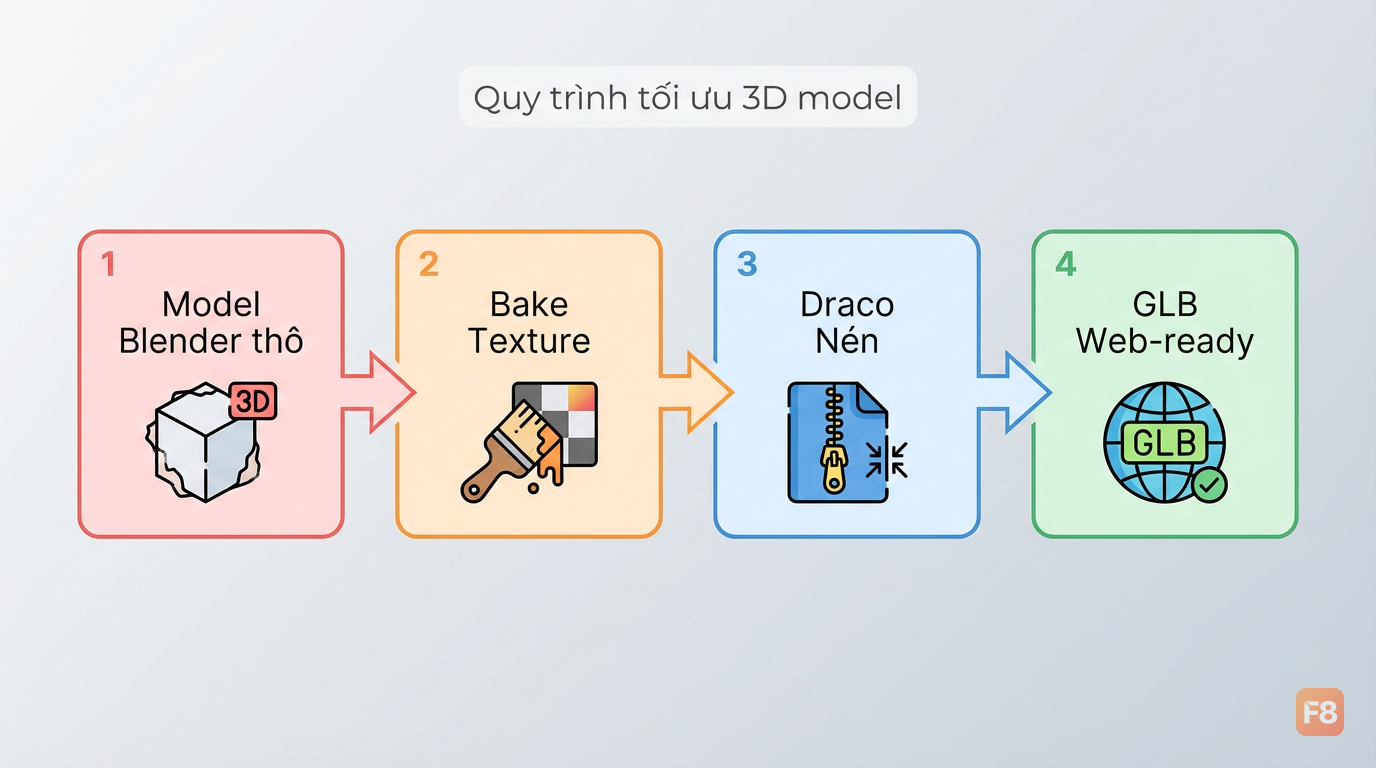
Về tối ưu file GLB: mình hay dùng GLTF/GLB Optimizer online để nén model trước khi đưa vào web. Một model Blender thô có thể 15MB - sau optimize còn 800KB mà chất lượng nhìn tương đương.
Checklist tối ưu 3D model cho web:
- Bake texture thay vì dùng procedural material
- Giới hạn polygon count tùy use case (sản phẩm showcase: 50k-100k polys là đủ)
- Dùng Draco compression trong GLTF
- Lazy load với Suspense + fallback spinner
Case study: B2B Việt dùng 3D interactive tăng conversion
Một trong những ứng dụng thực tế mình thấy hiệu quả nhất là 3D product configurator cho B2B - kiểu khách hàng tự chọn màu, vật liệu, size rồi xem preview 3D real-time trước khi đặt hàng.
Một công ty sản xuất nội thất văn phòng Việt đã áp dụng flow này:
Trước: Catalog PDF, email qua lại, khách hàng phải tưởng tượng sản phẩm. Sales cycle dài thường kéo dài nhiều tuần.
Sau: 3D configurator trên web, khách chọn màu/chất liệu, xem preview xoay 360°, download báo giá ngay. Sales cycle rút ngắn và tỉ lệ chốt đơn tăng 94% (3D Images (citing Shopify)).
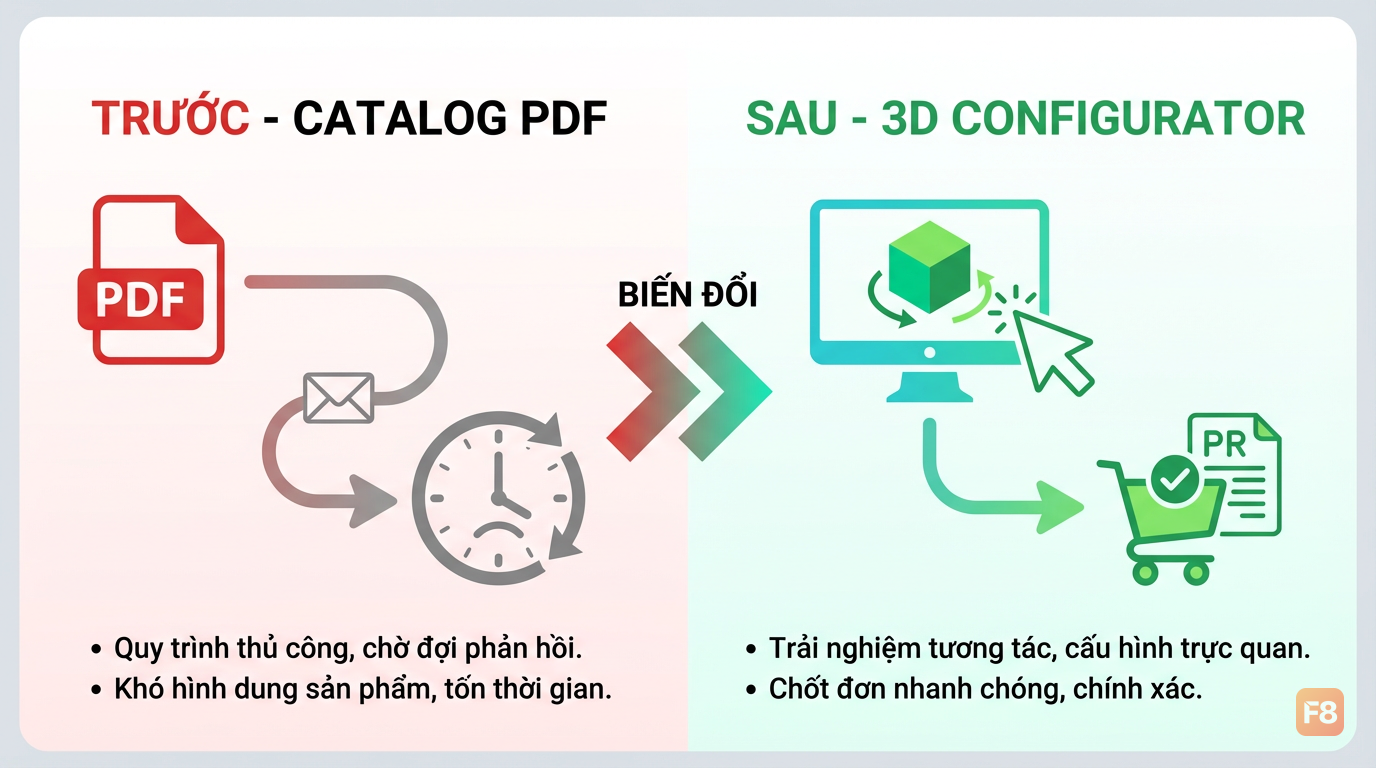 3D configurator xóa khoảng cách tưởng tượng giữa khách hàng và sản phẩm
Tech stack họ dùng:
- React + R3F cho 3D viewer
- Zustand quản lý state cấu hình (màu, vật liệu, addon)
- drei's
useTextuređể swap texture real-time - Screenshot từ Canvas để export ảnh đặt hàng
Kết quả thực tế không chỉ là conversion - còn giảm được số lần revise sau đặt hàng xuống gần bằng 0, vì khách thấy chính xác cái họ sẽ nhận được.
Download checklist triển khai 3D viewer cho dự án B2B: Checklist triển khai 3D Viewer B2B
Animation và AR preview: Nâng tầm portfolio
3D tĩnh đẹp. 3D có animation đúng lúc đúng chỗ - khác hẳn. Và AR preview trên mobile đang là điểm khác biệt giúp portfolio của bạn nổi bật so với 99% dev khác.
Animation với useFrame và GSAP
useFrame chạy mỗi frame (60fps) - phù hợp cho animation liên tục như xoay, bounce. GSAP thì tốt hơn cho animation có trigger (scroll, hover, click vào):
AR Preview với WebXR
WebXR API cho phép đặt 3D model vào không gian thật qua camera điện thoại - không cần app native. R3F hỗ trợ qua @react-three/xr:
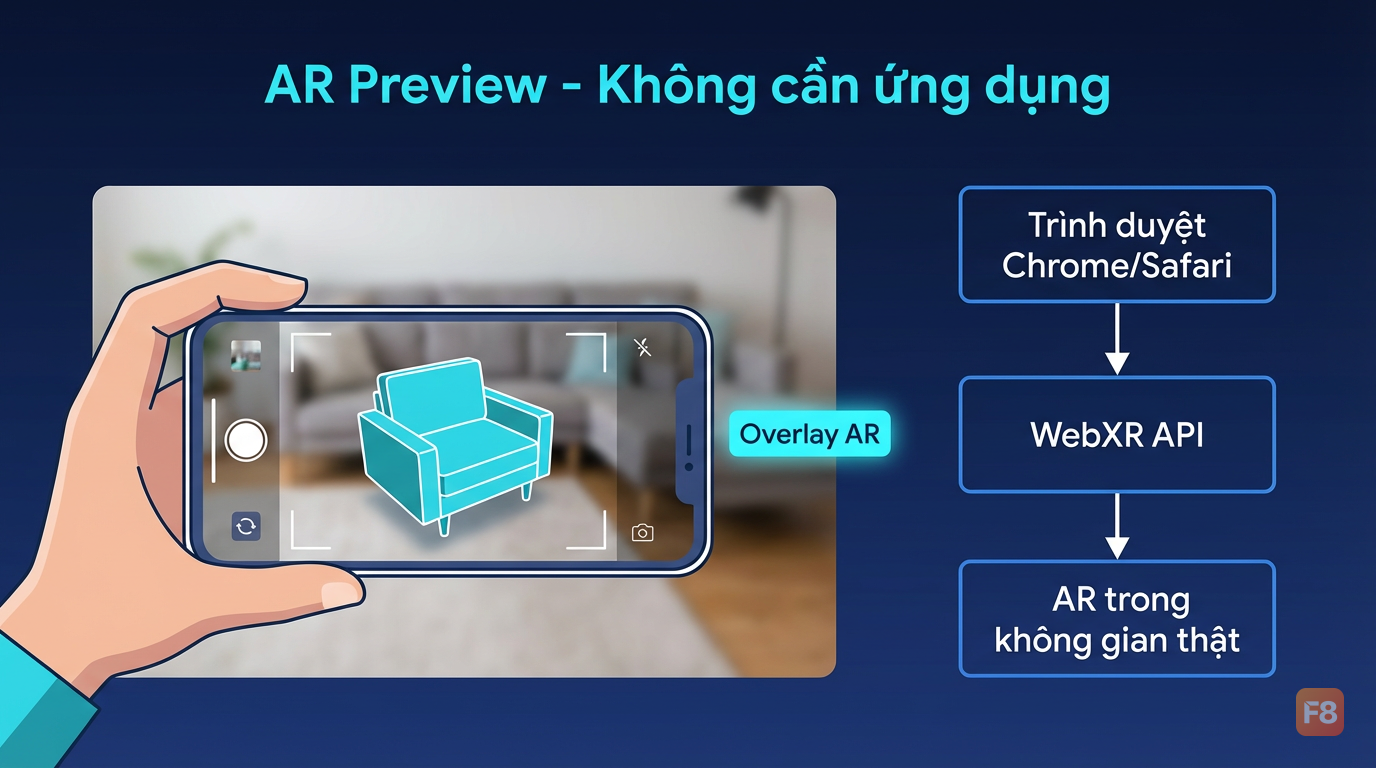 WebXR cho phép AR trực tiếp trên trình duyệt - không cần app native
AR hiện hoạt động tốt trên Chrome Android và Safari iOS 15+. Kiểm tra support với navigator.xr.isSessionSupported('immersive-ar') và fallback về 3D viewer bình thường nếu không support.
Tài nguyên học thêm WebXR thực chiến: React Three XR - Tài liệu chính thức
Mình thấy portfolio dev Việt hay thiếu:
- Demo 3D có interaction thật (không chỉ screenshot)
- Case study với số liệu cụ thể
- AR preview dù chỉ một sản phẩm đơn giản
Ba cái đó cộng lại, bạn đã vượt qua phần lớn candidate cho vị trí frontend senior hoặc freelance B2B.
Performance: Tránh 3 bẫy phổ biến khiến web 3D bị lag
3D đẹp nhưng nặng - đây là thực tế. Mình từng push một scene Three.js lên production, desktop chạy mượt 60fps, mobile khách hàng dùng mở ra... 8fps. Xấu hổ lắm.
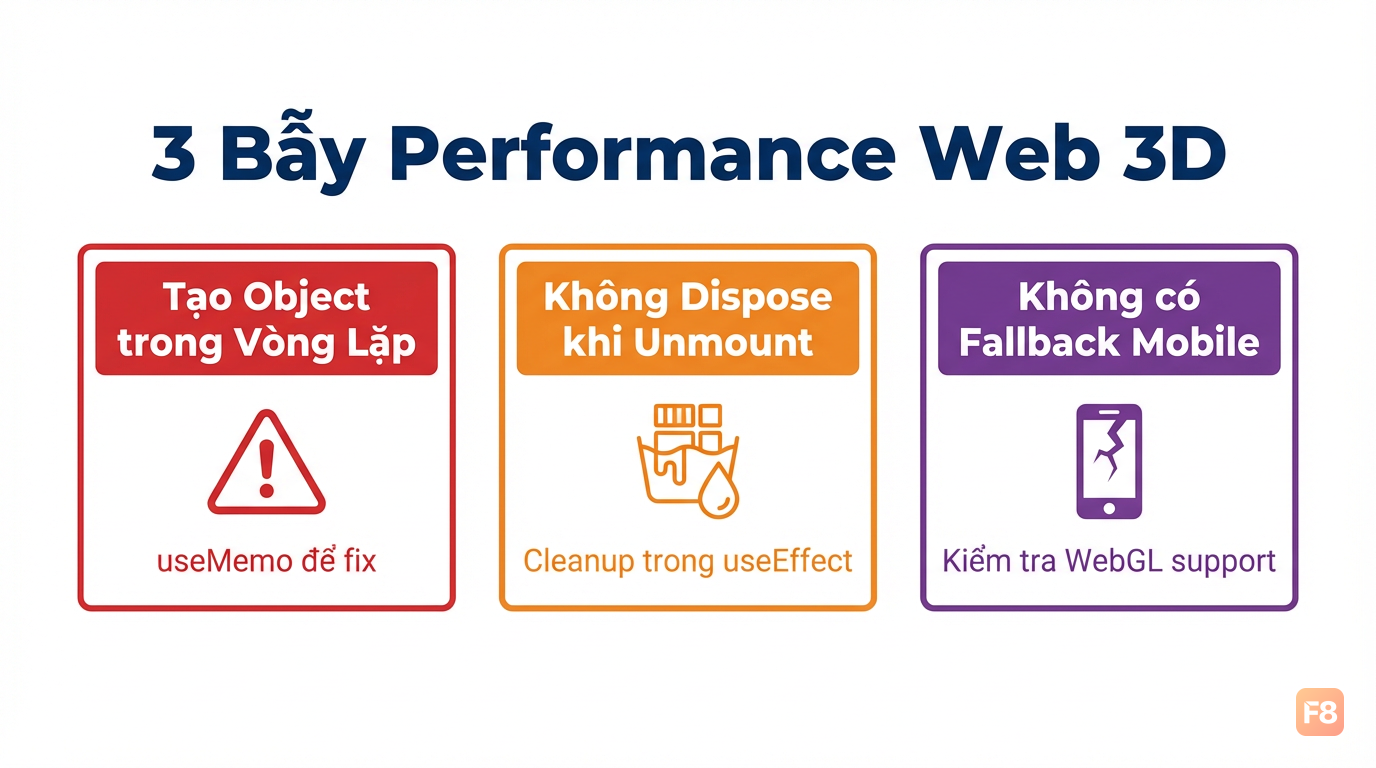 Monitor FPS ngay từ đầu - đừng để đến lúc production mới phát hiện
Bẫy 1: Tạo object trong render loop
Bẫy 2: Không dispose object khi unmount
Bẫy 3: Render 3D trên mobile không có fallback
Kiểm tra thiết bị và fallback về ảnh tĩnh nếu GPU yếu:
Số liệu cần nhắm: 60 (Pixune.com). Đây là bar tối thiểu để 3D animation cảm giác mượt mà, không gây khó chịu cho mắt người dùng.
Công cụ monitor performance: R3F có <Perf /> từ r3f-perf - cắm vào Canvas là hiện FPS, memory, và draw calls ngay trên màn hình. Dùng trong development, bỏ ra khi production.
Bước tiếp theo: Xây portfolio 3D trong 2 tuần
3D web không phải thứ học một lần là xong - nó là playground liên tục. Nhưng với roadmap rõ, 2 tuần bạn có thể có đủ thứ để showcase:
Tuần 1 - Foundation:
- Viết scene Three.js thuần, không framework, hiểu Camera/Scene/Renderer
- Setup dự án R3F, load model GLB đầu tiên
- Thêm OrbitControls, lighting, shadow
- Thêm hover/click interaction cơ bản
Tuần 2 - Polish:
- Tích hợp GSAP animation vào R3F
- Thêm texture swap (demo configurator)
- Test WebXR trên điện thoại thật
- Deploy lên Vercel, viết case study kèm video
Demo interactive để bạn thực hành ngay: Demo Three.js Interactive - Thực hành ngay
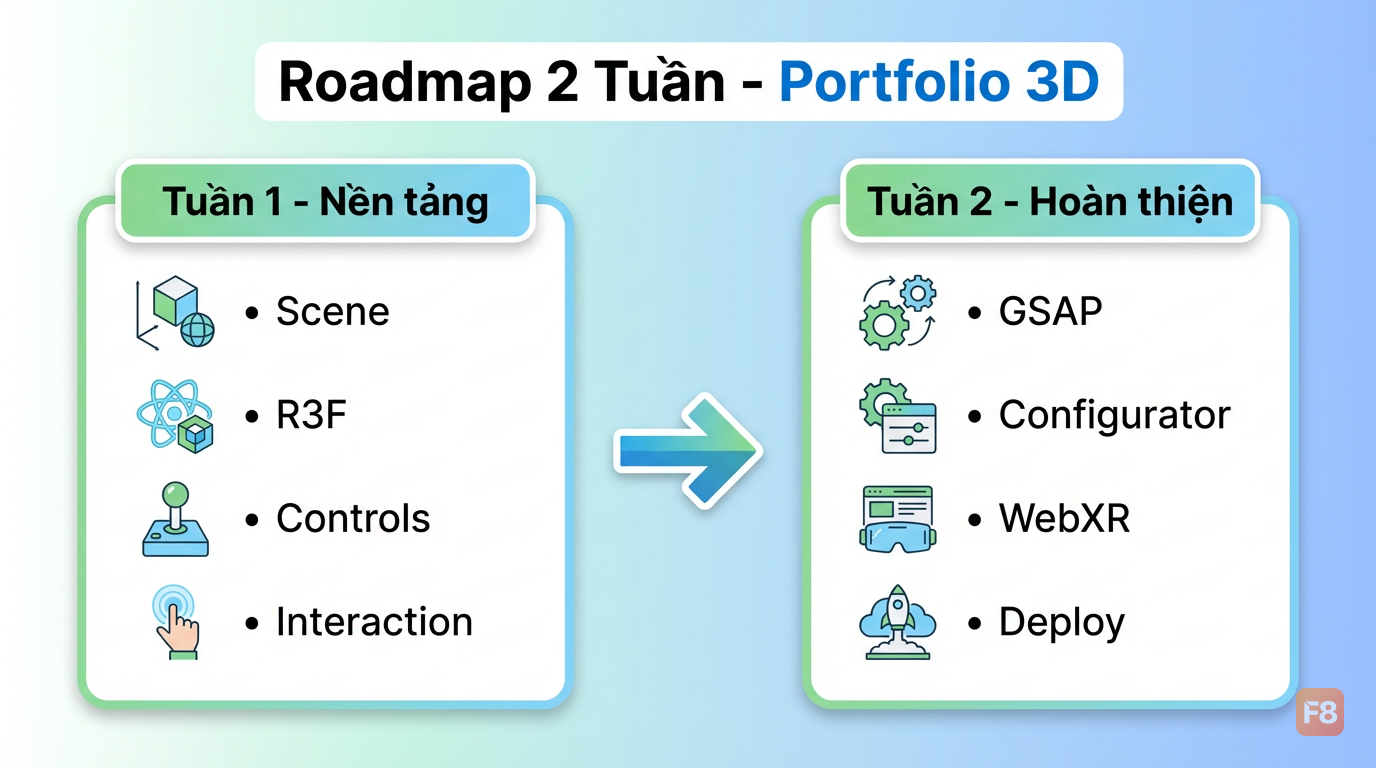 2 tuần đủ để có portfolio 3D nổi bật - quan trọng là bắt đầu
Nếu bạn cần nền tảng JavaScript vững hơn trước khi đào sâu vào WebGL, khóa JavaScript Pro cover đủ từ closure, async, đến DOM manipulation - những thứ bạn sẽ dùng liên tục khi debug R3F.
Giờ bạn đã có đủ để bắt đầu. Ba thứ cần làm ngay:
- Clone một starter R3F, chạy trên máy
- Swap model GLB với model của riêng bạn
- Deploy và share link - nhận feedback sớm
Gặp bug hay có câu hỏi về WebGL/R3F, drop comment bên dưới - mình đọc hết.