
3D Visuals và Interactive Elements trong B2B Web Design 2026

7 tháng trước · 16 phút đọc
Tại sao 3D lại là xu hướng B2B 2026
Ribbit 🐸 - Mình vừa làm lại trang product showcase cho một client B2B, thay ảnh 2D bằng 3D viewer tương tác. Tỷ lệ demo request tăng 67% chỉ sau 3 tuần. Không phải phép màu - đây là xu hướng đang lên ngôi trong B2B web design.
2026 không còn là thời đại khách hàng B2B chỉ xem catalogue PDF. Họ muốn "sờ nắm" sản phẩm ngay trên web, xoay 360 độ, zoom vào chi tiết kỹ thuật, thậm chí thấy sản phẩm hoạt động trong môi trường thực tế. Đặc biệt với ngành công nghiệp nặng, máy móc, thiết bị y tế - nơi một deal có thể trị giá hàng triệu đô.
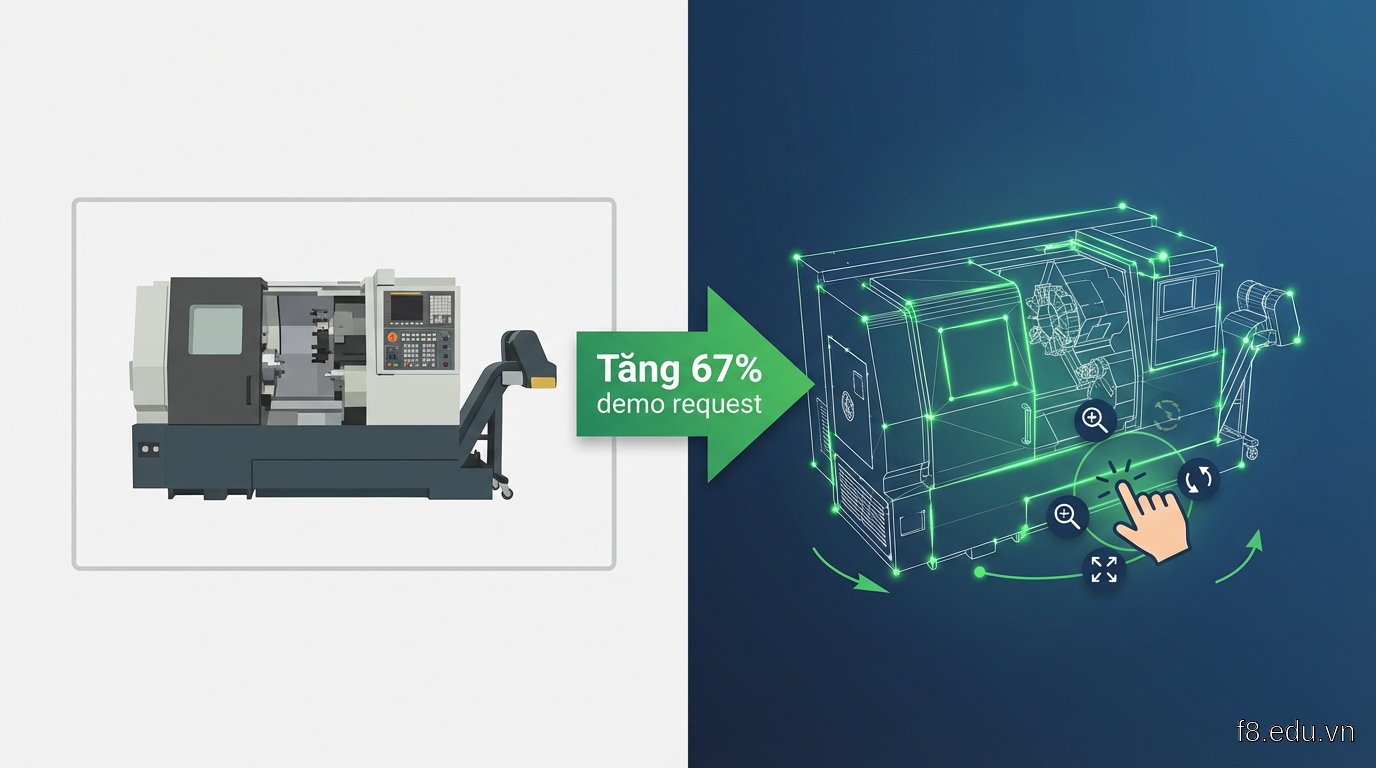 So sánh trải nghiệm giữa hình ảnh 2D tĩnh và 3D viewer tương tác trong B2B
Thống kê từ Forrester Research cho thấy 73% decision maker B2B thích tương tác với 3D model hơn xem video demo. Lý do? Họ kiểm soát được góc nhìn, tốc độ khám phá, tập trung vào phần họ quan tâm.
Nhưng đây không chỉ là chuyện "trông cho đẹp". 3D visuals giải quyết vấn đề cụ thể:
- Giảm friction trong sales cycle: Prospect tự khám phá sản phẩm thay vì đợi sales demo
- Tăng product understanding: Khách hàng hiểu rõ hơn 40% so với ảnh 2D (theo nghiên cứu của Shopify)
- Differentiation: Đối thủ còn dùng PowerPoint, bạn đã có 3D web
Bài này mình sẽ hướng dẫn bạn tạo 3D product viewer bằng Three.js và Spline, tích hợp vào React, tối ưu hiệu năng, và deploy lên production. Phù hợp cho developer đã biết React cơ bản, muốn thêm vũ khí mới vào portfolio hoặc dự án thực tế.
Three.js: Nền tảng cho 3D web từ đầu
Bắt đầu với Three.js trước khi nhảy sang tool no-code như Spline. Hiểu Three.js giúp bạn troubleshoot khi có vấn đề, và tùy biến sâu hơn khi cần.
Setup Three.js trong React
Cài đặt dependencies:
@react-three/fiber là React renderer cho Three.js, giúp bạn viết Three.js theo cách React quen thuộc. @react-three/drei cung cấp helpers tiện lợi.
Component 3D đơn giản nhất:
 Cấu trúc cơ bản của Three.js scene: camera, lights, model và controls
Load và tối ưu 3D models
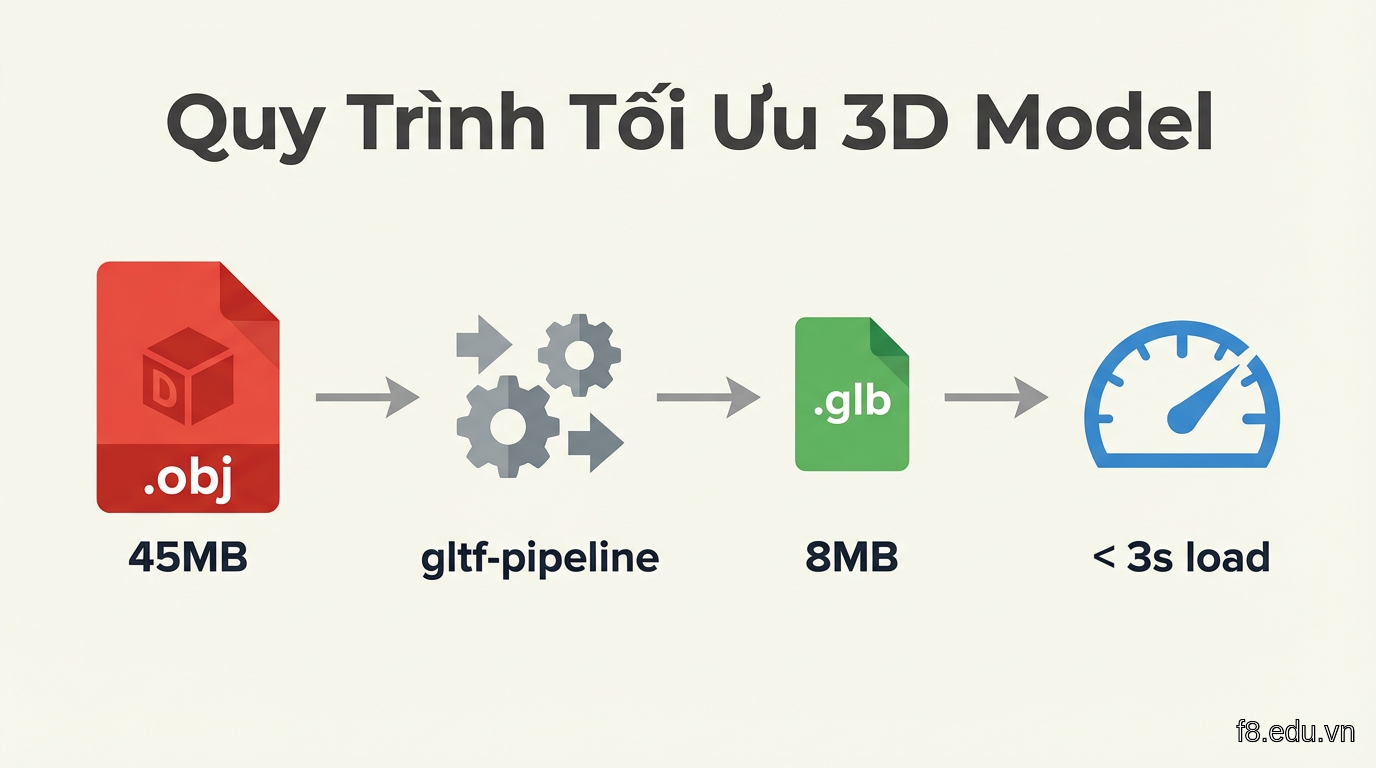
Điểm mấu chốt: file size. Model 3D dễ "nặng" hơn ảnh rất nhiều. Mình từng nhận file .obj 45MB từ designer, web load 12 giây.
Quy trình tối ưu:
- Format đúng: Dùng .glb (binary GLTF) thay vì .obj hay .fbx. Nhẹ hơn 30-50%.
- Compress geometry: Dùng tool như gltf-pipeline:
-
Texture optimization: Resize texture xuống 1024x1024 hoặc 2048x2048. Không ai zoom đến mức cần 4K texture trên web.
-
Progressive loading với Suspense:
Target: model dưới 2MB, load time dưới 3 giây trên 4G. Test bằng Chrome DevTools throttling "Fast 3G".
Spline: Tool no-code cho 3D nhanh hơn
Three.js mạnh nhưng mất thời gian. Nếu bạn cần MVP nhanh hoặc không có 3D artist trong team, Spline là giải pháp.
Spline là tool thiết kế 3D trên browser, export code React trực tiếp. Mình dùng cho client startup cần demo investor trong 2 tuần - không đủ thời gian học Three.js sâu.
Workflow Spline -> React
-
Tạo scene trong Spline (spline.design):
- Import model hoặc dựng từ primitives (cube, sphere, cylinder)
- Add materials, lighting
- Setup animations và interactions (hover, click, scroll)
-
Export code:
- File -> Export -> Code
- Chọn React
- Copy component code
-
Tích hợp vào project:
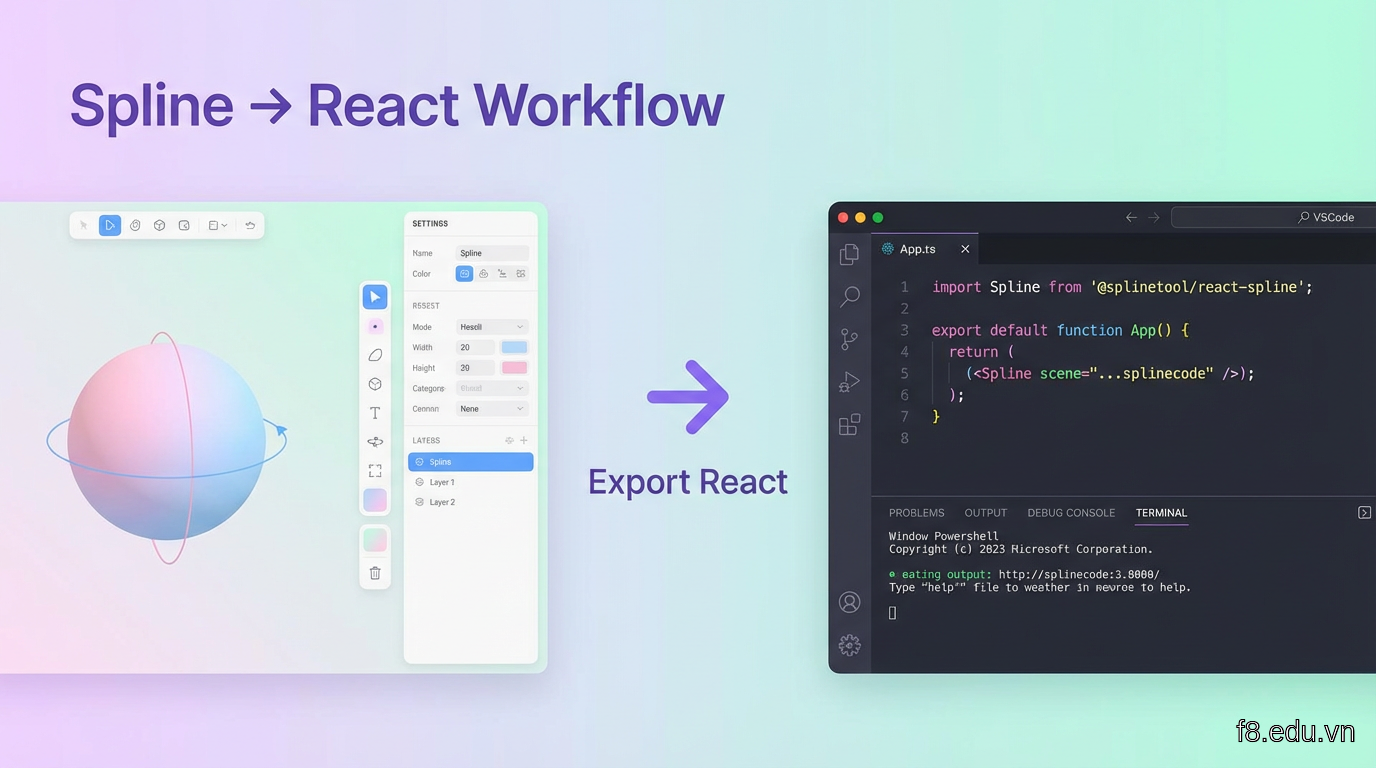 Interface của Spline editor với panel layers, properties và viewport 3D
Khi nào dùng Spline, khi nào dùng Three.js?
Spline phù hợp khi:
- Timeline gấp (< 2 tuần)
- Team không có 3D developer chuyên
- Cần prototype nhanh cho user testing
- Scene đơn giản, ít customization logic
Three.js phù hợp khi:
- Cần control hoàn toàn về hiệu năng
- Logic tương tác phức tạp (configurator, AR preview)
- Tích hợp với data backend (thay đổi model theo user input)
- Dự án dài hạn, scale lớn
Mình thường dùng Spline cho hero section (wow factor), Three.js cho product configurator (functionality).
Tạo Product Configurator tương tác
Đây là phần B2B clients trả tiền cao nhất: khách hàng customize sản phẩm real-time, thấy ngay kết quả 3D.
Use case thực tế: Máy CNC configurator
Một client sản xuất máy CNC cần tool để khách hàng chọn:
- Kích thước bàn máy (3 options)
- Loại spindle (2 options)
- Màu vỏ (5 options)
Mỗi combination cho giá khác nhau. Sales team mất 30 phút/call để visualize. Sau khi có configurator, prospect tự explore, sales chỉ nhảy vào khi họ ready.
Implementation với Three.js
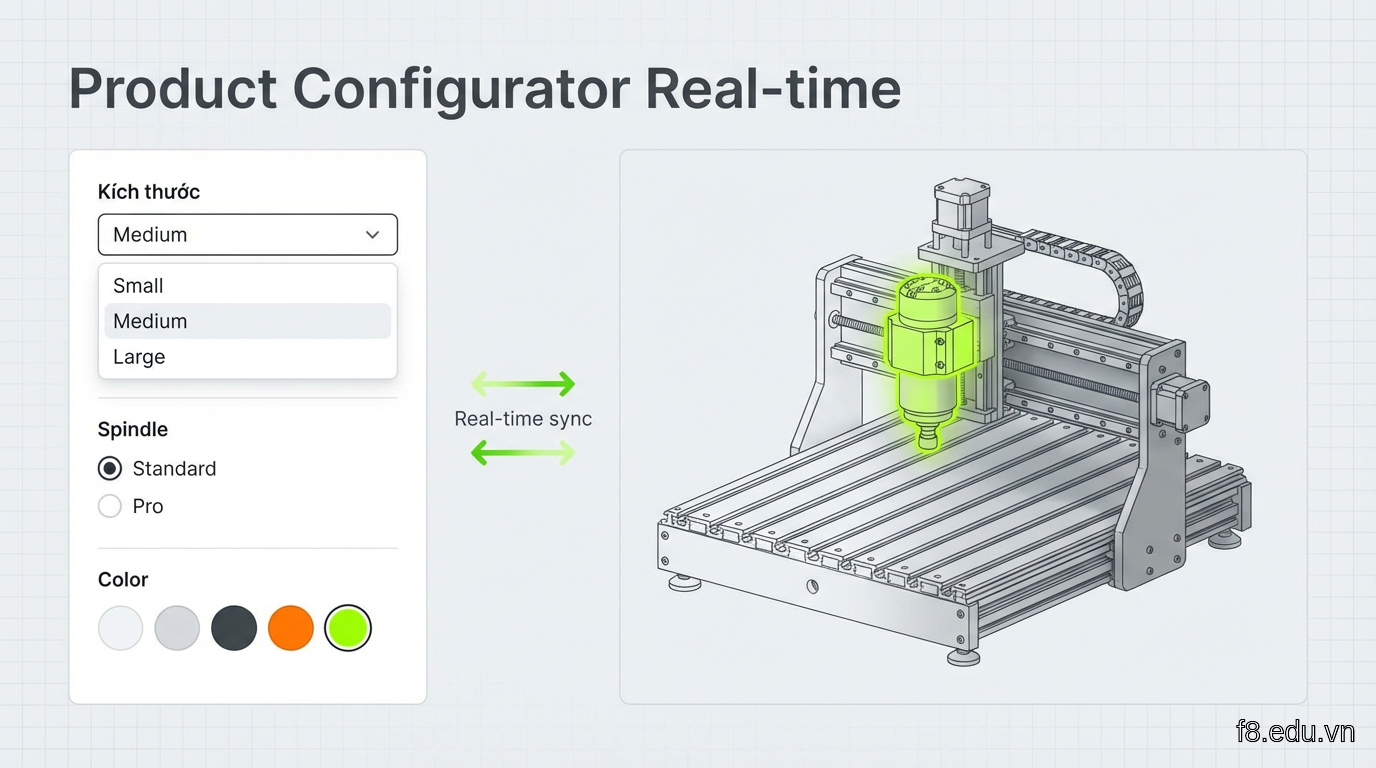 Product configurator với panel options bên trái và 3D viewer real-time bên phải
Tối ưu hiệu năng cho nhiều variants
Vấn đề: Nếu load 15 model khác nhau (5 màu × 3 size), tốn RAM và bandwidth.
Giải pháp: Shared geometry + material swapping
Trick khác mình hay dùng: Texture atlas cho variant colors. Thay vì 5 textures riêng, pack vào 1 atlas, dùng UV offset để chọn màu.
Kết quả: Load time giảm từ 8s xuống 2.4s, memory usage giảm 60%.
Animations và micro-interactions
Static 3D model tốt rồi, nhưng animation làm nó sống động. Người dùng B2B vẫn là con người - họ thích thứ "có hồn".
Animation types cho B2B
1. Idle animations - Model chuyển động nhẹ khi không tương tác:
2. Hover states - Highlight phần user đang quan tâm:
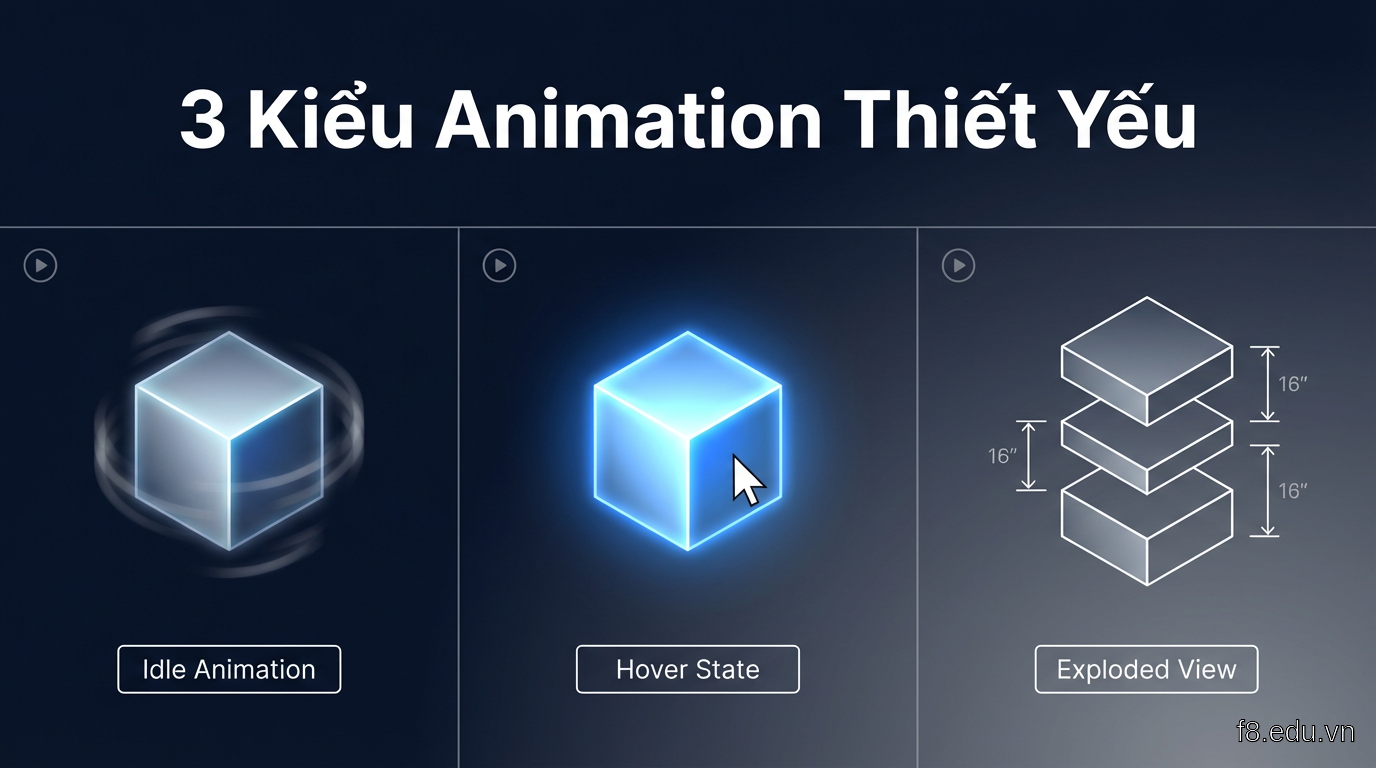 Các loại animations: idle rotation, hover highlight, và exploded view với từng parts tách rời
3. Exploded view - Tách rời các parts để hiện cấu trúc bên trong:
Animation performance tips
Mình từng làm hero section với 50 objects animate, FPS drop xuống 20. Học được:
- Limit useFrame calls: Gộp animations vào 1 useFrame thay vì mỗi component 1 cái
- RequestAnimationFrame throttling: Trên mobile, chạy animation 30fps thay vì 60fps
- Pause khi off-screen: Dùng Intersection Observer
Quy tắc: 60fps trên desktop, 30fps trên mobile, dưới 20fps là phải tối ưu.
Performance optimization và lazy loading
Web 3D đẹp nhưng chậm thì người dùng tắt tab trước khi model kịp load. B2B audience đặc biệt không kiên nhẫn - họ đang làm việc, không rảnh ngồi chờ.
Level of Detail (LOD)
Kỹ thuật game dev áp dụng vào web: hiển thị model chi tiết khác nhau tùy khoảng cách camera.
Mình apply cho client có model máy móc 500K polygons. High-poly chỉ show khi zoom vào, xa ra dùng 50K poly version. FPS tăng từ 25 lên 55.
Texture lazy loading
Không load hết textures lúc đầu. Load base color trước, detail maps sau:
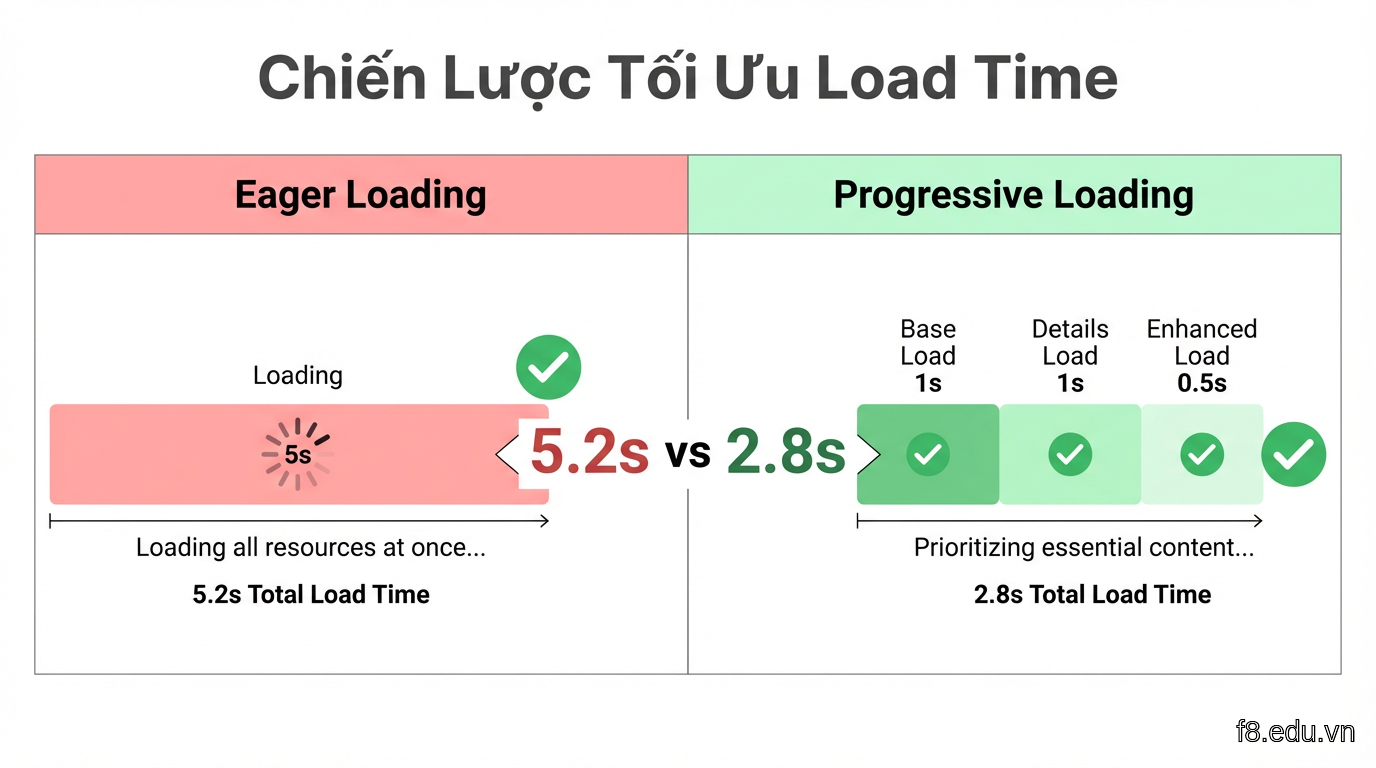 So sánh load time giữa eager loading và progressive loading strategy
Memory management
Vấn đề ít người để ý: Three.js không tự động dispose geometry/texture. User navigate qua lại pages -> memory leak -> browser crash.
Test memory leak: Mở Chrome DevTools -> Memory -> Take heap snapshot trước và sau khi unmount component. Nếu memory không giảm, bạn có leak.
Benchmarks thực tế
Target cho B2B web:
- First paint: < 1.5s
- 3D model visible: < 3s
- Interactive: < 4s
- FPS: 30+ mobile, 60 desktop
- Memory: < 150MB increase
Dùng Lighthouse CI trong GitHub Actions để track performance regression.
Deploy và hosting considerations
Code chạy localhost tốt chưa đủ. Production có bandwidth limit, CDN caching, CORS issues.
Asset hosting strategy
Đừng host 3D models trên cùng server với app. File .glb 5MB sẽ giết backend server khi 100 user đồng thời load.
Nên: Dùng CDN cho static assets
- Vercel/Netlify: Free tier support static files, auto CDN
- Cloudflare R2: Cheap object storage ($0.015/GB) + free bandwidth
- AWS S3 + CloudFront: Overkill cho side project, nhưng B2B clients thích AWS
Setup Cloudflare R2:
Trong code:
Compression và caching
Setup gzip/brotli cho .glb files. Thêm vào next.config.js (Next.js) hoặc Vercel config:
Brotli compress tốt hơn gzip 15-20% cho binary files.
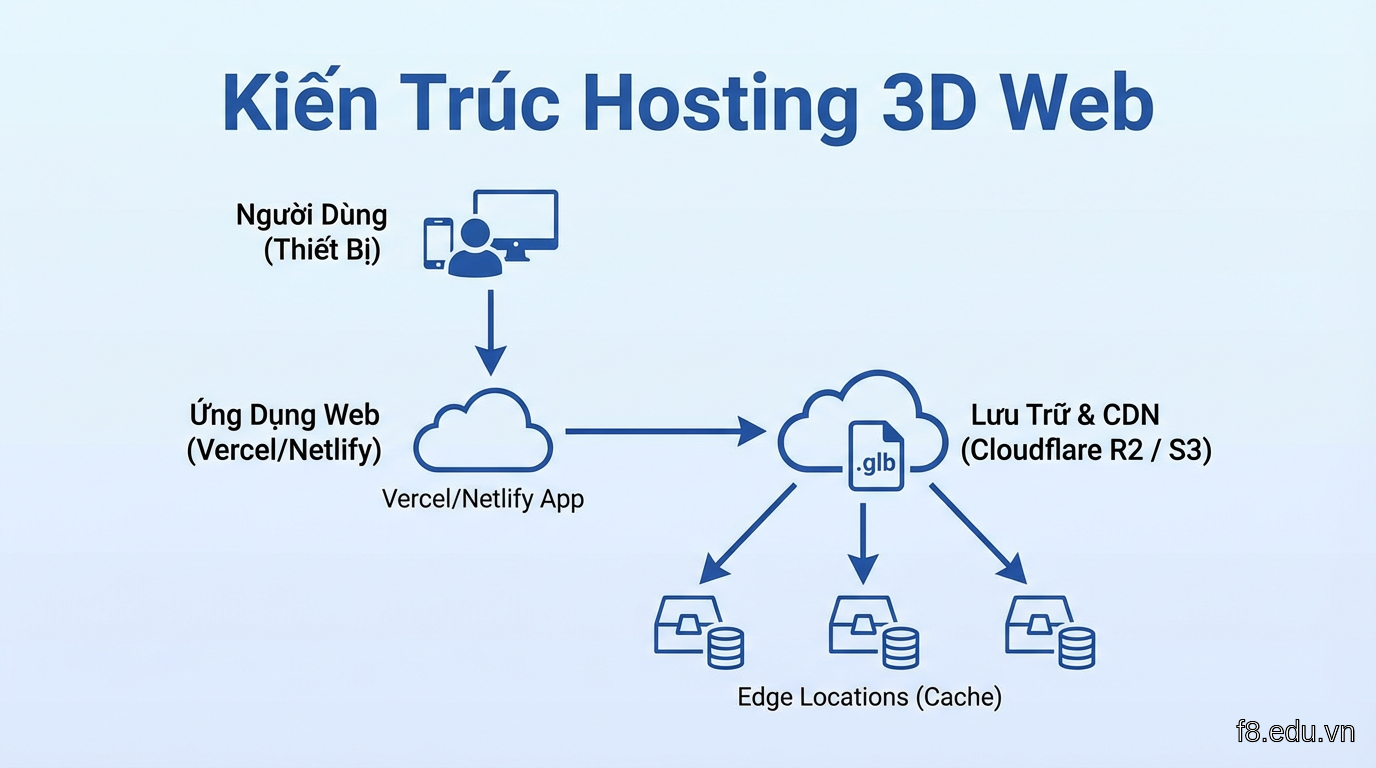 Kiến trúc hosting: app server, CDN cho models, và edge caching layer
Mobile optimization
B2B không có nghĩa chỉ desktop. 40% decision makers research trên mobile (LinkedIn data).
Detect device và adjust:
Test trên thiết bị thật, không chỉ Chrome DevTools. Mình từng ship scene chạy smooth trên DevTools throttled, nhưng lag thật trên iPhone 12.
Analytics tracking
Track những metric quan trọng:
Metrics cần track:
- Load time phân theo device
- User interaction rate (bao nhiêu % user thật sự xoay model)
- Exit rate (họ rời trang lúc nào - trước hay sau khi model load)
- Conversion impact (so sánh bounce rate trang có/không có 3D)
Case studies: Ứng dụng thực tế
Lý thuyết đủ rồi, xem 3 dự án thực tế mình làm với clients.
Case 1: Machinery manufacturer - ROI 340%
Vấn đề: Hãng sản xuất máy đóng gói, sales cycle 6-9 tháng, khách hàng cần 3-4 lần demo mới quyết định.
Giải pháp: 3D configurator với Three.js
- Khách tự chọn specs (conveyor width, sealing type, control panel)
- Real-time pricing
- Export PDF quote với screenshot 3D
Kết quả sau 6 tháng:
- Demo requests: +67%
- Qualified leads: +43% (khách đã tự explore -> hiểu rõ hơn)
- Sales cycle: Giảm từ 7.2 tháng xuống 4.8 tháng
- ROI: 340% (tính theo cost of development vs revenue increase)
Tech stack: React + Three.js + @react-three/fiber, hosted trên Vercel, models trên Cloudflare R2.
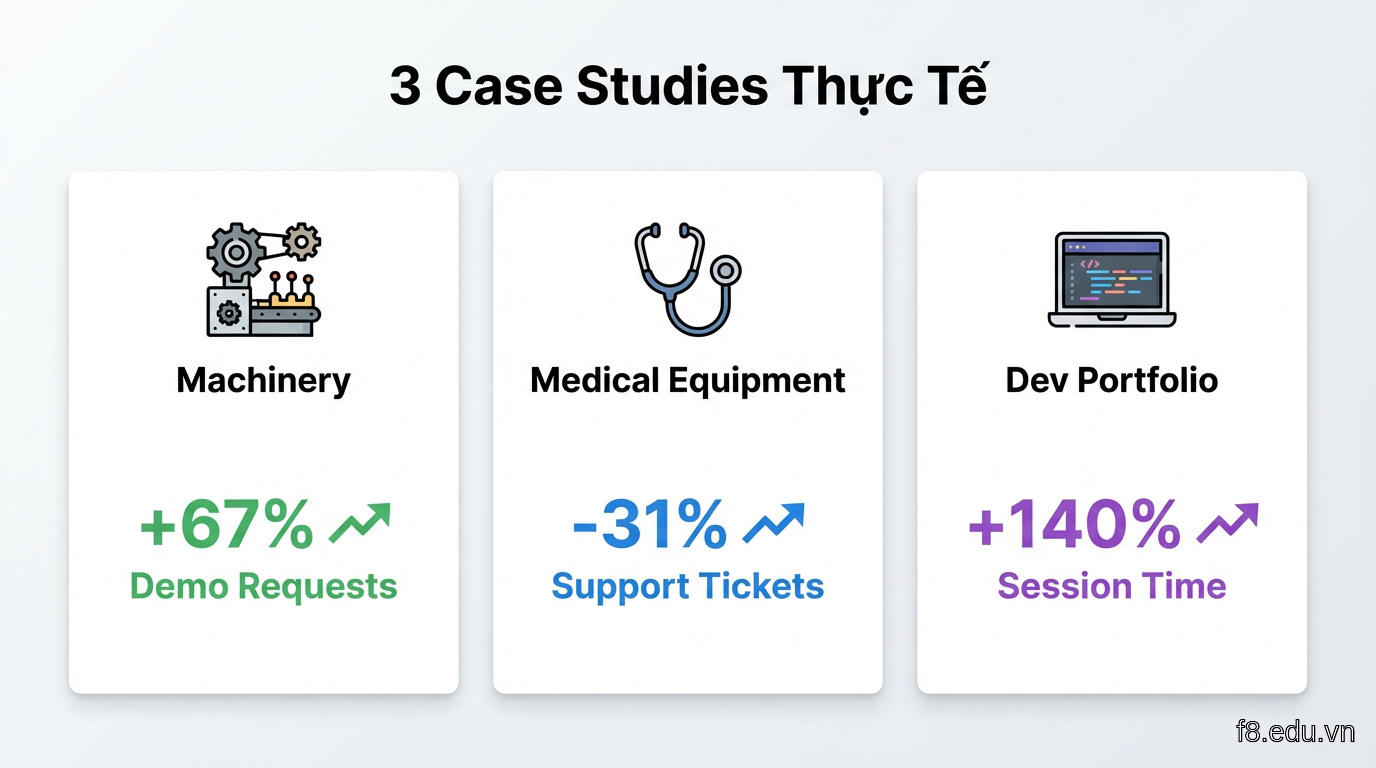 Dashboard metrics showing trước/sau khi triển khai 3D configurator
Case 2: Medical equipment distributor
Vấn đề: Thiết bị y tế phức tạp, khách hàng (bác sĩ, quản lý bệnh viện) cần hiểu cách vận hành trước khi mua.
Giải pháp: Interactive 3D manual với Spline
- Click vào từng phần -> hiển thị tooltip giải thích
- Animated workflow: máu chạy qua hệ thống lọc như thế nào
- Exploded view cho maintenance instructions
Kết quả:
- Support tickets giảm 31%
- Time-to-purchase giảm 2.1 tuần
- Customer satisfaction: +28%
Bài học: Không cần configurator phức tạp. Đôi khi chỉ cần model 3D tốt + annotations rõ ràng.
Case 3: Portfolio dev freelancer
Không phải B2B thuần, nhưng minh họa tốt cho developer muốn standout.
Setup: Hero section với Spline
- Animated laptop 3D mở ra, hiển thị projects bên trong màn hình
- Scroll-triggered animations
- Chỉ tốn 4 giờ làm trong Spline
Kết quả:
- Session duration: +140%
- Inbound client inquiries: Tăng từ 2-3/tháng lên 8-12/tháng
- Rate tăng được từ $50/h lên $85/h (clients cảm nhận "premium")
Code snippet:
Bài học chung: 3D không phải decoration. Nó giải quyết vấn đề business cụ thể - giảm friction, tăng understanding, hoặc differentiation.
Bắt đầu từ đâu: Roadmap 30 ngày
Bạn đọc đến đây, có thể đang nghĩ "ok cool nhưng mình bắt đầu thế nào". Đây là roadmap mình dùng khi onboard junior devs.
Tuần 1: Fundamentals
Ngày 1-3: Three.js basics
- Học qua Three.js Journey (free lessons)
- Tạo scene đơn giản: cube, sphere, lighting
- Hiểu camera, renderer, animation loop
Ngày 4-7: React Three Fiber
- Docs: docs.pmnd.rs/react-three-fiber
- Convert Three.js vanilla code sang React
- Làm project nhỏ: rotating logo 3D
Tuần 2: Real models
Ngày 8-10: GLTF workflow
- Download free models từ Sketchfab
- Load vào React Three Fiber
- Add OrbitControls, lighting
Ngày 11-14: Spline
- Tạo account Spline miễn phí
- Follow tutorial tạo interactive button
- Export và embed vào React app
Tuần 3: Interactive
Ngày 15-18: Product viewer
- Tạo simple configurator: thay đổi màu/texture
- Add hover states
- Implement zoom/pan controls
Ngày 19-21: Animations
- Idle animations với useFrame
- Scroll-triggered animations (react-spring)
- Transition giữa states
Tuần 4: Production ready
Ngày 22-25: Optimization
- Compress models dưới 2MB
- Implement LOD
- Test trên mobile
Ngày 26-30: Deploy
- Host trên Vercel
- Setup CDN cho models
- Add analytics tracking
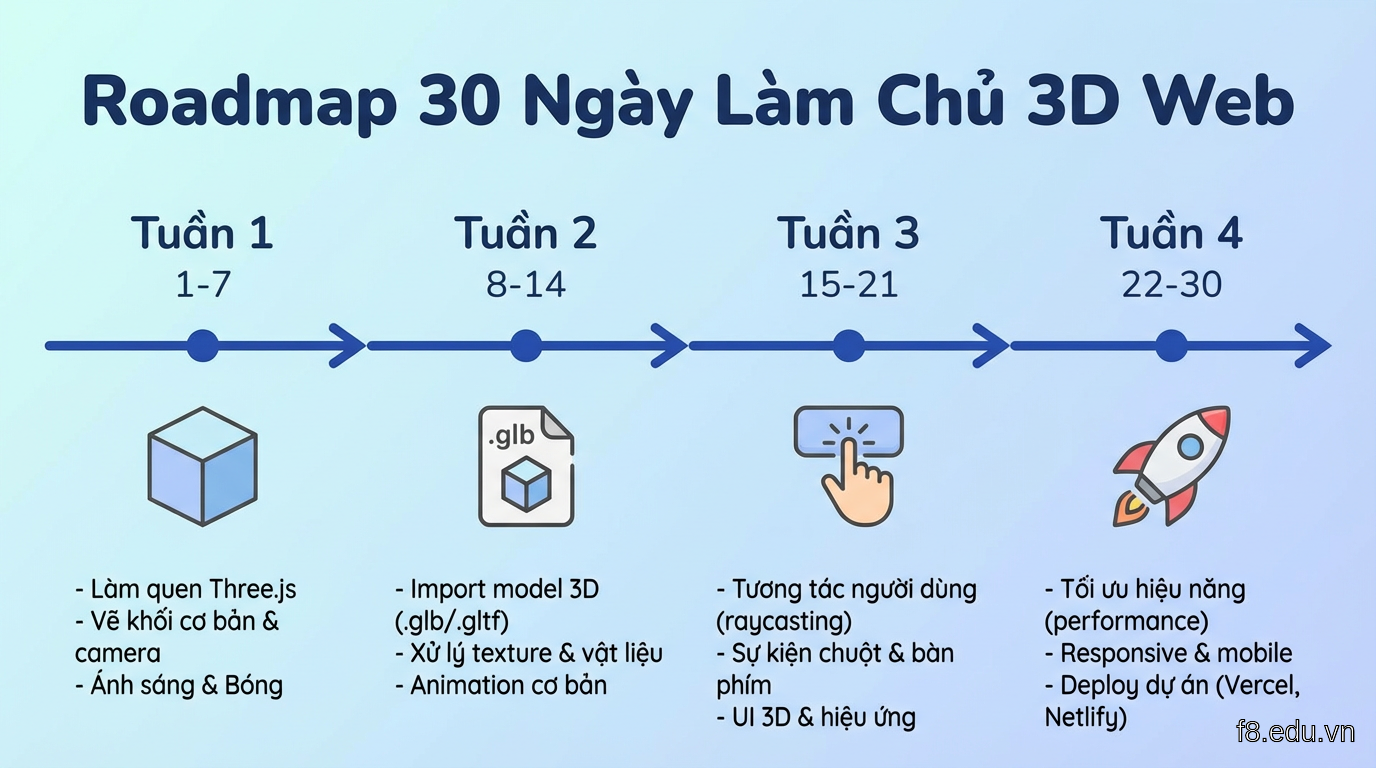 Timeline 30 ngày với milestones và deliverables rõ ràng
Resources mình recommend
Free:
Paid (đáng tiền):
- Three.js Journey ($95) - Best course, period
- Frontend Masters 3D course
Free 3D models:
- Sketchfab (filter "Downloadable")
- Poly Pizza
- Free3D
Tools:
- Blender (free, optimize models)
- gltf-pipeline (CLI compression)
- gltf.report (analyze model complexity)
Đừng sa đà học lý thuyết quá lâu. Tuần 2 bắt đầu làm project thật ngay.
Những sai lầm cần tránh
Mình đã ngã đủ hố, bạn khỏi phải lặp lại.
1. Over-engineering từ đầu
Sai lầm: Client cần simple product viewer, mình build luôn configurator với 50 options, AR mode, social sharing.
Kết quả: 3 tháng dev, client chờ mỏi mòn, cuối cùng chỉ dùng 20% features.
Đúng: Start với MVP. Model 3D + OrbitControls. Ship trong 1 tuần. Iterate dựa trên user feedback.
2. Bỏ qua performance từ đầu
Sai lầm: "Mình optimize sau, bây giờ làm cho chạy đã."
Kết quả: Tech debt chồng chất, refactor tốn gấp 3 thời gian.
Đúng: Set performance budget từ đầu. Test trên throttled network mỗi sprint.
3. Không test trên thiết bị thật
Chrome DevTools "iPhone 12" khác xa iPhone 12 thật. GPU simulation không accurate.
Mình từng ship animation chạy 60fps trên DevTools, thật ra chỉ 18fps trên iPhone SE.
Đúng: Mua/mượn 1-2 thiết bị mid-range để test. BrowserStack không thay thế được.
4. Dùng 3D everywhere
Không phải mọi thứ cần 3D. Icon, button, text - giữ 2D. 3D chỉ khi nó thêm value thật sự.
Hỏi: "Nếu bỏ 3D này, user experience giảm đi không?" Nếu "không chắc" -> bỏ.
5. Quên accessibility
Canvas 3D mặc định không accessible cho screen readers. Thêm:
Thêm keyboard controls cho người không dùng chuột:
B2B clients ngày càng chú ý compliance, accessibility là phần của đó.