Đang tải...

Ếch Trendy

Cùng chú ếch nhỏ khám phá thế giới Web đầy biến động. Cập nhật trending nhanh như cách ếch đớp mồi! ⌨️🌿


0

Progressive Web App (PWA) 2026: Xây app web mượt như mobile app với offline, push notification và cache

Ếch Trendy
Ếch Trendy

2 tháng trước · 9 phút đọc

PWA là gì và tại sao 2026 lại quan trọng hơn bao giờ hết

Mình nhớ lần đầu demo PWA cho khách hàng. Tắt mạng, reload trang - app vẫn chạy. Khách hàng nhìn như thấy ma. "Web mà làm được vậy à?"

Đúng vậy. Progressive Web App không phải trend mới, nhưng năm 2026 là thời điểm nó thực sự mature - browser support đã đủ rộng, tooling đã ổn định, và quan trọng nhất: người dùng đã quen với việc cài app từ trình duyệt.

PWA là web app tận dụng các Web API hiện đại để có trải nghiệm gần với native app: cài được lên home screen, chạy offline, nhận push notification, load nhanh ngay cả trên mạng chậm. Không cần App Store, không cần review process, deploy xong là người dùng có bản mới ngay.
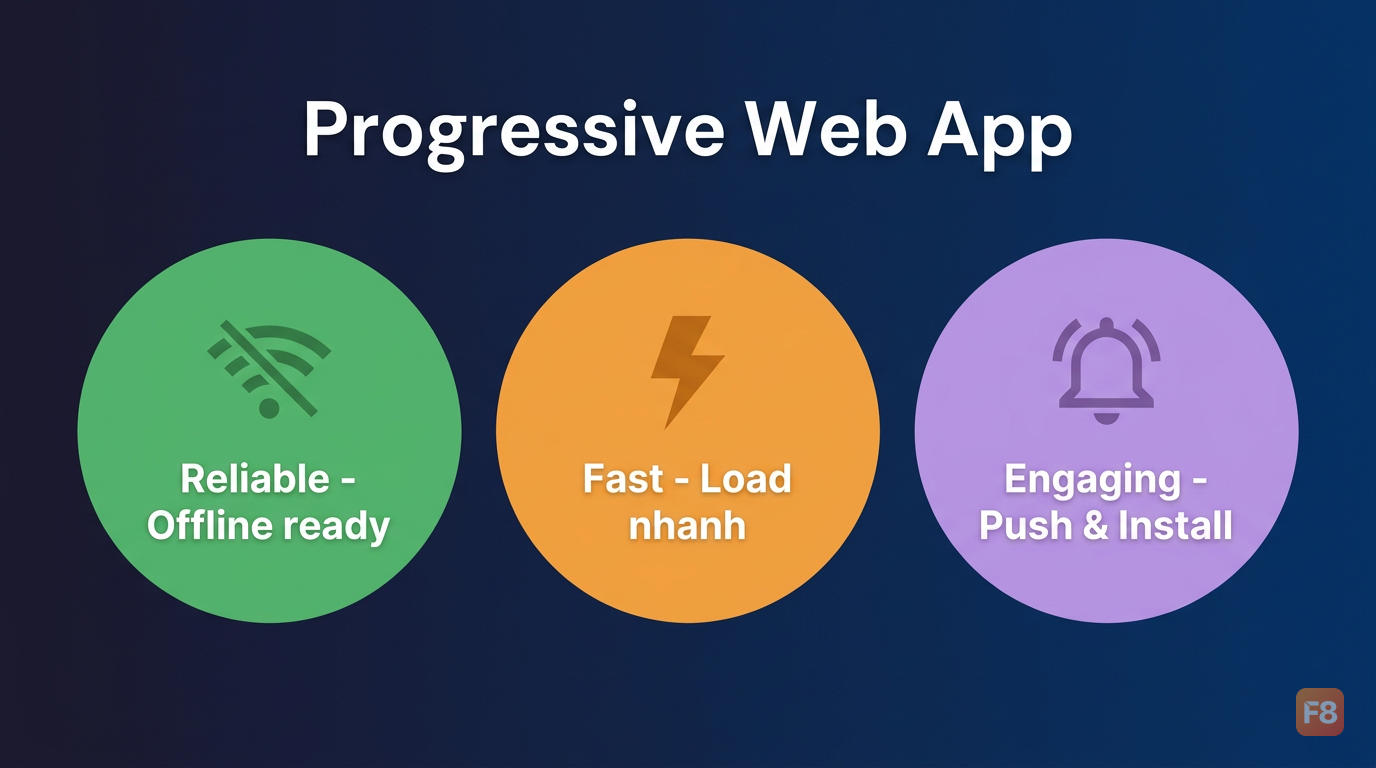
346679 Ba trụ cột của PWA: Reliable (offline), Fast (performance), Engaging (push, install)

Con số thực tế nói lên tất cả: 65% more pages per session (PWA case study roundups). Đây không phải lý thuyết - Twitter Lite, Starbucks, MakeMyTrip đều đã chứng minh PWA có thể thay thế native app trong nhiều use case thực tế.


Decision tree: Khi nào chọn PWA, khi nào không

Đây là câu hỏi mình hay bị hỏi nhất. Câu trả lời không phải "PWA luôn tốt hơn" hay "native luôn cần thiết" - mà phụ thuộc vào context cụ thể.
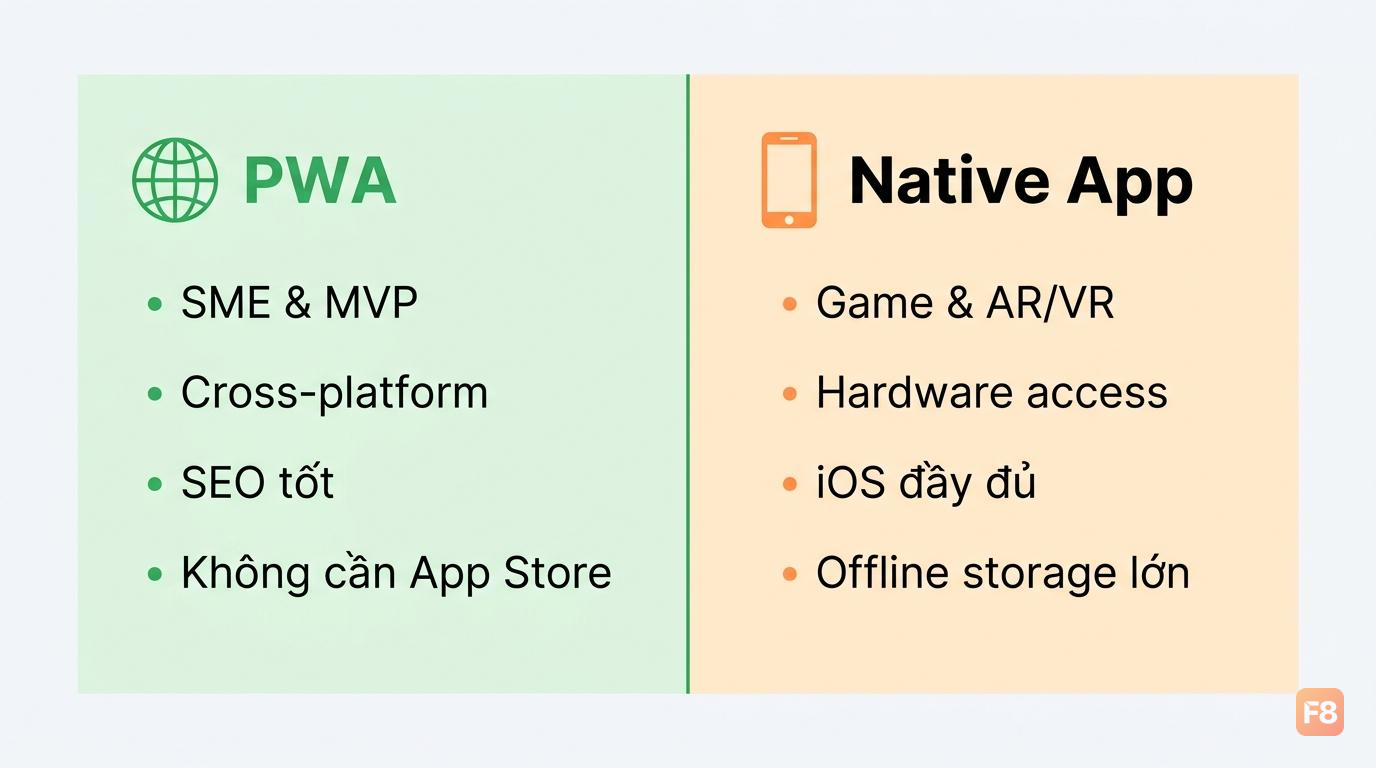
346680 Không có câu trả lời tuyệt đối - context quyết định tất cả

PWA thắng native khi:

  • SME và MVP: Budget hạn chế, team nhỏ, cần ship nhanh. Một codebase chạy mọi platform thay vì maintain iOS + Android riêng.
  • Cross-platform content app: Tin tức, blog, e-commerce catalog, dashboard - những app nặng về hiển thị data hơn là hardware access.
  • Không muốn App Store friction: Update ngay không cần review, người dùng không cần download 50MB từ store.
  • SEO quan trọng: PWA là web, Google index được. Native app không có lợi thế này.

Native app vẫn thắng khi:

  • Game nặng và AR/VR: WebGL đã mạnh nhưng vẫn chưa match được native rendering pipeline cho game AAA hay AR experience phức tạp.
  • Hardware access sâu: Bluetooth Low Energy, NFC writing, background location tracking liên tục, camera với custom processing - Web API vẫn còn giới hạn.
  • iOS push notification (trước 2023): Apple chỉ mới hỗ trợ Web Push trên iOS 16.4+, và vẫn có một số hạn chế so với native.
  • Offline storage lớn: IndexedDB có giới hạn, trong khi native app có full file system access.

Một rule of thumb mình hay dùng: nếu app của bạn chủ yếu là UI + API calls + một chút offline, PWA là đủ. Nếu app cần làm gì đó mà browser API chưa expose - đi native.

Với React dev, nếu bạn chưa vững JavaScript nâng cao, khóa Lập Trình JavaScript Nâng Cao sẽ giúp hiểu sâu hơn về event loop, Promise và async patterns - những thứ cực kỳ quan trọng khi làm việc với service worker.


Service worker và offline-first architecture

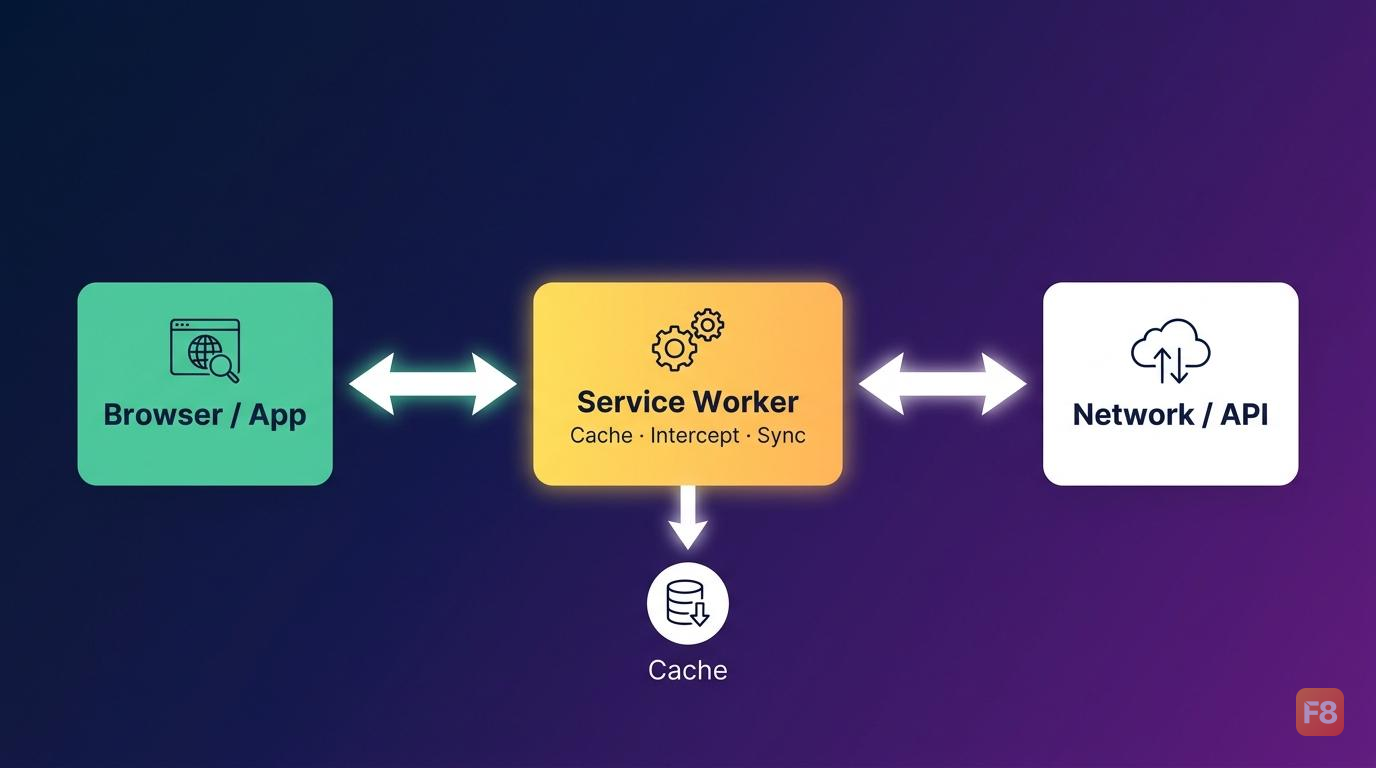
Service worker là backbone của mọi PWA. Hiểu đơn giản: nó là một JavaScript file chạy trên background thread riêng, intercept mọi network request của app bạn, và quyết định trả về từ cache hay fetch từ network.
// sw.js - Service worker cơ bản
const CACHE_NAME = 'pwa-v1';
const PRECACHE_URLS = [
  '/',
  '/index.html',
  '/styles/main.css',
  '/scripts/app.js',
  '/offline.html'
];

// Cài đặt: precache các file tĩnh quan trọng
self.addEventListener('install', (event) => {
  event.waitUntil(
    caches.open(CACHE_NAME)
      .then((cache) => cache.addAll(PRECACHE_URLS))
      .then(() => self.skipWaiting()) // Activate ngay, không chờ tab cũ đóng
  );
});

// Activate: dọn cache cũ
self.addEventListener('activate', (event) => {
  event.waitUntil(
    caches.keys().then((cacheNames) => {
      return Promise.all(
        cacheNames
          .filter((name) => name !== CACHE_NAME)
          .map((name) => caches.delete(name))
      );
    }).then(() => self.clients.claim()) // Claim các tab đang mở
  );
});

// Fetch: intercept request và quyết định chiến lược cache
self.addEventListener('fetch', (event) => {
  event.respondWith(
    caches.match(event.request)
      .then((cached) => cached || fetch(event.request))
  );
});

346681 Service worker nằm giữa browser và network, quyết định mọi request đi đâu

App Shell Model là pattern đi kèm với offline-first. Ý tưởng: tách app thành 2 phần:

  1. App Shell - skeleton UI (header, nav, layout) được cache vĩnh viễn, load gần như instant
  2. Dynamic Content - data từ API, được fetch và cache riêng theo chiến lược khác

Người dùng mở app lần đầu thấy shell hiện ngay (< 100ms), content điền vào sau. Offline thì shell vẫn hiện, content thì show cached version hoặc placeholder. Trải nghiệm mượt hơn nhiều so với blank screen.


Caching strategies với Workbox

Viết tay service worker logic cho mọi loại request rất dễ bug. Workbox - thư viện của Google - giải quyết vấn đề này bằng cách wrap sẵn các caching strategy phổ biến.

Setup Workbox với Vite:
npm install -D vite-plugin-pwa
// vite.config.js
import { VitePWA } from 'vite-plugin-pwa';

export default {
  plugins: [
    VitePWA({
      registerType: 'autoUpdate',
      workbox: {
        // Precache toàn bộ build output
        globPatterns: ['**/*.{js,css,html,ico,png,svg,woff2}'],
        runtimeCaching: [
          {
            // Network-first cho API calls
            urlPattern: /^https:\/\/api\.example\.com\//,
            handler: 'NetworkFirst',
            options: {
              cacheName: 'api-cache',
              expiration: { maxEntries: 50, maxAgeSeconds: 300 }, // 5 phút
              networkTimeoutSeconds: 3 // Fallback về cache sau 3s
            }
          },
          {
            // Cache-first cho ảnh CDN
            urlPattern: /^https:\/\/cdn\.example\.com\//,
            handler: 'CacheFirst',
            options: {
              cacheName: 'image-cache',
              expiration: { maxEntries: 100, maxAgeSeconds: 86400 * 30 } // 30 ngày
            }
          },
          {
            // Stale-while-revalidate cho font, static assets
            urlPattern: /\.(?:woff2|woff|ttf)$/,
            handler: 'StaleWhileRevalidate',
            options: { cacheName: 'font-cache' }
          }
        ]
      },
      manifest: {
        name: 'My PWA App',
        short_name: 'MyApp',
        theme_color: '#1a1a2e',
        icons: [
          { src: '/icons/icon-192.png', sizes: '192x192', type: 'image/png' },
          { src: '/icons/icon-512.png', sizes: '512x512', type: 'image/png', purpose: 'any maskable' }
        ]
      }
    })
  ]
};

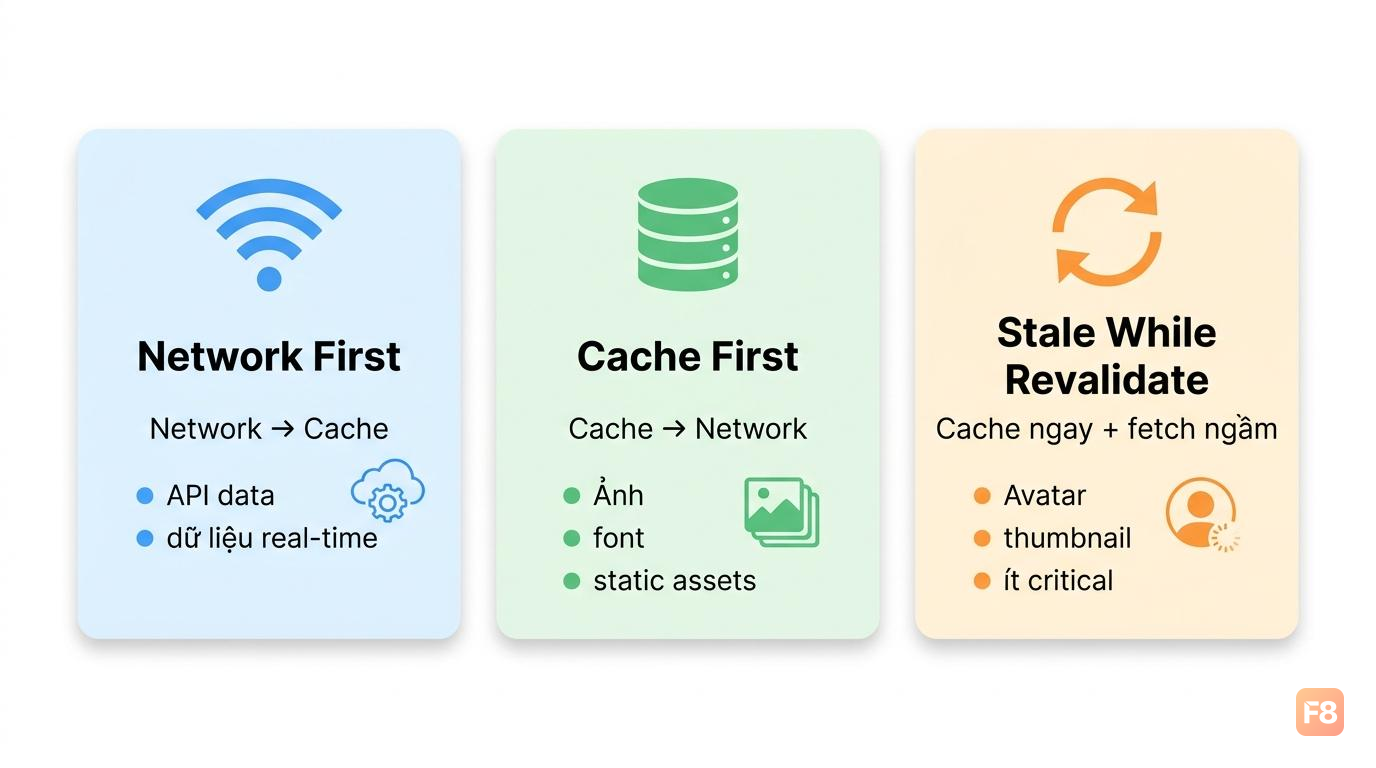
346682 Ba chiến lược cache phù hợp với 3 loại dữ liệu khác nhau - chọn sai là chọn bug

Ba strategy bạn sẽ dùng 90% thời gian:

Network-first: Luôn thử fetch từ network trước, fallback về cache nếu offline hoặc timeout. Dùng cho API data cần fresh nhất có thể.

Cache-first: Trả về từ cache ngay, chỉ fetch network nếu không có cache. Dùng cho ảnh, font, static assets - thứ gần như không thay đổi.

Stale-while-revalidate: Trả về cache ngay (nhanh), đồng thời fetch network để update cache cho lần sau. Trade-off: người dùng có thể thấy data cũ một lần. Dùng cho avatar, thumbnail, content ít critical.


Background sync và push notifications

Hai tính năng này là thứ làm PWA thật sự "feel like native" - không chỉ là web có offline mode.

Background sync

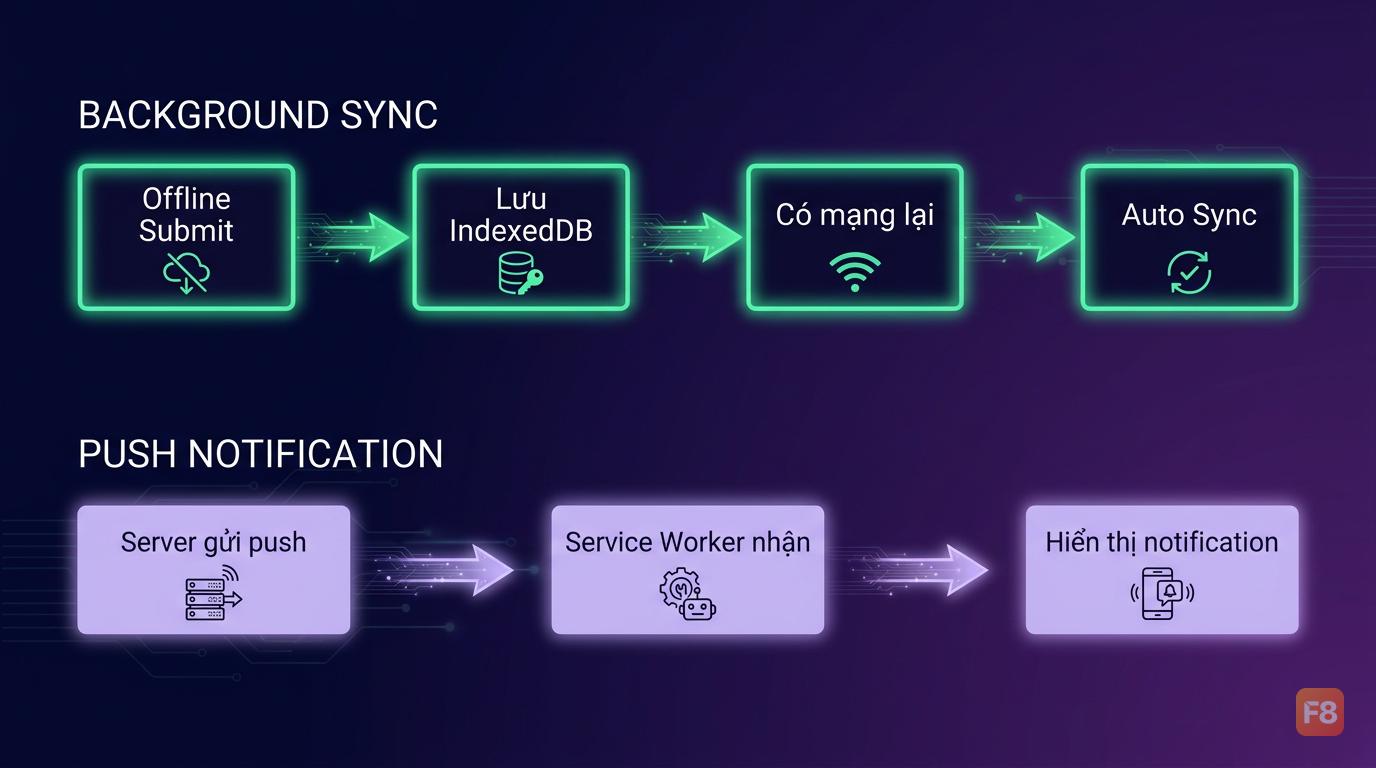
Scenario: người dùng điền form rồi submit khi đang offline. Thay vì báo lỗi, Background Sync queue request lại và tự động retry khi có mạng - kể cả khi app đã đóng.

// Trong app code: đăng ký sync khi submit form offline
async function submitFormOffline(data) {
  // Lưu data vào IndexedDB
  await saveToIndexedDB('pending-forms', data);
  
  // Đăng ký background sync
  const registration = await navigator.serviceWorker.ready;
  await registration.sync.register('sync-forms');
}

// Trong service worker: xử lý sync event
self.addEventListener('sync', (event) => {
  if (event.tag === 'sync-forms') {
    event.waitUntil(syncPendingForms());
  }
});

async function syncPendingForms() {
  // Lấy pending data từ IndexedDB
  const pendingForms = await getFromIndexedDB('pending-forms');
  
  for (const form of pendingForms) {
    try {
      await fetch('/api/submit', {
        method: 'POST',
        body: JSON.stringify(form),
        headers: { 'Content-Type': 'application/json' }
      });
      // Xóa khỏi queue sau khi sync thành công
      await removeFromIndexedDB('pending-forms', form.id);
    } catch (err) {
      // Giữ lại trong queue, retry lần sau
      console.error('Sync thất bại, sẽ retry:', err);
    }
  }
}

Push notifications

// Đăng ký nhận push notification
async function subscribeToPush() {
  const registration = await navigator.serviceWorker.ready;
  
  const subscription = await registration.pushManager.subscribe({
    userVisibleOnly: true, // Bắt buộc true - không cho silent push
    applicationServerKey: urlBase64ToUint8Array(PUBLIC_VAPID_KEY)
  });
  
  // Gửi subscription lên server để lưu
  await fetch('/api/push/subscribe', {
    method: 'POST',
    body: JSON.stringify(subscription),
    headers: { 'Content-Type': 'application/json' }
  });
}

// Service worker: nhận và hiển thị notification
self.addEventListener('push', (event) => {
  const data = event.data?.json() ?? {};
  
  event.waitUntil(
    self.registration.showNotification(data.title || 'Thông báo mới', {
      body: data.body,
      icon: '/icons/icon-192.png',
      badge: '/icons/badge-72.png',
      data: { url: data.url }, // URL để mở khi click
      actions: [
        { action: 'open', title: 'Xem ngay' },
        { action: 'dismiss', title: 'Bỏ qua' }
      ]
    })
  );
});

// Xử lý click vào notification
self.addEventListener('notificationclick', (event) => {
  event.notification.close();
  
  if (event.action === 'open' || !event.action) {
    event.waitUntil(
      clients.openWindow(event.notification.data.url || '/')
    );
  }
});

346683 Background sync giữ data an toàn khi offline, push notification kéo người dùng quay lại

Với push notification, bạn cần generate VAPID keys và setup server-side để gửi. Thư viện web-push cho Node.js là lựa chọn phổ biến nhất. Xem hướng dẫn setup VAPID tại đây: Hướng dẫn setup VAPID với web-push.


Install prompt và app manifest

App shell, service worker, push notification - xong hết rồi nhưng người dùng vẫn chưa "cài" app. Install prompt là cầu nối cuối cùng.

Browser tự động show install prompt khi app đáp ứng đủ tiêu chí PWA installability. Bạn có thể custom timing để tăng conversion:
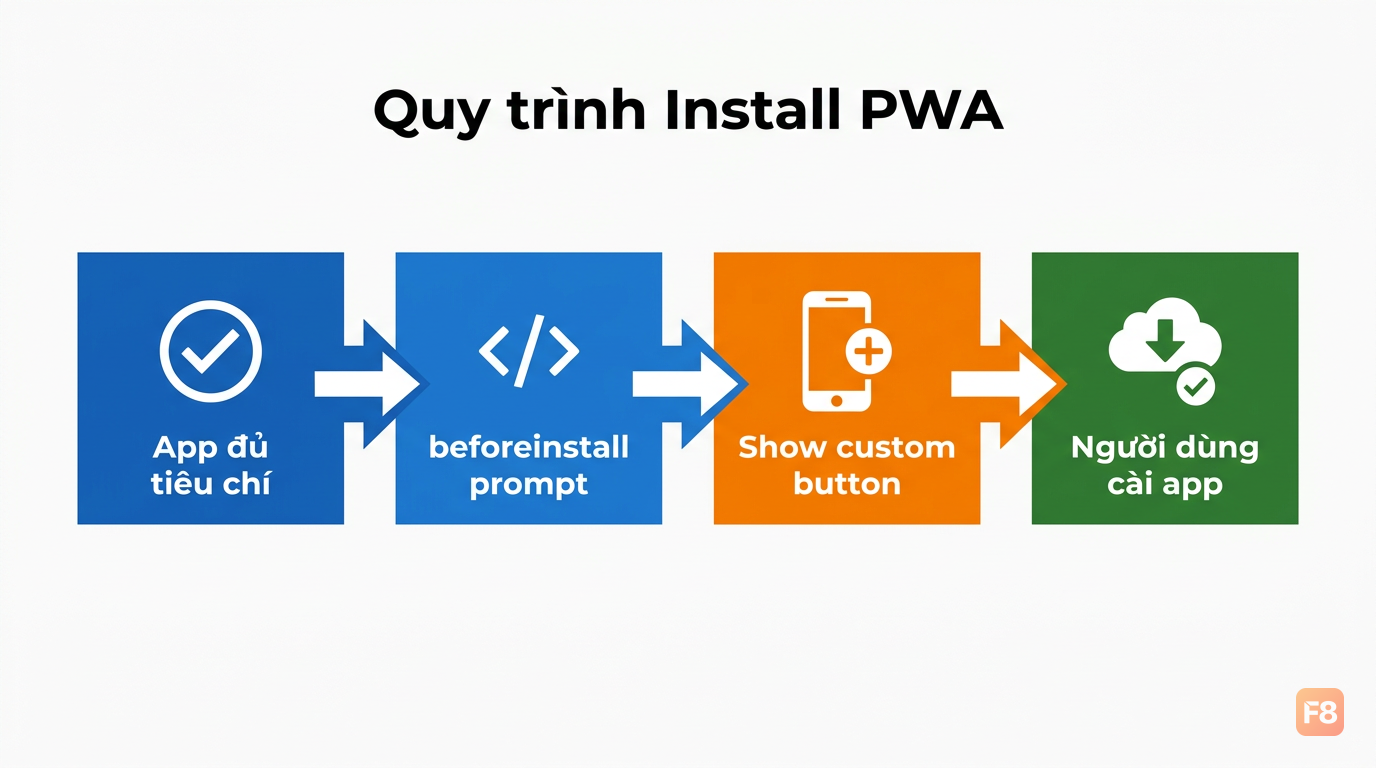
// Bắt sự kiện beforeinstallprompt
let deferredPrompt;

window.addEventListener('beforeinstallprompt', (event) => {
  event.preventDefault(); // Ngăn browser show ngay
  deferredPrompt = event; // Lưu lại để dùng sau
  
  // Show custom install button thay vì browser default
  showInstallButton();
});

// Khi người dùng click install button của bạn
async function handleInstallClick() {
  if (!deferredPrompt) return;
  
  deferredPrompt.prompt(); // Show native install dialog
  const { outcome } = await deferredPrompt.userChoice;
  
  if (outcome === 'accepted') {
    console.log('Người dùng đã cài app');
    trackEvent('pwa_installed'); // Analytics
  }
  
  deferredPrompt = null;
  hideInstallButton();
}

// Detect khi app đã được cài
window.addEventListener('appinstalled', () => {
  console.log('PWA installed successfully');
});

346684 Custom install prompt convert tốt hơn browser default vì bạn control được timing

Web App Manifest là file manifest.json khai báo metadata cho PWA:

{
  "name": "My Awesome PWA",
  "short_name": "MyPWA",
  "description": "Mô tả app ngắn gọn",
  "start_url": "/?source=pwa",
  "display": "standalone",
  "orientation": "portrait",
  "theme_color": "#1a1a2e",
  "background_color": "#ffffff",
  "icons": [
    { "src": "/icons/icon-192.png", "sizes": "192x192", "type": "image/png" },
    { "src": "/icons/icon-512.png", "sizes": "512x512", "type": "image/png" },
    {
      "src": "/icons/icon-512-maskable.png",
      "sizes": "512x512",
      "type": "image/png",
      "purpose": "maskable"
    }
  ],
  "screenshots": [
    {
      "src": "/screenshots/desktop.png",
      "sizes": "1280x720",
      "type": "image/png",
      "form_factor": "wide"
    }
  ]
}

Lưu ý maskable icon - Android dùng adaptive icons, nếu bạn không có maskable icon thì icon sẽ bị crop xấu trên một số launcher. Dùng Maskable.app - tạo maskable icon để generate maskable icon từ icon thường.

Trang web dùng cookie để hoạt động và đo hiệu quả quảng cáo. Xem chính sách bảo mật