Đang tải...

Ếch Trendy

Cùng chú ếch nhỏ khám phá thế giới Web đầy biến động. Cập nhật trending nhanh như cách ếch đớp mồi! ⌨️🌿


0

Python FastAPI cho backend AI 2026: Xây dựng API tối ưu tích hợp LLM và Machine Learning

Ếch Trendy
Ếch Trendy

2 tháng trước · 11 phút đọc

Tại sao FastAPI lại hot trong làng AI backend?

Mình nhớ hồi cuối 2023, team mình đang dùng Node.js/Express để wrap một model PyTorch. Mỗi request inference phải serialize data sang JSON, gọi một Python subprocess, rồi parse kết quả về. Latency thêm 200-300ms chỉ vì context switching giữa hai runtime. Đau.

Sau khi chuyển sang FastAPI, vấn đề đó biến mất hoàn toàn. Model chạy native trong cùng process, không overhead. Nhưng đó chỉ là một lý do nhỏ.
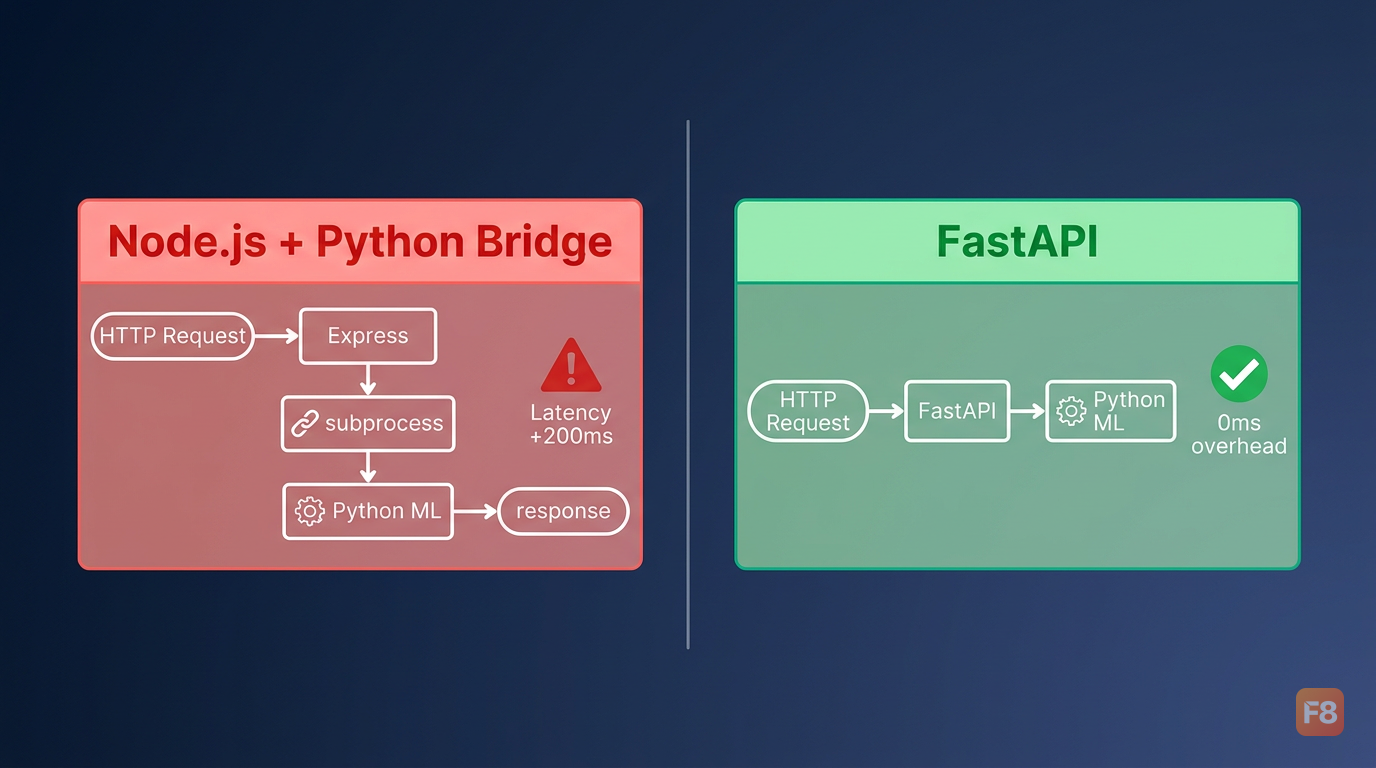
346019 FastAPI loại bỏ lớp trung gian giữa Python ML code và HTTP layer

Lý do thật sự FastAPI đang thống trị AI backend năm 2025-2026 là sự kết hợp của ba thứ:

Async-native từ đầu. FastAPI xây trên Starlette và ASGI, nghĩa là concurrency không cần thread pool. Khi LLM đang stream token, server vẫn nhận request mới bình thường.

Type hints = validation tự động. Pydantic v2 validate input/output không cần viết thêm code. Với AI API thường có payload phức tạp (messages array, model params, tool definitions), đây là cứu tinh.

Python ecosystem trực tiếp. import torch, import transformers, import langchain - dùng thẳng, không wrapper, không bridge. Phần lớn các ML engineer chọn Python làm ngôn ngữ chính cho production AI systems.

Node.js/Express không phải lựa chọn tệ, nhưng khi corelogic là Python ML, thêm một lớp Node ở giữa chỉ tạo thêm điểm thất bại.


FastAPI vs Express: so sánh thực tế cho AI workload

So sánh benchmark thuần thường misleading. Một FastAPI endpoint trả JSON đơn giản có thể nhanh hơn Express, nhưng số đó không nói gì nhiều về real-world AI workload. Mình sẽ đi vào các tiêu chí thực tế hơn.
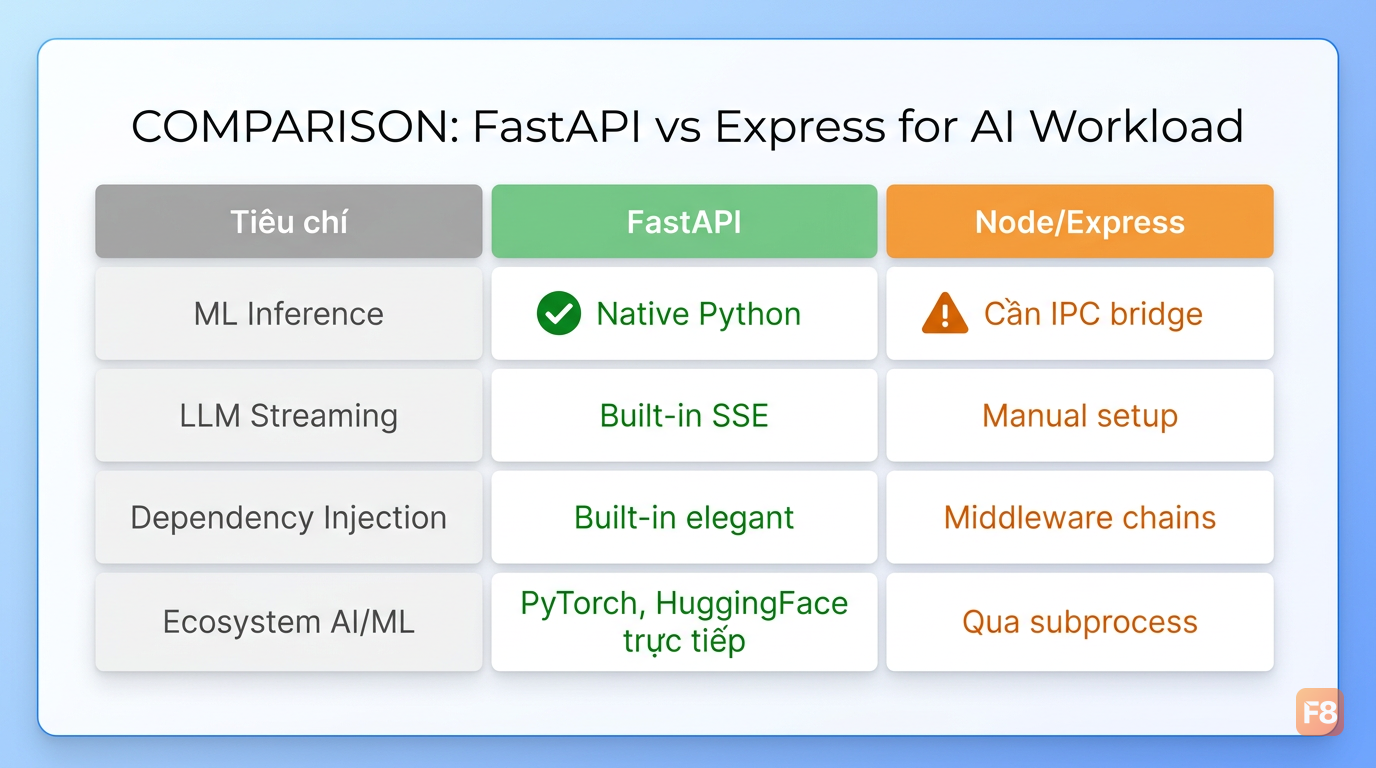
346020 Mỗi tiêu chí có trade-off riêng - chọn theo use case thực tế

Throughput khi inference ML model

Express tốt cho I/O-bound tasks (gọi API ngoài, query DB). Nhưng ML inference là CPU/GPU-bound. Khi dùng Express, bạn phải chạy Python model trong worker process riêng và communicate qua IPC hoặc HTTP nội bộ. FastAPI chạy thẳng trong Python runtime, dùng asyncio để handle concurrent requests trong khi GPU đang xử lý batch.

Streaming response cho LLM

Đây là điểm mạnh rõ nhất của FastAPI. Server-Sent Events (SSE) và StreamingResponse là built-in:

from fastapi import FastAPI
from fastapi.responses import StreamingResponse
import asyncio

app = FastAPI()

async def stream_llm_tokens(prompt: str):
    # Giả lập stream từ LLM (thay bằng OpenAI/Anthropic SDK thực)
    tokens = ["Xin", " chào", ",", " đây", " là", " AI"]
    for token in tokens:
        yield f"data: {token}\n\n"
        await asyncio.sleep(0.05)  # Simulate latency giữa token
    yield "data: [DONE]\n\n"

@app.post("/chat/stream")
async def chat_stream(prompt: str):
    return StreamingResponse(
        stream_llm_tokens(prompt),
        media_type="text/event-stream"
    )

Với Express, bạn vẫn làm được SSE nhưng phải setup thêm headers thủ công và manage backpressure tự. Không phải không thể, nhưng FastAPI làm mượt hơn nhiều.

Dependency injection và middleware

FastAPI có DI system built-in khá elegant. Dùng để inject model instances, auth, rate limiter mà không cần global state:

from fastapi import Depends
from functools import lru_cache

@lru_cache(maxsize=1)
def get_ml_model():
    # Load model 1 lần duy nhất, cache lại
    from transformers import pipeline
    return pipeline("text-classification", model="distilbert-base-uncased")

@app.post("/classify")
async def classify_text(
    text: str,
    model = Depends(get_ml_model)  # Inject model đã load
):
    result = model(text)
    return {"label": result[0]["label"], "score": result[0]["score"]}

Pattern này tránh load model mỗi request - critical với model nặng vài GB.

Khi nào vẫn nên dùng Node.js?

Nếu AI feature chỉ là một phần nhỏ của app lớn viết bằng Node (BFF pattern, gateway chung), thì không cần convert toàn bộ sang Python. Gọi FastAPI service riêng từ Node hoàn toàn ổn. Microservice architecture giải quyết vấn đề này tốt hơn là đổi toàn bộ stack.


Async processing và batch inference

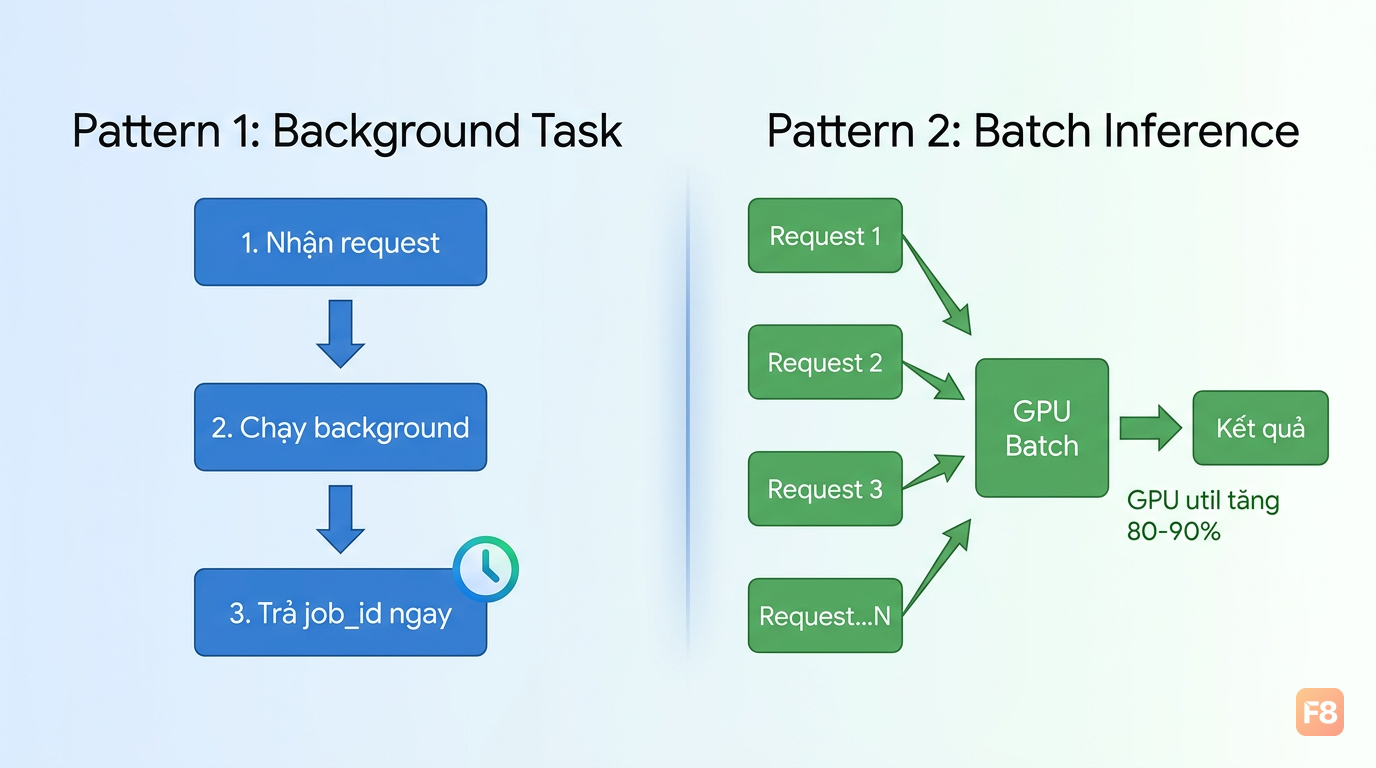
Một vấn đề thực tế: model inference chậm (1-5 giây/request), trong khi user muốn kết quả ngay. Có hai pattern phổ biến để xử lý.

Pattern 1: Background task cho non-blocking response
from fastapi import BackgroundTasks
from pydantic import BaseModel
import uuid

# Lưu trạng thái job đơn giản (thực tế dùng Redis)
job_results = {}

class InferenceRequest(BaseModel):
    text: str
    model_id: str = "default"

async def run_heavy_inference(job_id: str, text: str):
    """Chạy inference nặng ở background"""
    # Simulate heavy ML computation
    await asyncio.sleep(2)
    job_results[job_id] = {"result": f"Processed: {text}", "status": "done"}

@app.post("/inference/async")
async def start_inference(
    request: InferenceRequest,
    background_tasks: BackgroundTasks
):
    job_id = str(uuid.uuid4())
    job_results[job_id] = {"status": "processing"}
    
    # Trả về ngay, xử lý ở background
    background_tasks.add_task(run_heavy_inference, job_id, request.text)
    return {"job_id": job_id, "status": "accepted"}

@app.get("/inference/{job_id}")
async def get_result(job_id: str):
    return job_results.get(job_id, {"status": "not_found"})

346021 Pattern polling này giúp frontend không bị block khi model inference chậm

Pattern 2: Batch inference để tối ưu GPU

GPU hoạt động hiệu quả nhất khi xử lý batch. Thay vì chạy inference từng request riêng lẻ, gom requests trong một time window:

import asyncio
from collections import deque

class BatchProcessor:
    def __init__(self, max_batch_size: int = 32, timeout_ms: int = 50):
        self.queue = deque()
        self.max_batch = max_batch_size
        self.timeout = timeout_ms / 1000  # Convert sang giây
    
    async def add_to_batch(self, item: str) -> dict:
        """Thêm item vào queue, đợi batch được xử lý"""
        future = asyncio.get_event_loop().create_future()
        self.queue.append((item, future))
        
        # Kích hoạt xử lý batch nếu đủ số lượng
        if len(self.queue) >= self.max_batch:
            await self._process_batch()
        
        return await future
    
    async def _process_batch(self):
        """Gom batch và gọi model 1 lần"""
        batch = []
        futures = []
        
        while self.queue and len(batch) < self.max_batch:
            item, future = self.queue.popleft()
            batch.append(item)
            futures.append(future)
        
        # Gọi model với toàn bộ batch (hiệu quả hơn inference đơn)
        results = await run_model_batch(batch)
        
        for future, result in zip(futures, results):
            future.set_result(result)

batch_processor = BatchProcessor()

@app.post("/embed")
async def get_embedding(text: str):
    result = await batch_processor.add_to_batch(text)
    return {"embedding": result}

Batch inference có thể tăng throughput lên đáng kể khi load cao, vì GPU utilization tăng từ 20-30% (single request) lên 80-90% (batched). Trade-off là latency tăng nhẹ do phải đợi đủ batch hoặc hết timeout. Với embedding API hoặc classification service, đây là pattern worth doing.


Bảo mật API AI: những điểm không được bỏ qua

AI API có attack surface đặc thù mà REST API thông thường không có. Prompt injection, model abuse, và chi phí inference bị lạm dụng là ba vấn đề thường gặp nhất.
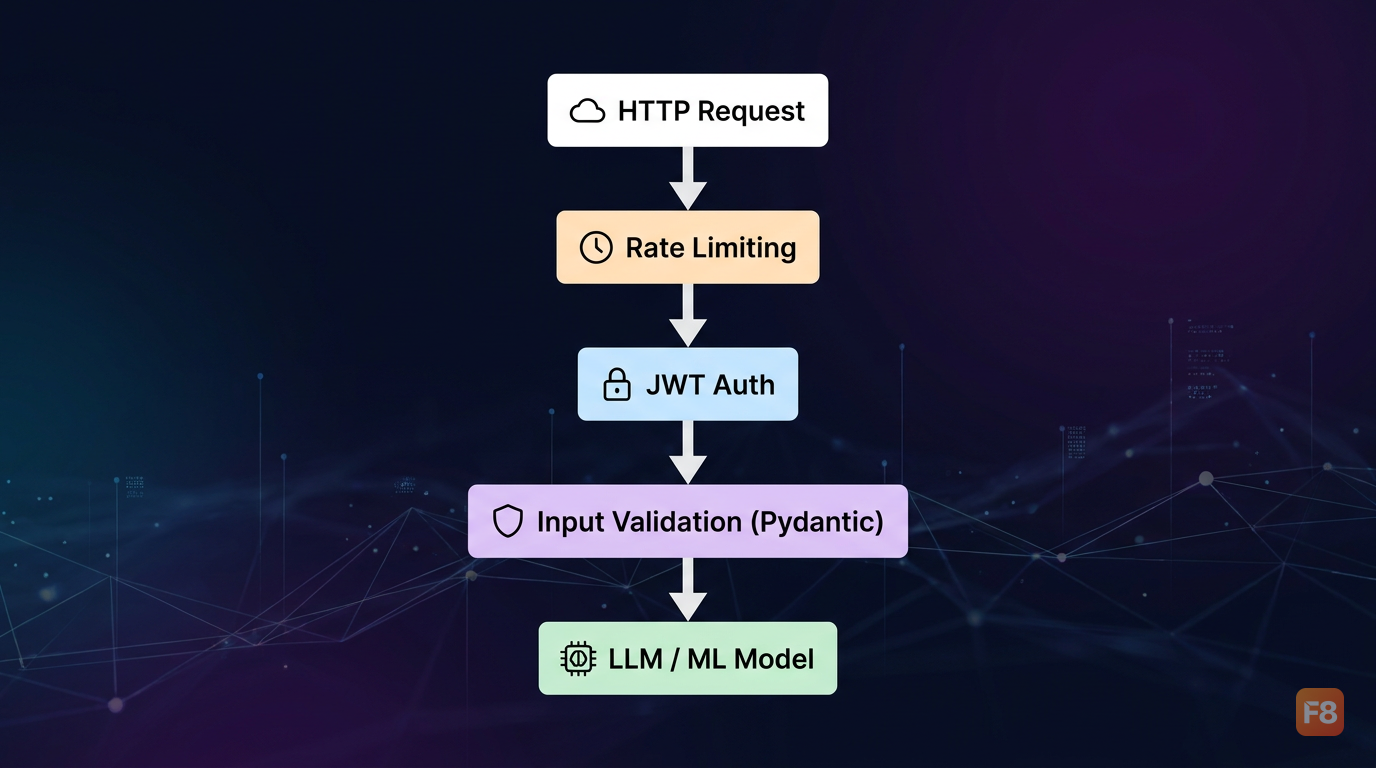
346022 Bảo mật AI API không chỉ là auth - còn phải kiểm soát input tới model

Rate limiting và cost control

from fastapi import HTTPException, Request
from datetime import datetime, timedelta
import asyncio

# Simple in-memory rate limiter (production: dùng Redis)
request_counts = {}

async def check_rate_limit(request: Request, max_requests: int = 10, window_seconds: int = 60):
    client_ip = request.client.host
    now = datetime.now()
    window_start = now - timedelta(seconds=window_seconds)
    
    # Xóa requests cũ ngoài window
    if client_ip in request_counts:
        request_counts[client_ip] = [
            t for t in request_counts[client_ip] if t > window_start
        ]
    else:
        request_counts[client_ip] = []
    
    if len(request_counts[client_ip]) >= max_requests:
        raise HTTPException(
            status_code=429,
            detail=f"Rate limit: tối đa {max_requests} requests/{window_seconds}s"
        )
    
    request_counts[client_ip].append(now)

@app.post("/llm/generate")
async def generate(
    prompt: str,
    request: Request,
    _: None = Depends(check_rate_limit)  # Apply rate limit
):
    # ... gọi LLM
    pass

Input validation cho prompt

Pydantic validate structure, nhưng bạn cần thêm content validation để block prompt injection:

from pydantic import BaseModel, field_validator

class ChatRequest(BaseModel):
    messages: list[dict]
    max_tokens: int = 1000
    temperature: float = 0.7
    
    @field_validator('max_tokens')
    @classmethod
    def limit_tokens(cls, v):
        # Giới hạn để tránh cost abuse
        if v > 4096:
            raise ValueError('max_tokens không được vượt quá 4096')
        return v
    
    @field_validator('temperature')
    @classmethod  
    def validate_temperature(cls, v):
        if not 0.0 <= v <= 2.0:
            raise ValueError('temperature phải trong khoảng 0.0 - 2.0')
        return v
    
    @field_validator('messages')
    @classmethod
    def validate_messages(cls, v):
        if len(v) > 50:  # Giới hạn context window abuse
            raise ValueError('Tối đa 50 messages trong một request')
        for msg in v:
            if len(msg.get('content', '')) > 10000:  # ~2500 tokens
                raise ValueError('Message quá dài')
        return v

API Key và JWT authentication

from fastapi.security import HTTPBearer, HTTPAuthorizationCredentials
import jwt

security = HTTPBearer()
SECRET_KEY = "your-secret-key"  # Thực tế lấy từ env variable

async def verify_token(
    credentials: HTTPAuthorizationCredentials = Depends(security)
):
    try:
        payload = jwt.decode(
            credentials.credentials,
            SECRET_KEY,
            algorithms=["HS256"]
        )
        return payload
    except jwt.ExpiredSignatureError:
        raise HTTPException(status_code=401, detail="Token hết hạn")
    except jwt.InvalidTokenError:
        raise HTTPException(status_code=401, detail="Token không hợp lệ")

@app.post("/protected/generate")
async def protected_generate(
    request: ChatRequest,
    user: dict = Depends(verify_token)
):
    # user chứa thông tin từ JWT payload
    return {"user_id": user["sub"], "status": "ok"}

Một điểm hay của FastAPI DI: Depends chain lại được. verify_token có thể depend vào check_rate_limit, tạo thành security middleware stack mà không cần decorator riêng.


Case study: xây dựng chatbot AI backend với FastAPI

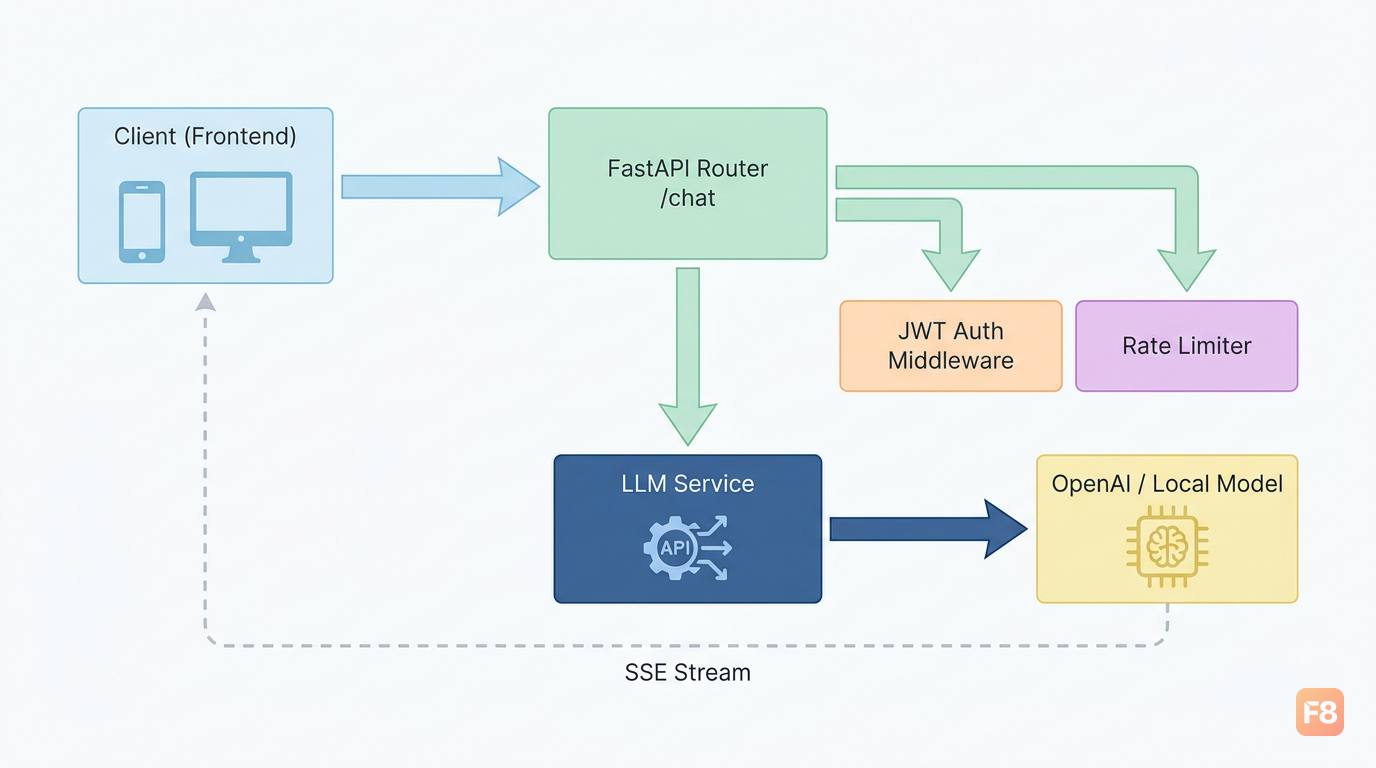
Đủ lý thuyết rồi. Mình sẽ walk through một backend chatbot AI thực tế, có streaming, conversation history, và tích hợp OpenAI API.

Cấu trúc project

chatbot-api/
├── main.py              # FastAPI app entry point
├── routers/
│   └── chat.py          # Chat endpoints
├── services/
│   └── llm_service.py   # Logic gọi LLM
├── models/
│   └── schemas.py       # Pydantic schemas
├── middleware/
│   └── auth.py          # Auth middleware
└── requirements.txt

Schema và service layer

# models/schemas.py
from pydantic import BaseModel
from typing import Literal

class Message(BaseModel):
    role: Literal["user", "assistant", "system"]
    content: str

class ChatRequest(BaseModel):
    messages: list[Message]
    stream: bool = True
    model: str = "gpt-4o-mini"
    max_tokens: int = 1000

class ConversationStore(BaseModel):
    conversation_id: str
    messages: list[Message] = []
# services/llm_service.py
from openai import AsyncOpenAI
from models.schemas import Message
import json

client = AsyncOpenAI()  # Lấy OPENAI_API_KEY từ env tự động

async def stream_chat_response(messages: list[Message], model: str, max_tokens: int):
    """Stream response từ OpenAI về client"""
    # Convert Pydantic models sang dict
    messages_dict = [{"role": m.role, "content": m.content} for m in messages]
    
    stream = await client.chat.completions.create(
        model=model,
        messages=messages_dict,
        max_tokens=max_tokens,
        stream=True
    )
    
    async for chunk in stream:
        delta = chunk.choices[0].delta
        if delta.content:
            # SSE format: data: {...}\n\n
            yield f"data: {json.dumps({'token': delta.content})}\n\n"
    
    yield "data: [DONE]\n\n"

Router và endpoint chính

# routers/chat.py
from fastapi import APIRouter, Depends
from fastapi.responses import StreamingResponse
from models.schemas import ChatRequest
from services.llm_service import stream_chat_response
from middleware.auth import verify_token

router = APIRouter(prefix="/chat", tags=["chat"])

# Lưu conversation đơn giản (production: dùng Redis/PostgreSQL)
conversations: dict = {}

@router.post("/completions")
async def chat_completion(
    request: ChatRequest,
    user: dict = Depends(verify_token)
):
    """Endpoint chat chính, hỗ trợ streaming"""
    
    if request.stream:
        return StreamingResponse(
            stream_chat_response(
                request.messages,
                request.model,
                request.max_tokens
            ),
            media_type="text/event-stream",
            headers={
                "Cache-Control": "no-cache",
                "X-Accel-Buffering": "no"  # Tắt Nginx buffering cho SSE
            }
        )
    
    # Non-streaming fallback
    # ... (tương tự nhưng await toàn bộ response)

346023 Cấu trúc router-service tách biệt rõ logic HTTP và logic AI

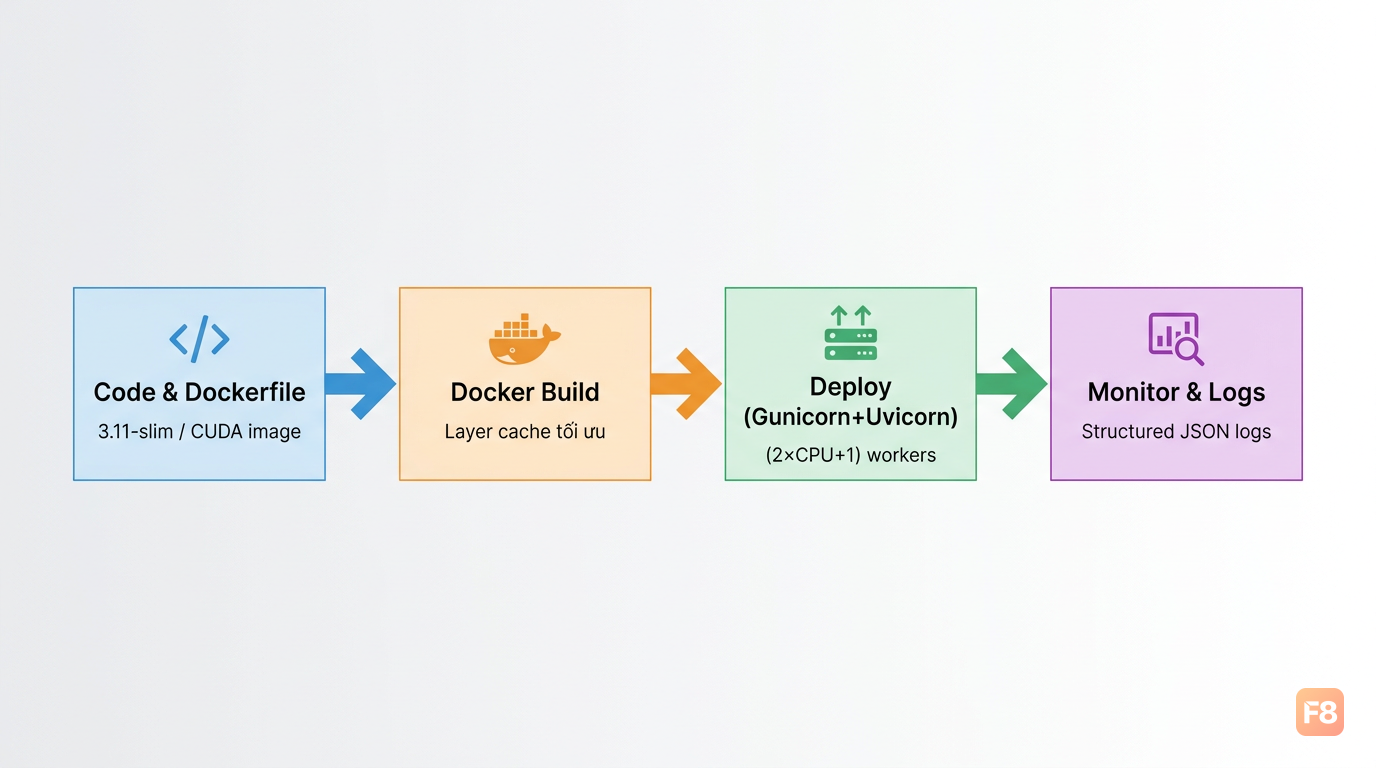
Chạy production với Uvicorn + Gunicorn

# Development
uvicorn main:app --reload --port 8000

# Production: Gunicorn quản lý worker processes
gunicorn main:app \
  --workers 4 \
  --worker-class uvicorn.workers.UvicornWorker \
  --bind 0.0.0.0:8000 \
  --timeout 120  # Tăng timeout cho LLM response dài

Số workers nên là (2 × CPU cores) + 1. Với server 4 core thì 9 workers. Tuy nhiên nếu workload là GPU inference, quá nhiều workers sẽ tranh nhau GPU memory - cần cân nhắc theo VRAM thực tế.

Toàn bộ code mẫu đầy đủ có tại FastAPI LLM Chatbot template trên GitHub.


Deploy và monitoring FastAPI AI service

Code chạy local xong, bước tiếp theo khiến nhiều người toát mồ hôi hơn: production deployment.

Dockerfile cho FastAPI + ML

# Dùng image Python slim để giảm size
FROM python:3.11-slim

WORKDIR /app

# Copy requirements trước (tận dụng Docker layer cache)
COPY requirements.txt .
RUN pip install --no-cache-dir -r requirements.txt

# Copy code sau (thay đổi code không rebuild dependencies)
COPY . .

# Expose port
EXPOSE 8000

# Chạy với uvicorn
CMD ["uvicorn", "main:app", "--host", "0.0.0.0", "--port", "8000"]

Nếu bạn cần PyTorch với CUDA, dùng base image từ NVIDIA thay vì python:slim:

FROM pytorch/pytorch:2.1.0-cuda11.8-cudnn8-runtime

Size image sẽ lớn hơn (~5-8GB), nhưng đó là cái giá cho GPU support.

Structured logging cho AI API

Logs của AI API cần capture thêm metadata: model dùng, số tokens, latency inference:
import logging
import time
from fastapi import Request

# Cấu hình JSON logging
logging.basicConfig(
    format='{"time": "%(asctime)s", "level": "%(levelname)s", "message": "%(message)s"}',
    level=logging.INFO
)
logger = logging.getLogger(__name__)

@app.middleware("http")
async def log_requests(request: Request, call_next):
    start = time.time()
    response = await call_next(request)
    duration = time.time() - start
    
    logger.info(
        f"path={request.url.path} "
        f"method={request.method} "
        f"status={response.status_code} "
        f"duration={duration:.3f}s"
    )
    return response

346024 Structured logs giúp debug production issues nhanh hơn rất nhiều

Health check endpoint

@app.get("/health")
async def health_check():
    """Kubernetes/Docker health check"""
    return {
        "status": "healthy",
        "model_loaded": ml_model is not None,
        "version": "1.0.0"
    }

Nếu bạn muốn đi sâu hơn về Docker và deployment pipeline, khóa Devops for Engineers của F8 cover phần này khá chi tiết - từ Docker cơ bản đến CI/CD.

Một lưu ý quan trọng: với AI service có GPU, autoscaling không đơn giản như stateless web app. Mỗi instance cần GPU memory để load model, cold start chậm (30-60 giây cho model lớn). Giải pháp thực tế là pre-warm instances và dùng min-replicas > 0 thay vì scale-to-zero.