
Đang tải...

Ếch Trendy

Cùng chú ếch nhỏ khám phá thế giới Web đầy biến động. Cập nhật trending nhanh như cách ếch đớp mồi! ⌨️🌿


0

React 19 và Next.js 15: Khi nào dùng Server Components, khi nào dùng Client Components

Ếch Trendy
Ếch Trendy

2 tháng trước · 8 phút đọc

Mình từng làm sai trong 3 tháng đầu dùng Next.js 13

Hồi App Router mới ra, mình hứng chí convert toàn bộ app sang Server Components. Kết quả? Form không hoạt động, state bị mất, và cái button onClick không chịu chạy. Mình mất gần một tuần debug trước khi nhận ra mình đang hiểu sai hoàn toàn cách hai loại component này hoạt động.

React 19 và Next.js 15 đẩy Server Components (RSC) lên một tầm cao mới - streaming, Server Actions, partial prerendering. Nhưng nếu bạn không nắm rõ ranh giới giữa server và client, bạn sẽ gặp đúng cái lỗi mình từng gặp.

Bài này mình sẽ giải thích đúng một câu hỏi: component này nên chạy ở đâu? Kèm code thực tế cho từng trường hợp.


Server Components và Client Components khác nhau thế nào?

Đây là điểm nhiều người hiểu lơ mơ nhất.

Server Components chạy hoàn toàn trên server - lúc build hoặc lúc request. Chúng không có lifecycle, không có state, không có event handler. Đổi lại, chúng có thể đọc database trực tiếp, giữ secrets an toàn, và gửi về browser chỉ HTML thuần - không kèm JavaScript bundle.

Client Components là React component truyền thống bạn đã biết. Chúng được hydrate trên browser, có useState, useEffect, xử lý click, scroll, form input. Khi bạn thêm 'use client' ở đầu file, bạn đang nói với Next.js: "bundle cái này vào JavaScript gửi xuống browser".
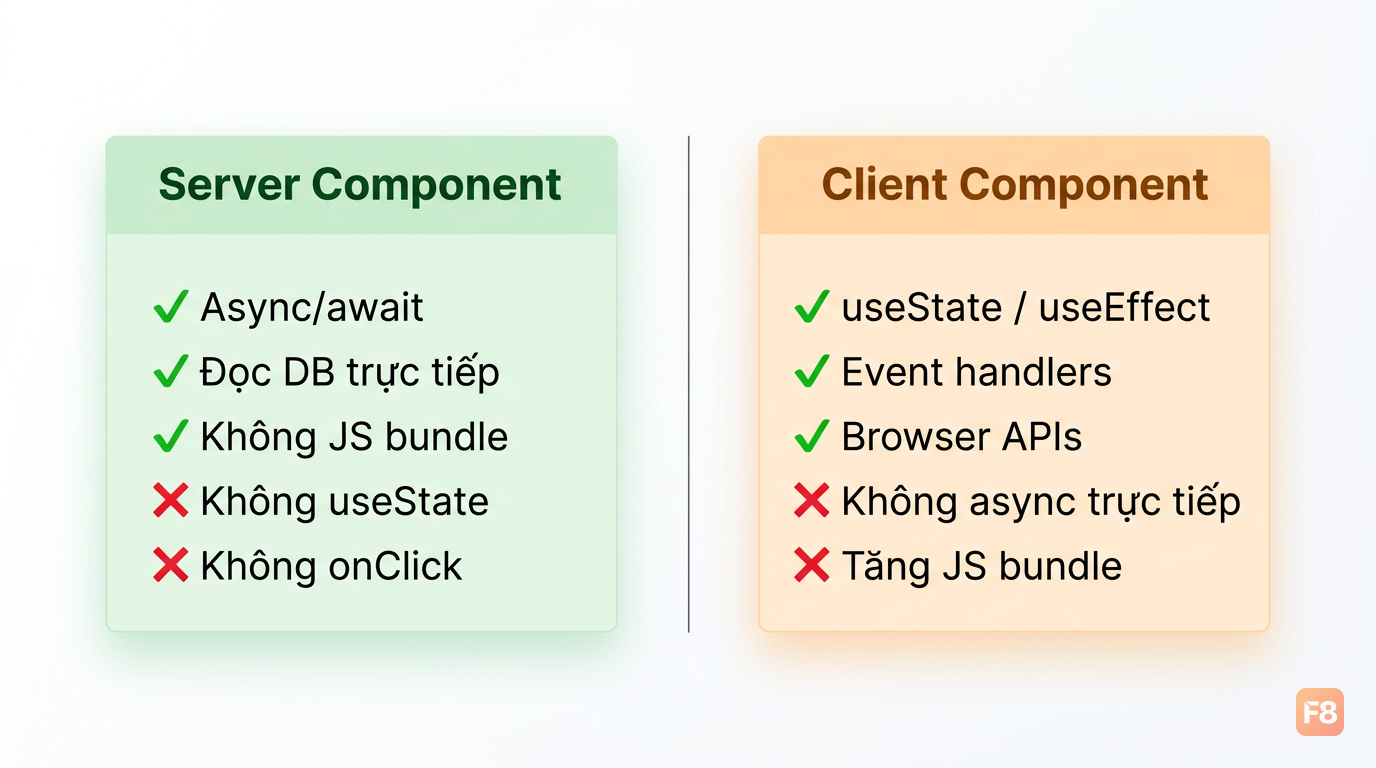
346168 Server không gửi JS bundle - Client mới cần hydration

Một chi tiết quan trọng hay bị bỏ qua: mặc định trong Next.js 15, mọi component đều là Server Component. Bạn phải opt-in vào Client Component bằng 'use client'. Điều này ngược với cách React hoạt động trước đây.

'use client' không có nghĩa là "chỉ chạy trên client". Nó vẫn được server-render lần đầu (SSR), sau đó hydrate trên browser. Đây là nguồn gốc của phần lớn nhầm lẫn.

// app/blog/page.tsx - Server Component (mặc định)
// Không cần 'use server' - đây là default
import { db } from '@/lib/db'

export default async function BlogPage() {
  // Gọi thẳng DB, không cần API route
  const posts = await db.post.findMany({
    orderBy: { createdAt: 'desc' },
    take: 10,
  })

  return (
    <ul>
      {posts.map(post => (
        <li key={post.id}>{post.title}</li>
      ))}
    </ul>
  )
}
// components/LikeButton.tsx - Client Component
'use client'

import { useState } from 'react'

export function LikeButton({ initialCount }: { initialCount: number }) {
  const [count, setCount] = useState(initialCount)

  return (
    <button onClick={() => setCount(c => c + 1)}>
      ❤️ {count}
    </button>
  )
}

Khi nào dùng Server Components?

Nguyên tắc đơn giản: nếu component chỉ cần hiển thị dữ liệu và không cần tương tác người dùng, dùng Server Component.

Các trường hợp điển hình:

  • Data fetching: Blog posts, product listings, user profiles - bất kỳ thứ gì cần query từ DB hoặc API
  • Static content: Header, footer, layout, sidebar
  • SEO-critical content: Nội dung cần crawler đọc được ngay
  • Sensitive logic: Xử lý API keys, kiểm tra auth token, business logic không nên lộ trên client
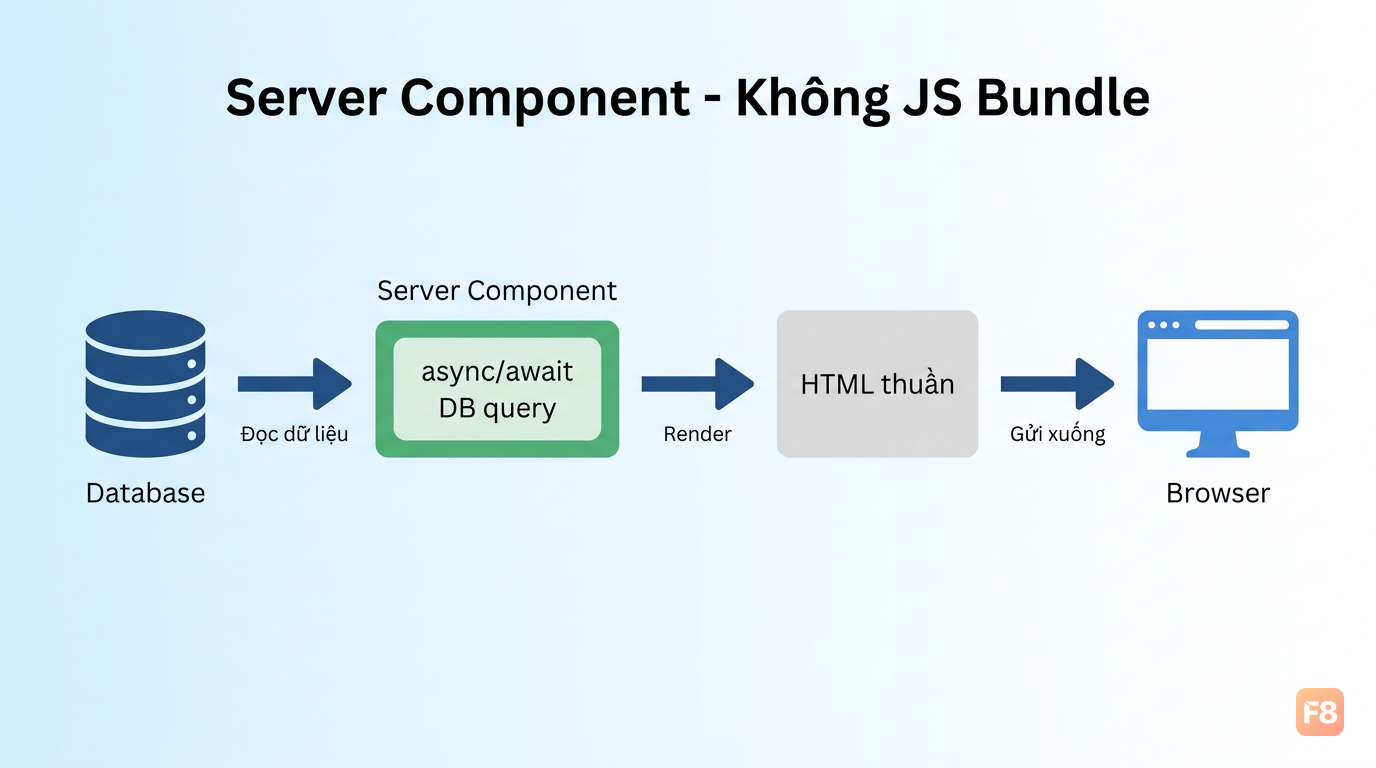
346169 Server Component phù hợp nhất khi dữ liệu đến từ DB và không cần tương tác

Ví dụ kiến trúc blog:

// app/blog/[slug]/page.tsx - Server Component
import { db } from '@/lib/db'
import { LikeButton } from '@/components/LikeButton' // Client Component
import { CommentSection } from '@/components/CommentSection' // Client Component

export default async function BlogPost({ params }: { params: { slug: string } }) {
  // Fetch thẳng từ DB - không cần useEffect, không cần loading state
  const post = await db.post.findUnique({
    where: { slug: params.slug },
    include: { author: true }
  })

  if (!post) notFound()

  return (
    <article>
      <h1>{post.title}</h1>
      <p>Tác giả: {post.author.name}</p>
      
      {/* Nội dung tĩnh - render trên server */}
      <div dangerouslySetInnerHTML={{ __html: post.content }} />
      
      {/* Nhúng Client Components khi cần tương tác */}
      <LikeButton initialCount={post.likeCount} postId={post.id} />
      <CommentSection postId={post.id} />
    </article>
  )
}

Lợi ích rõ ràng nhất: không còn cái pattern useEffect + fetch + useState lòng vòng nữa. Dữ liệu đến thẳng từ server, render xong gửi HTML xuống browser. Trang load nhanh hơn và SEO tốt hơn vì content có ngay từ đầu.

Một lưu ý: Next.js 15 thay đổi caching behavior - fetch không còn cache mặc định như Next.js 14. Bạn cần explicit opt-in:

// Cache trong 1 giờ
const data = await fetch('/api/data', { next: { revalidate: 3600 } })

// Không cache (luôn fetch mới)
const data = await fetch('/api/data', { cache: 'no-store' })

// Cache tĩnh - chỉ build lại khi deploy
const data = await fetch('/api/data', { cache: 'force-cache' })

Khi nào dùng Client Components?

Thêm 'use client' khi component cần một trong ba thứ: state, browser APIs, hoặc event handlers.

Cụ thể:

  • useState, useReducer, useContext - bất kỳ reactive state nào
  • useEffect, useLayoutEffect - side effects phía browser
  • Event handlers: onClick, onChange, onSubmit
  • Browser-only APIs: window, document, localStorage, navigator
  • Third-party libraries chưa hỗ trợ RSC: animation libraries, charting libraries, form libraries
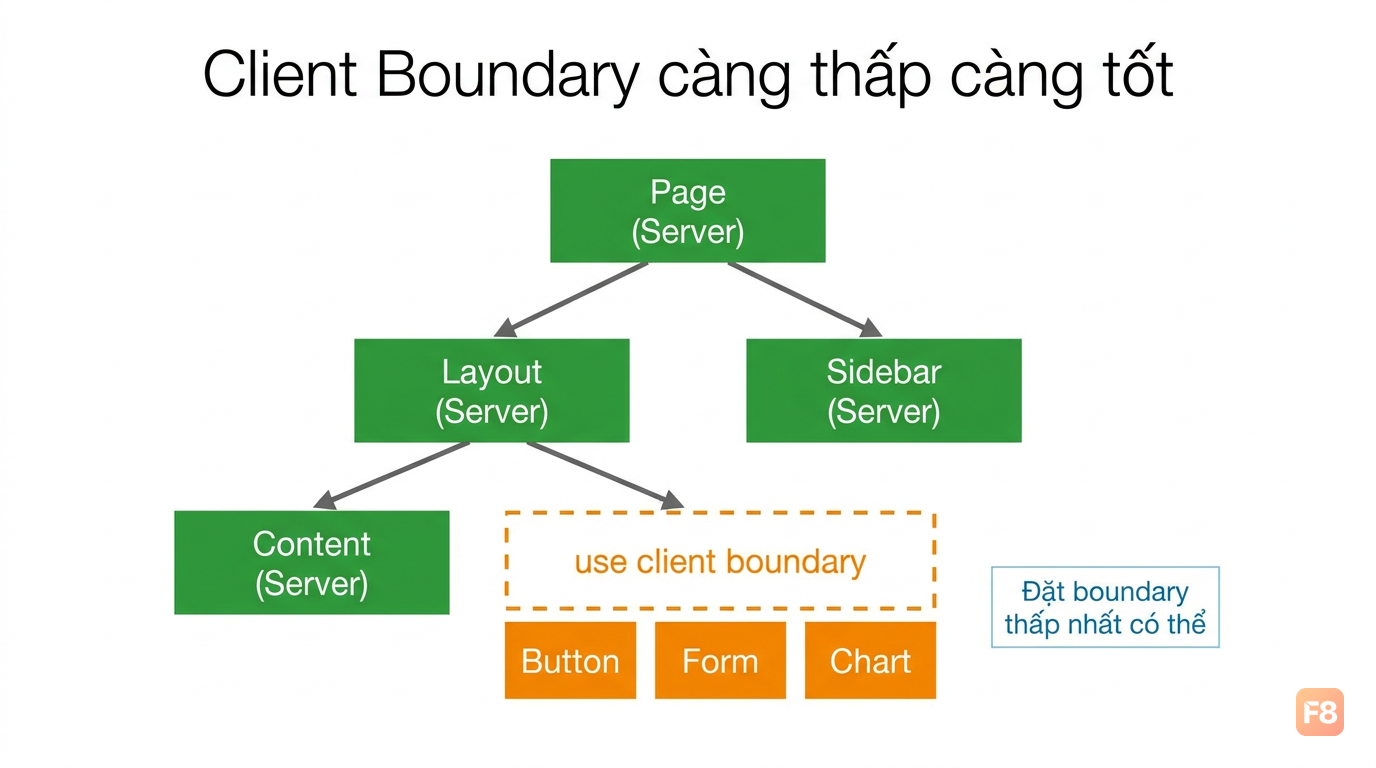
346170 Thêm 'use client' chỉ khi thực sự cần - đừng lạm dụng

Một pattern thực tế cho dashboard với realtime data:

// components/StatsCard.tsx
'use client'

import { useState, useEffect } from 'react'

interface Props {
  metric: string
  endpoint: string
}

export function RealtimeStatsCard({ metric, endpoint }: Props) {
  const [value, setValue] = useState<number | null>(null)
  const [isLoading, setIsLoading] = useState(true)

  useEffect(() => {
    // Polling mỗi 30s cho realtime feel
    const fetchData = async () => {
      const res = await fetch(endpoint)
      const data = await res.json()
      setValue(data.value)
      setIsLoading(false)
    }

    fetchData()
    const interval = setInterval(fetchData, 30_000)
    return () => clearInterval(interval)
  }, [endpoint])

  if (isLoading) return <div className="skeleton" />

  return (
    <div className="stats-card">
      <span className="metric-name">{metric}</span>
      <span className="metric-value">{value?.toLocaleString()}</span>
    </div>
  )
}

Và một lưu ý quan trọng về component tree: khi bạn đánh dấu một component là 'use client', toàn bộ subtree bên dưới nó cũng trở thành Client Component - dù bạn có viết 'use server' hay không. Vì vậy hãy đặt boundary 'use client' càng thấp trong cây component càng tốt.

Pattern được khuyến nghị là "leaf components" - chỉ những component ngoài cùng (button, input, chart) mới cần 'use client', còn parent layout vẫn là Server Component.


Server Actions: data mutation không cần API route

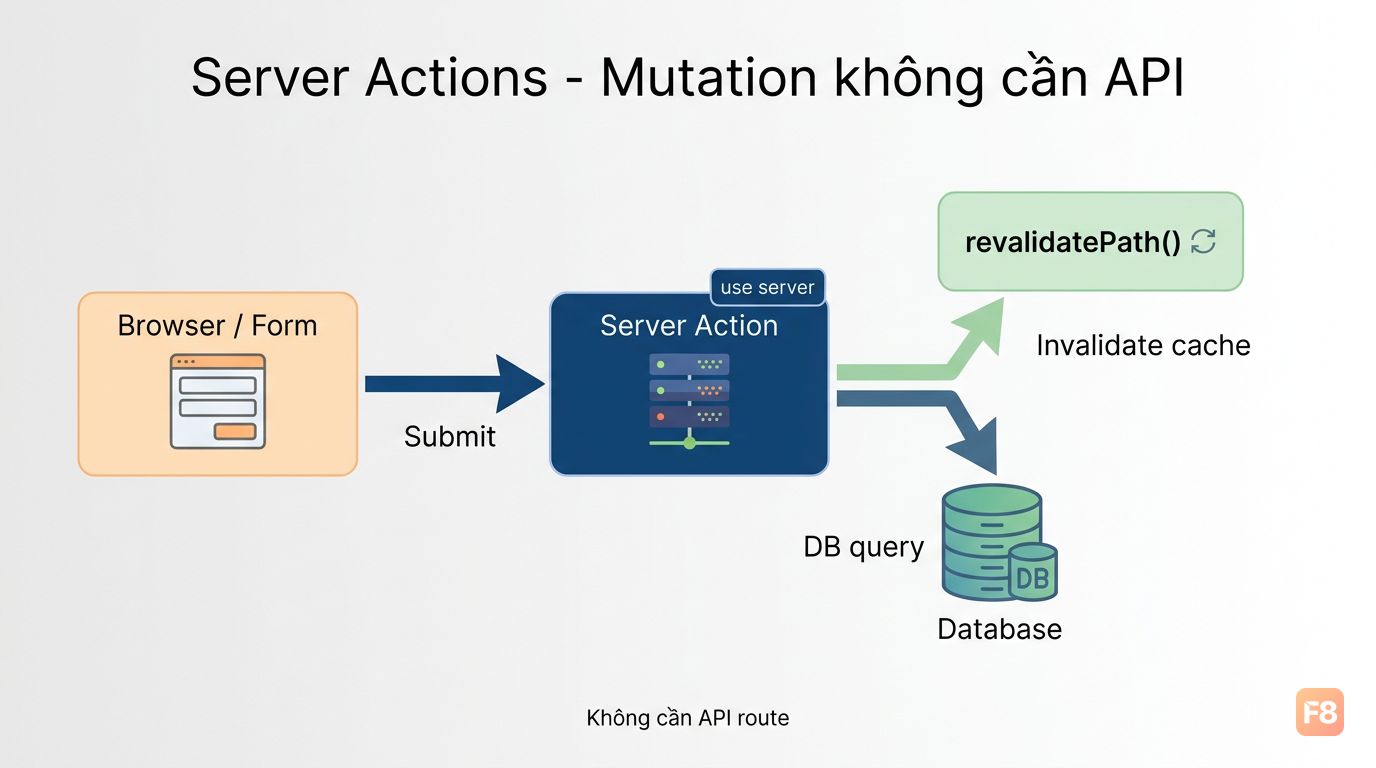
React 19 và Next.js 15 giới thiệu Server Actions như một cách chính thức để xử lý mutations (tạo/sửa/xóa dữ liệu) mà không cần tạo API endpoint riêng.

Thay vì pattern cũ fetch('/api/submit', { method: 'POST' }), giờ bạn viết function trực tiếp chạy trên server:
// app/actions.ts
'use server'

import { db } from '@/lib/db'
import { revalidatePath } from 'next/cache'

export async function createPost(formData: FormData) {
  const title = formData.get('title') as string
  const content = formData.get('content') as string

  // Validate
  if (!title || title.length < 3) {
    return { error: 'Tiêu đề quá ngắn' }
  }

  // Lưu DB trực tiếp trong Server Action
  await db.post.create({
    data: { title, content }
  })

  // Invalidate cache để page reload fresh data
  revalidatePath('/blog')
  return { success: true }
}
// app/blog/new/page.tsx - Dùng Server Action trong form
import { createPost } from '@/app/actions'

export default function NewPostPage() {
  return (
    // action={createPost} - không cần onSubmit, không cần 'use client'
    <form action={createPost}>
      <input name="title" placeholder="Tiêu đề bài viết" />
      <textarea name="content" placeholder="Nội dung" />
      <button type="submit">Đăng bài</button>
    </form>
  )
}

346171 Server Actions xử lý mutation thẳng trên server - không cần API route trung gian

Nếu cần feedback ngay lập tức (loading state, optimistic update), kết hợp với useActionState từ React 19:

'use client'

import { useActionState } from 'react'
import { createPost } from '@/app/actions'

export function PostForm() {
  const [state, action, isPending] = useActionState(createPost, null)

  return (
    <form action={action}>
      {state?.error && <p className="error">{state.error}</p>}
      {state?.success && <p className="success">Đăng bài thành công!</p>}
      
      <input name="title" disabled={isPending} />
      <textarea name="content" disabled={isPending} />
      <button type="submit" disabled={isPending}>
        {isPending ? 'Đang lưu...' : 'Đăng bài'}
      </button>
    </form>
  )
}

Trade-off cần biết: Server Actions không phải silver bullet. Nếu bạn cần gọi cùng mutation từ nhiều nơi (mobile app, third-party service), API route truyền thống vẫn linh hoạt hơn. Server Actions phù hợp nhất cho web-only mutations trong cùng Next.js app.


Streaming và Suspense: tránh waterfall trong Next.js 15

Vấn đề phổ biến khi migrate sang App Router: bạn có một trang cần nhiều data sources khác nhau - user info, posts, notifications. Nếu fetch tuần tự, người dùng nhìn màn hình trắng trong khi chờ cả ba.

Next.js 15 giải quyết điều này bằng Streaming kết hợp với Suspense.
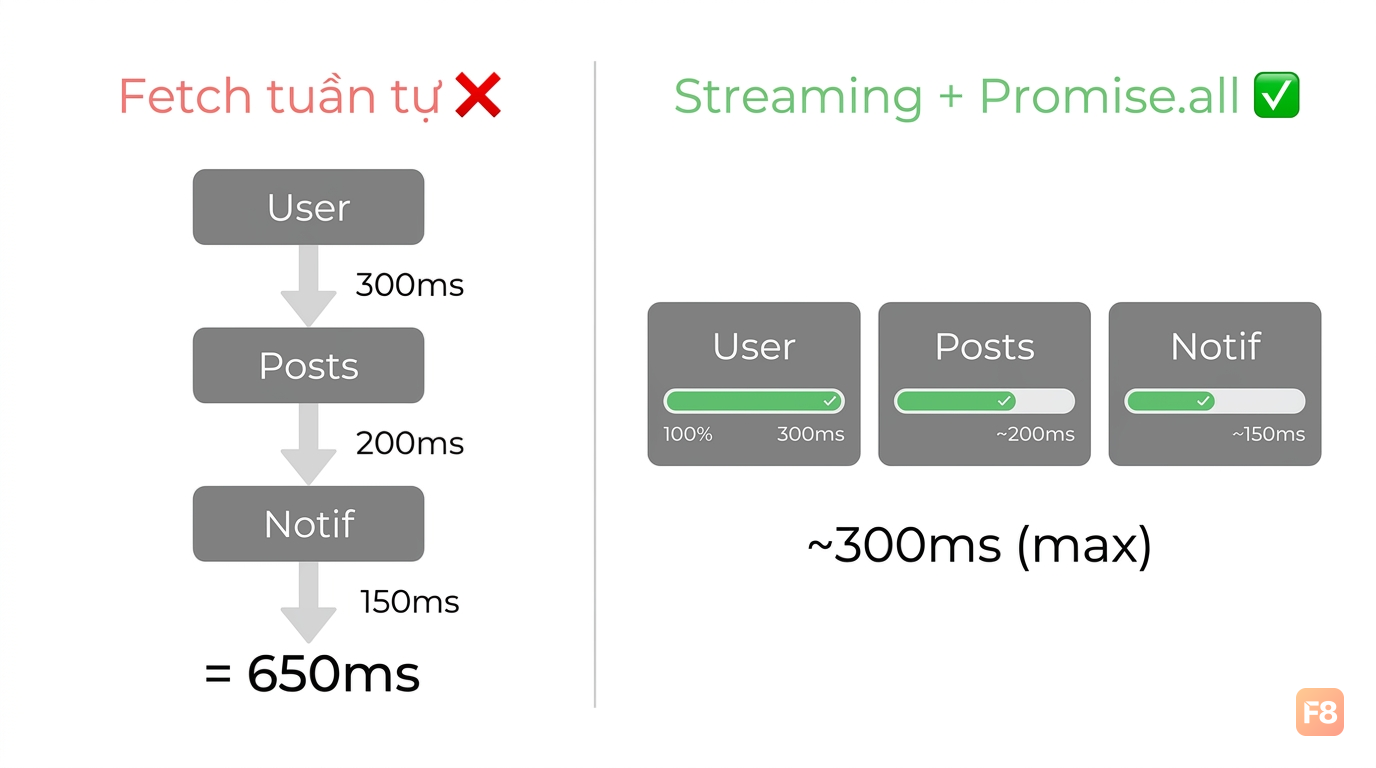
346172 Streaming render từng phần - người dùng thấy content sớm hơn thay vì chờ toàn bộ trang

// app/dashboard/page.tsx
import { Suspense } from 'react'
import { UserProfile } from './UserProfile'
import { RecentPosts } from './RecentPosts'
import { Notifications } from './Notifications'

export default function DashboardPage() {
  return (
    <div className="dashboard">
      {/* Render ngay - không cần chờ */}
      <h1>Dashboard</h1>
      
      {/* Mỗi section stream độc lập */}
      <Suspense fallback={<ProfileSkeleton />}>
        <UserProfile /> {/* Fetch user data */}
      </Suspense>
      
      <Suspense fallback={<PostsSkeleton />}>
        <RecentPosts /> {/* Fetch posts */}
      </Suspense>
      
      <Suspense fallback={<NotificationsSkeleton />}>
        <Notifications /> {/* Fetch notifications */}
      </Suspense>
    </div>
  )
}
// app/dashboard/RecentPosts.tsx - Server Component
import { db } from '@/lib/db'

export async function RecentPosts() {
  // Chậm nhất cũng không block các component khác
  const posts = await db.post.findMany({ take: 5 })
  
  return (
    <section>
      <h2>Bài viết gần đây</h2>
      {posts.map(p => <PostCard key={p.id} post={p} />)}
    </section>
  )
}

Mỗi Suspense boundary stream độc lập. UserProfile load xong trước thì hiện trước, không cần chờ RecentPosts. Người dùng thấy content dần dần thay vì nhìn skeleton mãi.

Một trick để tránh waterfall: nếu nhiều Server Components trong cùng scope cần fetch data, dùng Promise.all để fetch song song:

// Thay vì fetch tuần tự (chậm)
const user = await getUser(id)
const posts = await getUserPosts(id) // Chờ getUser xong mới chạy

// Fetch song song (nhanh hơn)
const [user, posts] = await Promise.all([
  getUser(id),
  getUserPosts(id),
])