
Serverless và Edge Computing cho web app: Deploy nhanh, scale tốt, giảm latency

2 tháng trước · 6 phút đọc
Mình từng deploy sai cách suốt 2 năm
Hồi mới làm web, mình cứ nghĩ deploy là thuê một cái VPS, cài Nginx, chạy Node.js, xong. App có vài trăm người dùng thì ổn. Nhưng khi traffic tăng đột biến - ví dụ chạy campaign marketing - server cứng đờ, latency nhảy lên 2-3 giây, và mình ngồi scale tay lúc 2 giờ sáng.
Vấn đề không phải ở code. Vấn đề ở kiến trúc.
Serverless và edge computing ra đời để giải quyết đúng cái pain point này: bạn không cần quản lý server, không cần lo scale, và request được xử lý ở vị trí gần người dùng nhất. Nghe hay - nhưng không phải lúc nào cũng là silver bullet. Bài này mình sẽ breakdown từng kiến trúc, so sánh thẳng vào trade-off, rồi hướng dẫn deploy thực tế trên các platform phổ biến nhất.
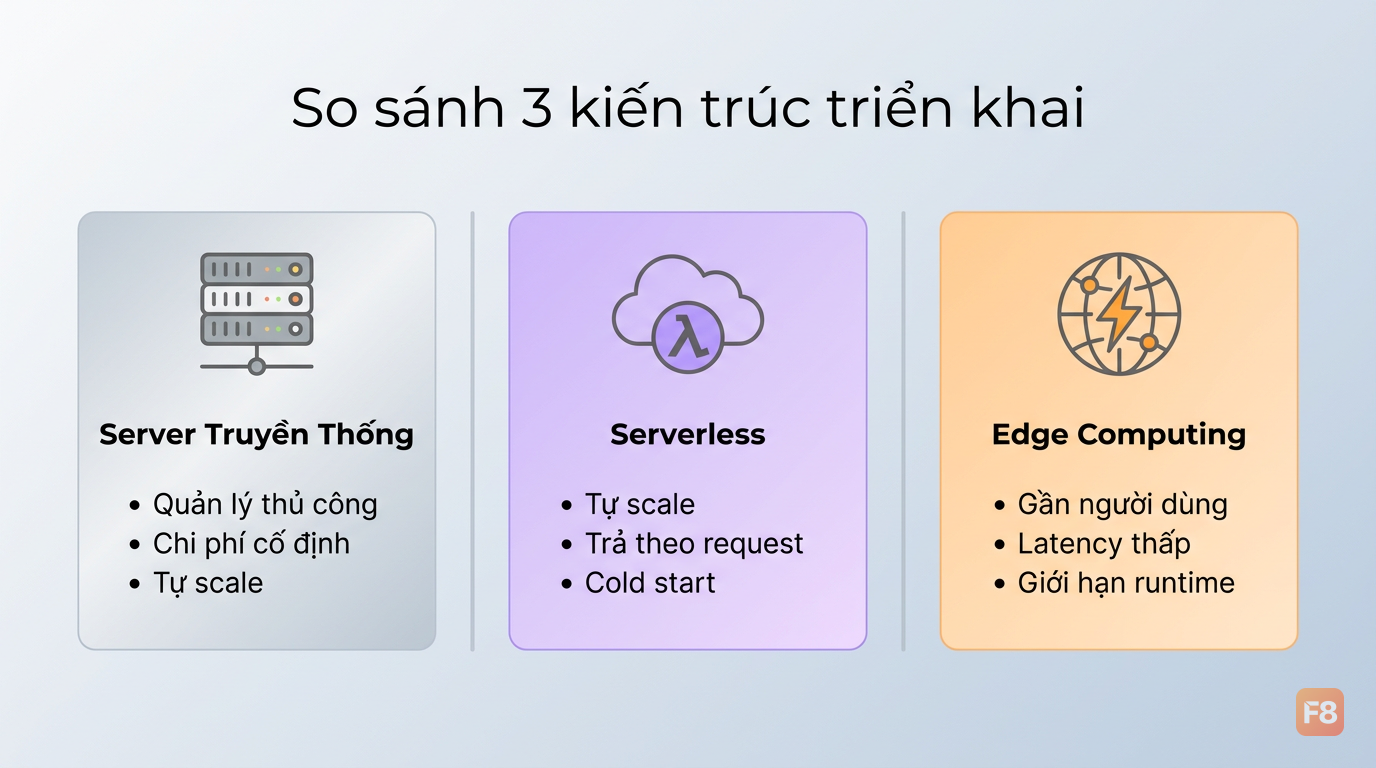 Ba hướng tiếp cận - mỗi cái phù hợp một bài toán khác nhau
Bạn sẽ biết khi nào nên dùng cái gì, không phải cứ hype là theo.
Serverless, edge, và server truyền thống - khác nhau ở đâu?
Để chọn đúng công cụ, cần hiểu rõ cách mỗi kiến trúc hoạt động.
Server truyền thống (VPS/dedicated): Bạn thuê một máy chủ, cài OS, cài runtime, deploy app. App chạy liên tục 24/7 dù có request hay không. Scale bằng cách thêm instance thủ công hoặc auto-scaling group. Chi phí cố định theo tháng, dù traffic thấp vẫn trả đủ.
Serverless: Function được đóng gói và chỉ chạy khi có request. Platform (AWS Lambda, Vercel, Supabase Edge) lo toàn bộ infrastructure. Bạn trả tiền theo số lần gọi và thời gian thực thi - không có request, không mất tiền. Trade-off lớn nhất là cold start: lần đầu gọi function sau thời gian idle, platform cần khởi động container, thêm 100-500ms latency.
Edge computing: Function chạy trên mạng lưới CDN toàn cầu, tại node gần người dùng nhất. Thay vì request bay từ Hà Nội về server ở Singapore (50-80ms), nó xử lý ngay tại node ở Hà Nội (<10ms). Giới hạn: runtime thường là V8 isolates (không phải Node.js đầy đủ), không có file system, giới hạn bundle size.
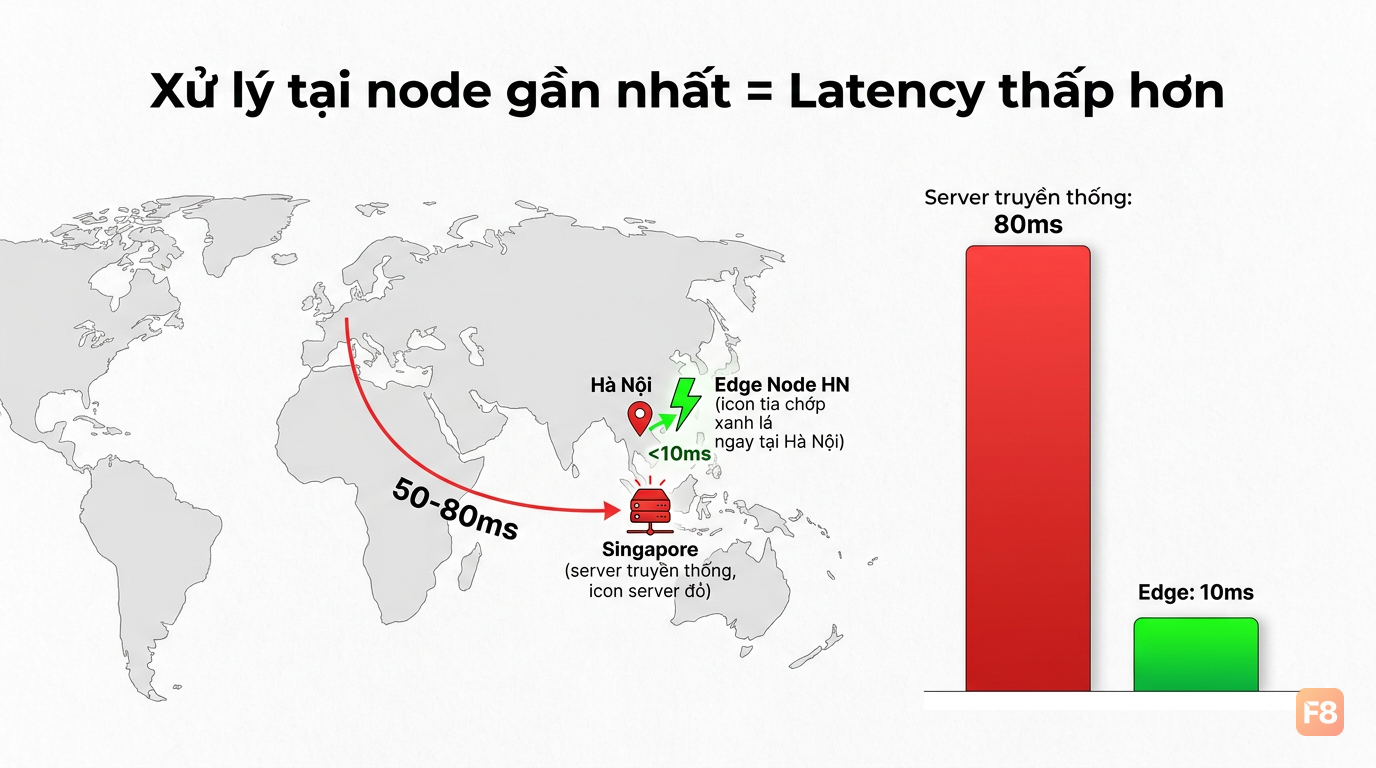 Latency giảm đáng kể khi request được xử lý gần người dùng hơn
Bảng so sánh nhanh:
| Server truyền thống | Serverless | Edge | |
|---|---|---|---|
| Cold start | Không | 100-500ms | <5ms |
| Latency | Phụ thuộc vị trí | Phụ thuộc vị trí | Thấp nhất |
| Chi phí | Cố định | Theo request | Theo request |
| Scale | Thủ công/cấu hình | Tự động | Tự động |
| Runtime | Đầy đủ | Đầy đủ | Giới hạn |
| Truy cập DB | Dễ | Cần connection pool | Khó (cần adapter) |
Không có kiến trúc nào "tốt nhất" - chỉ có kiến trúc phù hợp nhất với use case của bạn.
Deploy thực tế: Vercel Edge Functions và Cloudflare Workers
Mình bắt đầu với 2 platform phổ biến nhất cho edge - vì setup nhanh, free tier rộng, và phù hợp cho hầu hết web app.
Vercel Edge Functions
Vercel Edge Functions chạy trên V8 isolates, deploy tự động khi push code. Phù hợp nhất khi bạn đã dùng Next.js.
Lưu ý quan trọng: Edge runtime không hỗ trợ Node.js built-ins như fs, path, hay nhiều npm packages dùng native modules. Kiểm tra compatibility trước khi migrate.
Cloudflare Workers
Cloudflare Workers mạnh hơn ở chỗ có thêm KV Store (key-value storage tại edge), Durable Objects (stateful), và R2 (object storage). Phù hợp khi cần state nhẹ tại edge.
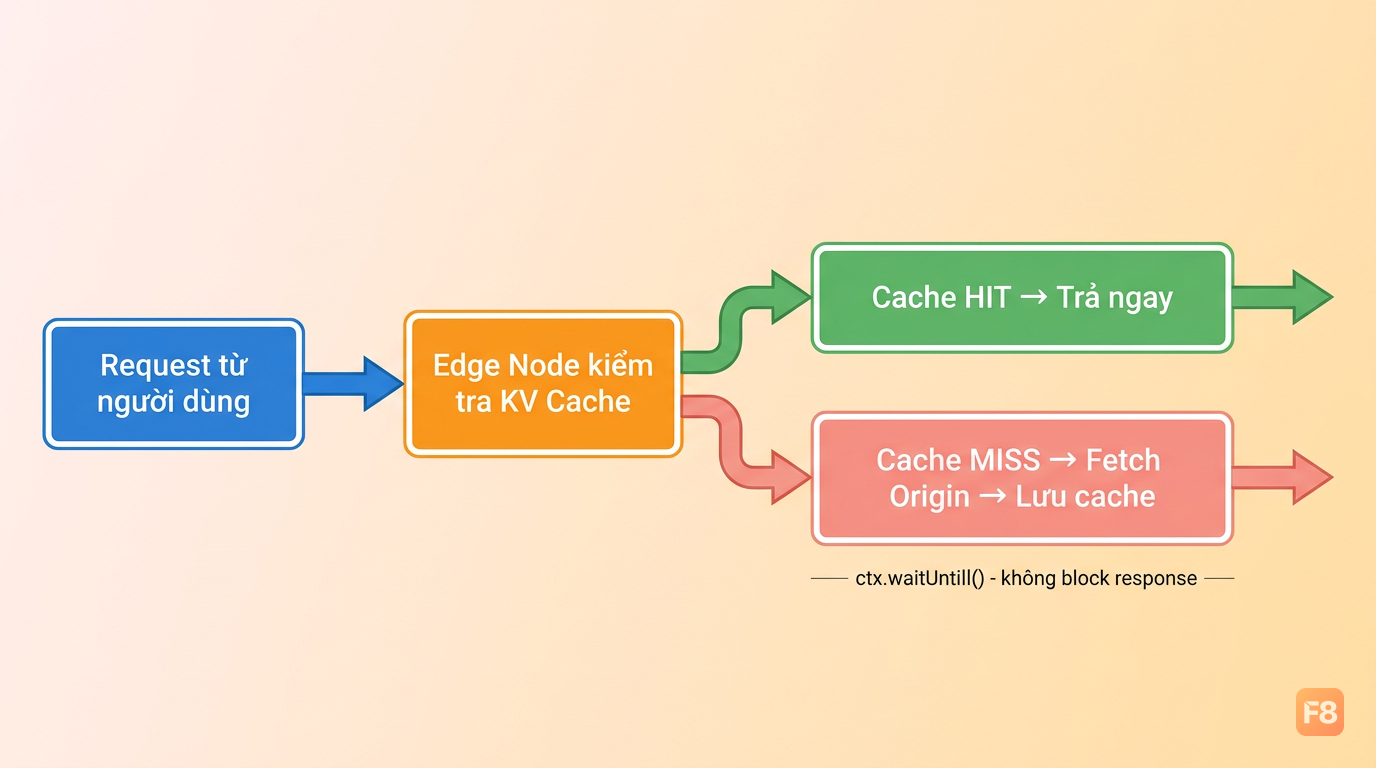 ctx.waitUntil() giúp cache không làm chậm response - một pattern quan trọng ở edge
Deploy Cloudflare Worker:
Free tier của Cloudflare Workers cho phép 100,000 requests per day (Cloudflare Workers Documentation) request/ngày - đủ để chạy side project hoặc MVP thoải mái.
AWS Lambda và Supabase Edge Functions
AWS Lambda - Serverless cho backend phức tạp
Lambda phù hợp khi bạn cần runtime đầy đủ (Python, Java, Go, Node.js), truy cập database phức tạp, hoặc tích hợp sâu với AWS ecosystem (RDS, DynamoDB, SQS).
Vấn đề lớn nhất với Lambda + database là connection exhaustion: mỗi Lambda instance mở một connection riêng tới DB. Khi scale lên hàng trăm concurrent request, bạn sẽ thấy lỗi "too many connections".
Giải pháp: dùng RDS Proxy hoặc PgBouncer để pool connections.
Tối ưu cold start Lambda:
- Giảm bundle size: dùng esbuild thay vì webpack, tree-shake aggressively
- Dùng Provisioned Concurrency nếu latency nhất quán là ưu tiên (tốn thêm chi phí)
- Giữ Lambda warm bằng scheduled ping (EventBridge rule mỗi 5 phút)
- Tránh import toàn bộ AWS SDK - chỉ import module cần thiết
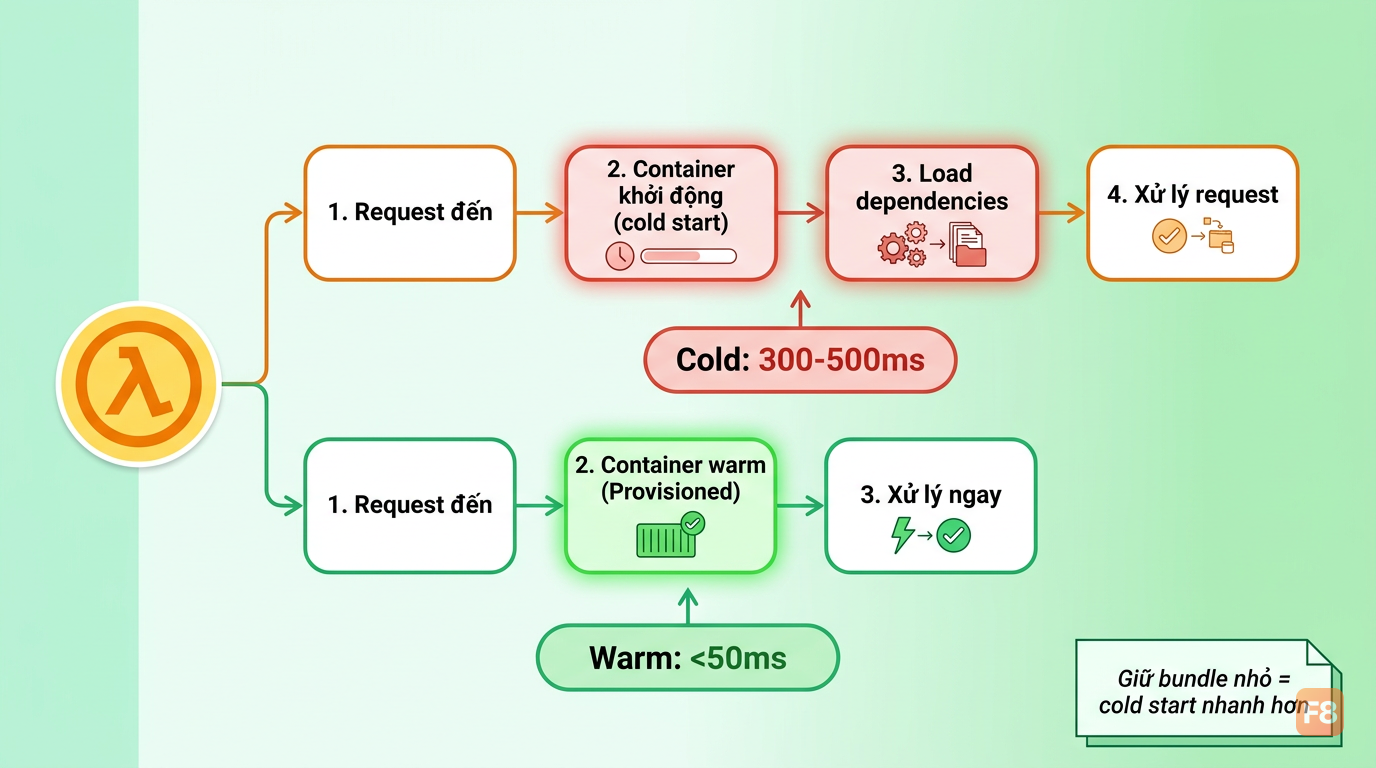 Bundle size nhỏ = cold start nhanh hơn - đây là trade-off dễ bị bỏ qua
Supabase Edge Functions
Supabase Edge Functions chạy trên Deno runtime, tích hợp trực tiếp với Supabase database và auth. Lý tưởng cho backend của app có Supabase làm nền tảng.
Deploy:
Nếu bạn đang xây dựng backend phức tạp hơn với Node.js, khóa Node & ExpressJS có thể giúp củng cố nền tảng trước khi bước vào serverless.
Use case thực tế: chọn kiến trúc nào cho từng loại app?
Đây là phần mình nghĩ quan trọng nhất - vì lý thuyết hay nhưng áp dụng sai vẫn là sai.
Blog / Content site
Kiến trúc: Static Generation + Edge CDN
Build HTML tĩnh lúc deploy (Next.js generateStaticParams, Astro, Hugo), đẩy lên CDN. Khi cần dynamic content (comments, view count), dùng Edge Functions để fetch từ edge cache.
Latency: dưới 50ms toàn cầu. Chi phí: gần như 0 (Vercel/Netlify free tier đủ dùng cho hầu hết blog cá nhân).
SaaS app
Kiến trúc: Serverless Functions + Managed Database
API routes là serverless functions (Vercel API Routes hoặc AWS Lambda). Database dùng PlanetScale, Neon, hoặc Supabase - các dịch vụ này có connection pooling built-in, giải quyết vấn đề cold start + DB connection.
Tiền: tốn hơn server truyền thống ở low traffic, nhưng scale tốt hơn ở high traffic mà không cần ops.
Realtime app (chat, live dashboard)
Kiến trúc: Edge + WebSocket hoặc SSE
Edge Functions không giữ được long-lived connections tốt. Giải pháp: dùng Cloudflare Durable Objects cho WebSocket state, hoặc Supabase Realtime (built on PostgreSQL LISTEN/NOTIFY).
E-commerce
Kiến trúc: Hybrid - Static + Serverless + Edge
Trang sản phẩm: static generation với ISR (Incremental Static Regeneration) - rebuild khi giá/stock thay đổi. Giỏ hàng + checkout: serverless functions với database. Personalization (gợi ý sản phẩm theo region): Edge Middleware.
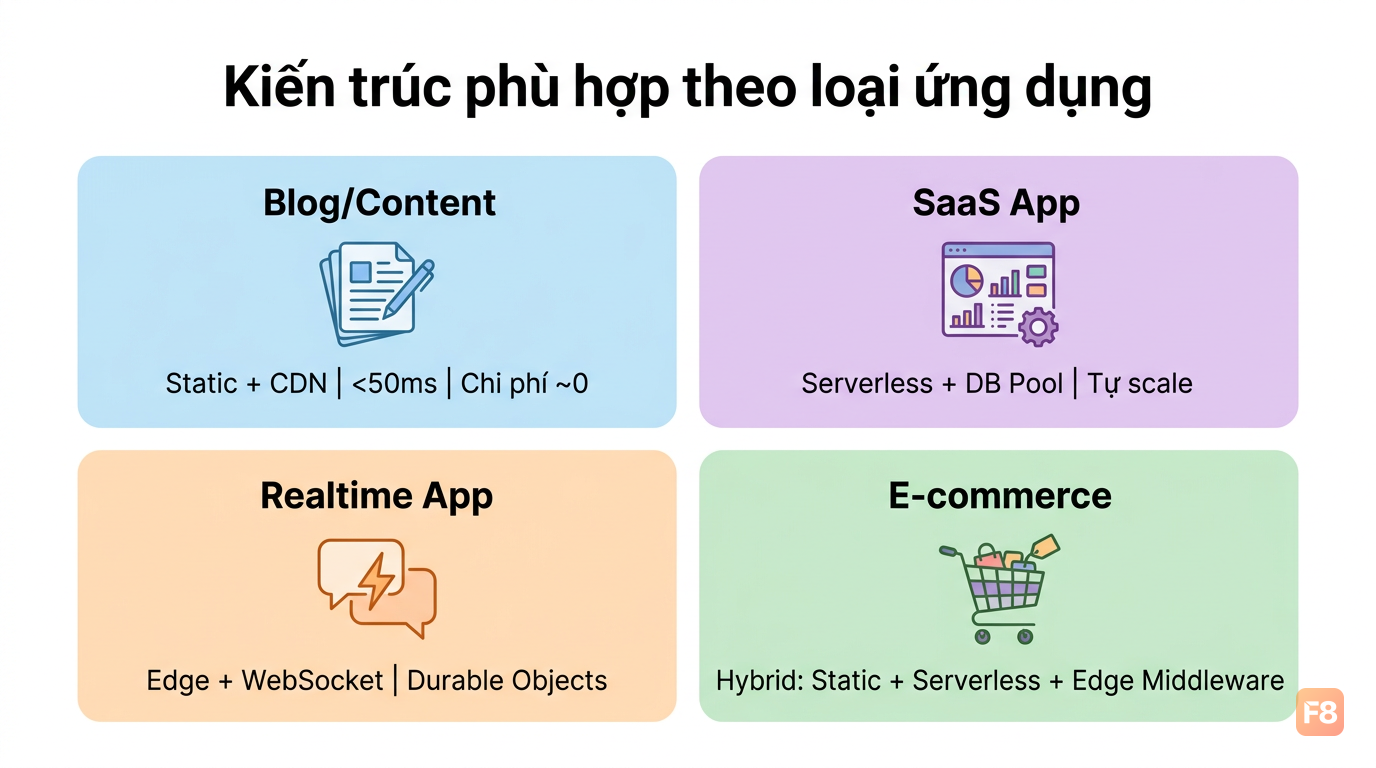 Hybrid architecture giúp e-commerce vừa load nhanh vừa personalized
Monitoring, environment variables, và deployment checklist
Deploy lên production mà thiếu phần này thì sớm muộn cũng có sự cố.
Environment variables
Khác với server truyền thống, mỗi platform có cách inject env vars khác nhau. Quy tắc chung:
- Không bao giờ hardcode secret vào code
- Vercel: quản lý qua dashboard > Settings > Environment Variables, hoặc
vercel env add - Cloudflare Workers: dùng
wrangler secret put SECRET_NAMEcho secrets,wrangler.tomlcho config thông thường - AWS Lambda: Environment Variables trong function configuration, hoặc AWS Systems Manager Parameter Store cho secrets nhạy cảm hơn
Monitoring
Serverless khó debug hơn server truyền thống vì không có persistent log file. Dùng:
- Vercel Analytics + Logs: built-in, xem real-time từ dashboard
- Cloudflare Workers Analytics: request count, error rate, CPU time
- AWS CloudWatch: logs, metrics, alerts - cần cấu hình thêm
- Sentry: error tracking cross-platform, free tier hào phóng
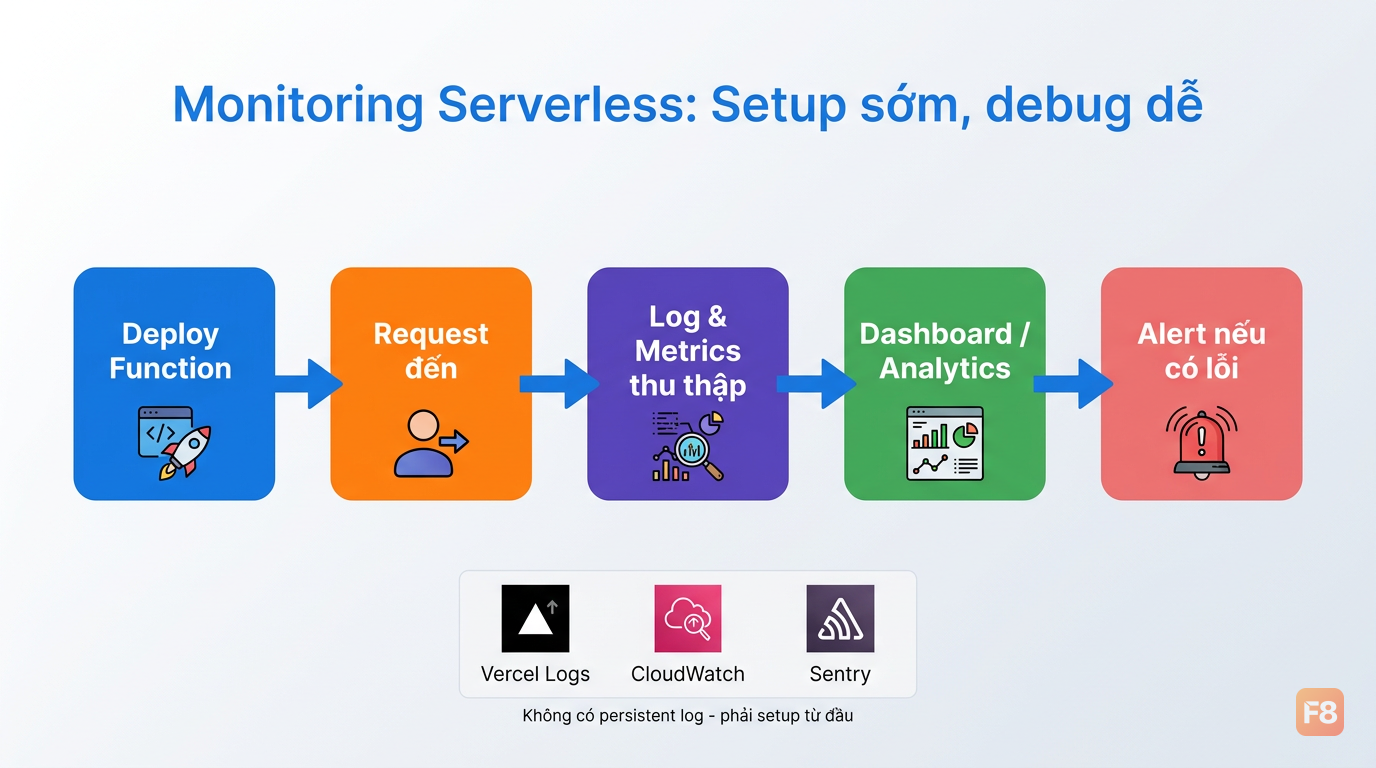 Monitoring từ đầu giúp phát hiện vấn đề trước khi user complain
Deployment checklist
Mình tổng hợp checklist này từ kinh nghiệm deploy thực tế. Tải về để dùng:
Tải Serverless Deployment Checklist
Các điểm quan trọng nhất:
- [ ] Kiểm tra bundle size (edge functions thường giới hạn 1-5MB)
- [ ] Test cold start time trên staging
- [ ] Cấu hình timeout phù hợp (Vercel Edge: 30s, Lambda: tối đa 15 phút)
- [ ] Set up alerts khi error rate vượt ngưỡng
- [ ] Verify environment variables đã set đủ cho môi trường production
- [ ] Kiểm tra CORS headers nếu API được gọi từ domain khác
- [ ] Enable compression (gzip/brotli) cho response
- [ ] Test rollback procedure - biết cách revert nhanh nếu có sự cố