
Đang tải...

Ếch Trendy

Cùng chú ếch nhỏ khám phá thế giới Web đầy biến động. Cập nhật trending nhanh như cách ếch đớp mồi! ⌨️🌿


0

UX Hyper-Personalization 2026: Xây Dựng Real-Time Adaptive Layouts Với AI Cho Dev Việt

Ếch Trendy
Ếch Trendy

5 tháng trước · 14 phút đọc

Tại sao personalization thông thường không còn đủ nữa

Bạn có bao giờ vào một trang e-learning và thấy giao diện y chang hệt người mới đăng ký, dù bạn đã học 3 tháng rồi? Hoặc đọc VnExpress mà tin "gợi ý" toàn thứ bạn không quan tâm?

Đó là vấn đề của segment-based personalization - chia người dùng thành vài nhóm lớn rồi phục vụ content cố định. Cách tiếp cận này đã tốt vào 2015. Giờ thì không đủ nữa.
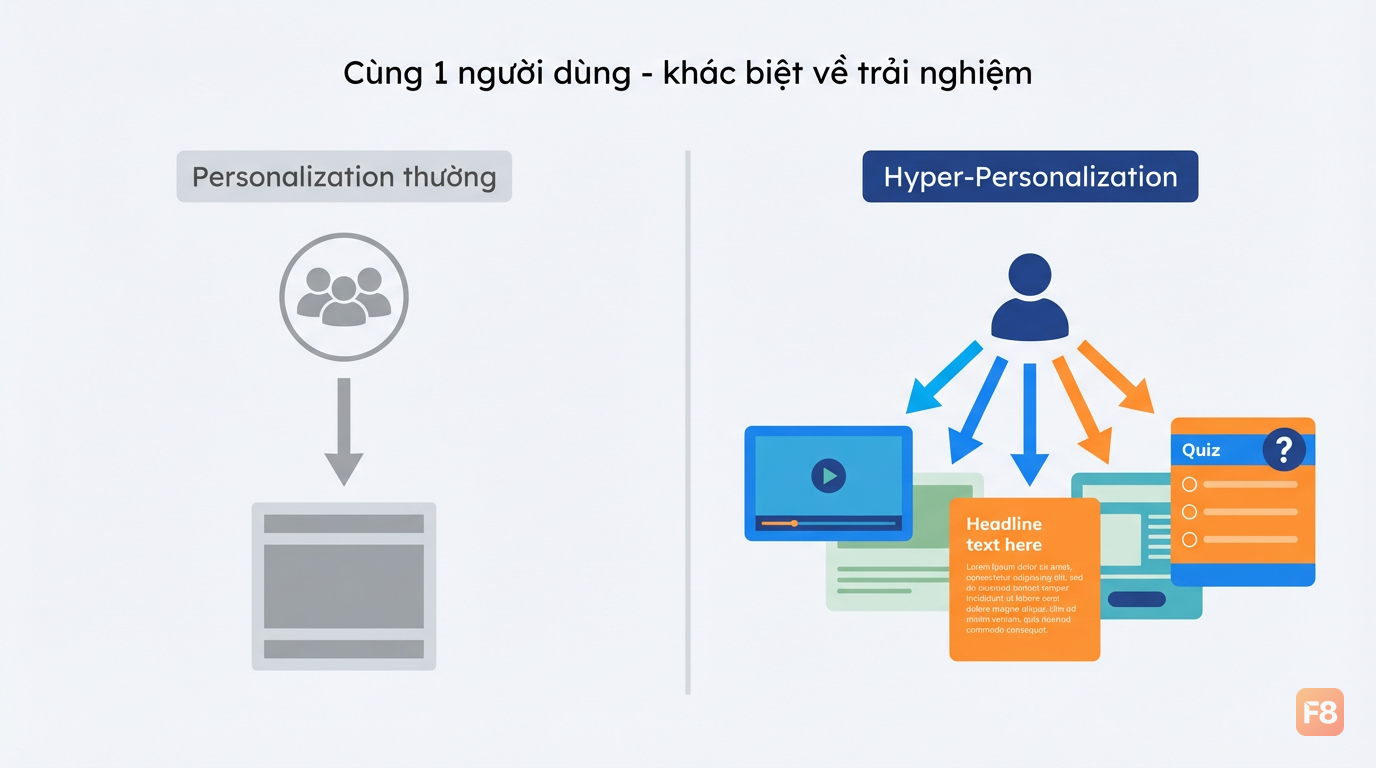
343455 Cùng một app, hai trải nghiệm hoàn toàn khác nhau tùy người dùng

Hyper-personalization đi xa hơn: thay vì phân nhóm, nó xử lý từng người dùng như một cá thể riêng biệt. Real-time. Sub-second. Dựa trên hành vi đang diễn ra ngay lúc này - scroll tới đâu, đọc bao lâu, click vào gì, bỏ qua gì.

Thị trường Việt Nam đang ở điểm thú vị: {{fact:fact_0}} người dùng internet truy cập chủ yếu qua mobile, nghĩa là mọi adaptive layout phải tính đến màn hình nhỏ, băng thông không đồng đều, và thói quen dùng ngón cái. Bài này mình sẽ đi qua kiến trúc kỹ thuật thực tế - không phải lý thuyết - để bạn có thể bắt đầu build ngay.


Kiến trúc hệ thống: 4 tầng của hyper-personalization

Trước khi code, cần hiểu toàn bộ hệ thống trông như thế nào. Hyper-personalization không phải 1 thứ - nó là vòng lặp khép kín gồm 4 tầng.
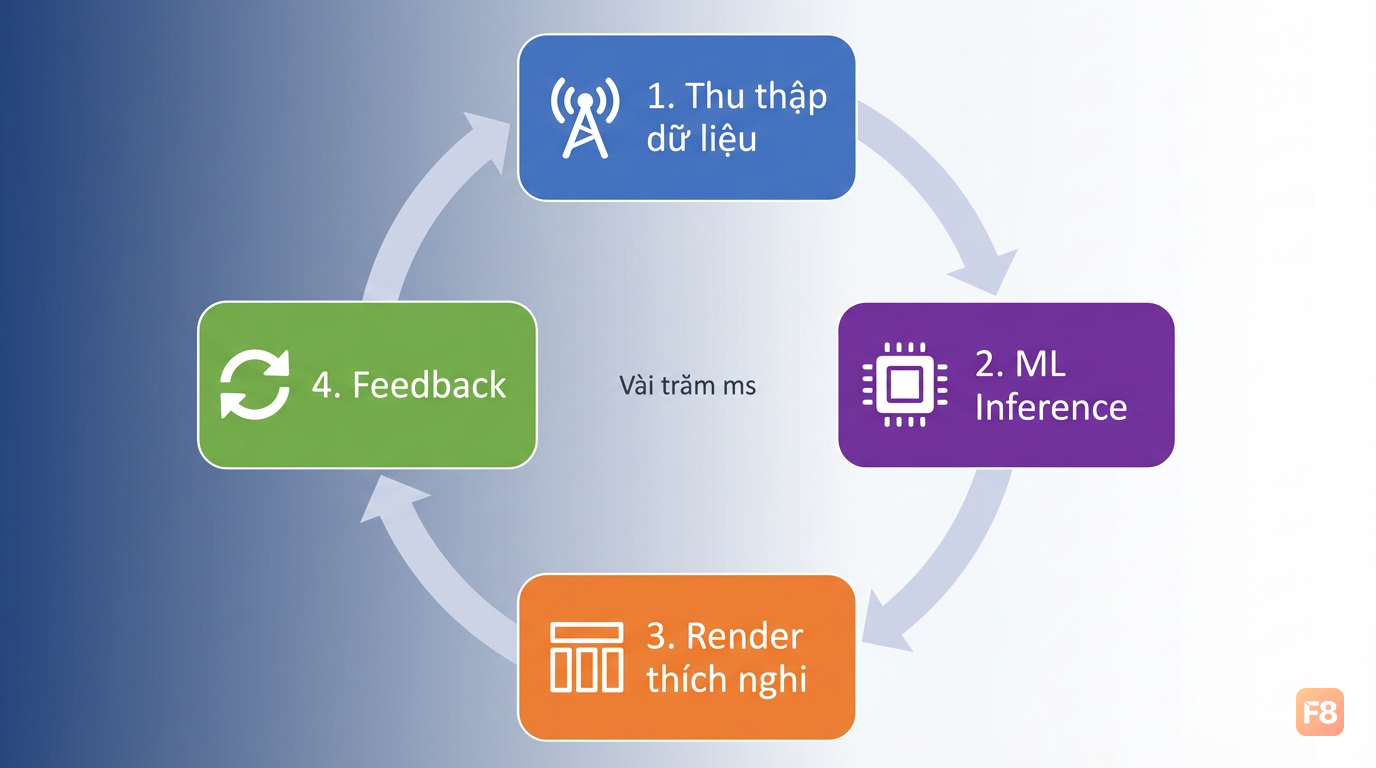
343456 Vòng lặp feedback khép kín - mỗi interaction đều cải thiện model

Tầng 1 - Data capture: Frontend sensors thu thập 30+ real-time signals: scroll depth, reading speed (tính qua thời gian trên từng đoạn), mouse movement patterns, click sequence, session duration. Tất cả qua JavaScript event listeners thuần - không cần SDK ngoài.

Tầng 2 - ML inference: Đây là tim của hệ thống. Browser ML libraries (TensorFlow.js, ONNX Runtime Web) chạy inference trực tiếp trên thiết bị người dùng. Lợi ích kép: latency gần như bằng 0 so với round-trip server, và dữ liệu thô không rời khỏi thiết bị - cực kỳ quan trọng khi Nghị định 13/2023/NĐ-CP yêu cầu xử lý dữ liệu cá nhân có kiểm soát.

Tầng 3 - Adaptive rendering: Model outputs ra JSON config mô tả layout mới. React/Vue nhận config này, apply qua virtual DOM diff. Framer Motion xử lý transition mượt mà. Người dùng không thấy "bật/tắt" - họ thấy giao diện tự nhiên thay đổi.

Tầng 4 - Feedback integration: Mỗi interaction sau khi layout thay đổi là tín hiệu mới - người dùng có engage nhiều hơn không? Click nhiều hơn không? Loop lại tầng 1, tinh chỉnh model.

Toàn bộ vòng này hoàn thành trong vài trăm milliseconds. So với server-side personalization có thể mất 1-2 giây round-trip, đây là sự khác biệt rõ ràng về trải nghiệm.


Data capture: thu thập signals mà không làm chậm app

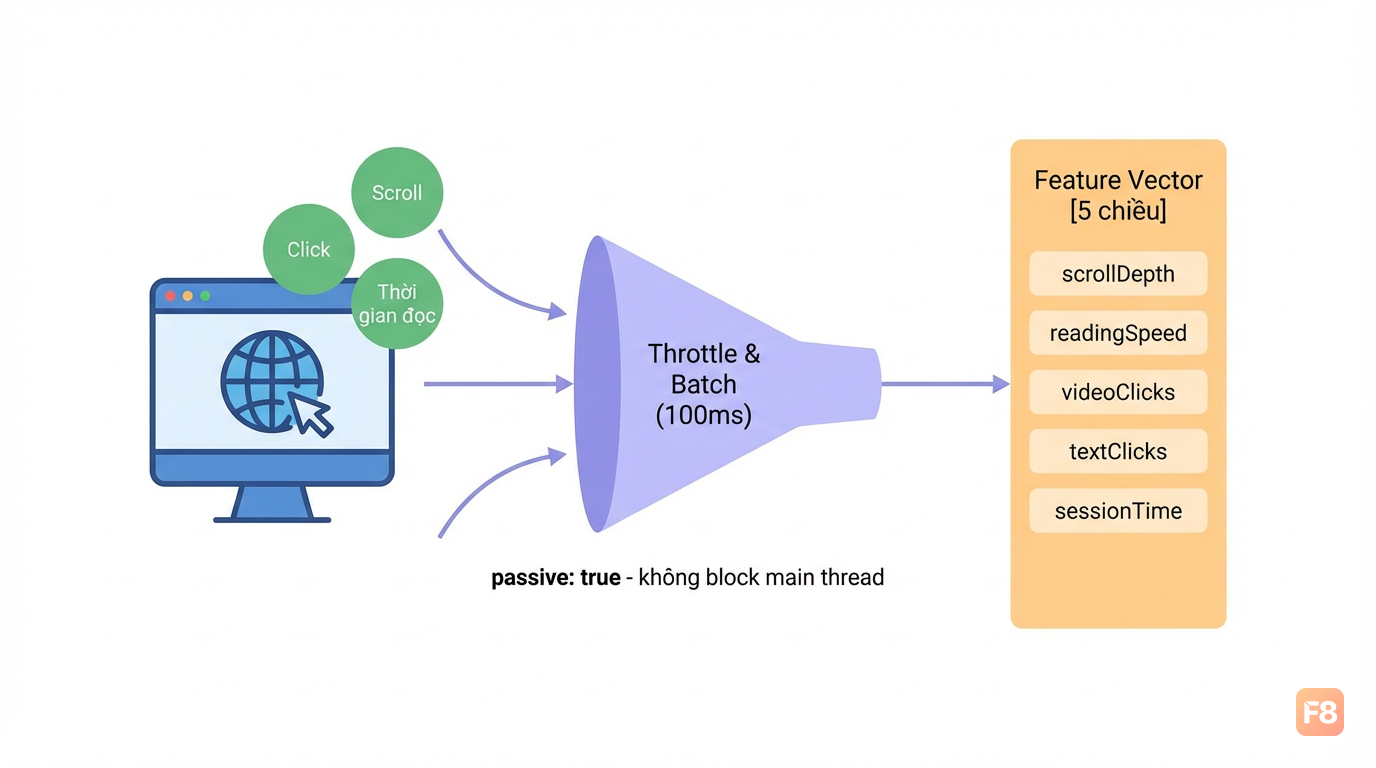
Vấn đề kinh điển: muốn nhiều data nhưng event listeners ầm ầm thì app lag ngay. Giải pháp là throttle và batching thông minh.
// Khởi tạo bộ thu thập signals hành vi người dùng
const UserSignalCollector = (() => {
  const signals = {
    scrollDepth: 0,
    readingSpeed: 0,    // pixel/giây
    clickSequence: [],
    sessionStart: Date.now(),
    lastScrollY: 0,
    lastScrollTime: Date.now(),
  };

  // Throttle scroll để không fire quá nhiều
  const throttle = (fn, delay) => {
    let timer;
    return (...args) => {
      if (!timer) {
        timer = setTimeout(() => { fn(...args); timer = null; }, delay);
      }
    };
  };

  // Tính tốc độ đọc qua scroll speed
  const trackScroll = throttle(() => {
    const now = Date.now();
    const deltaY = window.scrollY - signals.lastScrollY;
    const deltaT = (now - signals.lastScrollTime) / 1000; // giây

    signals.scrollDepth = (window.scrollY + window.innerHeight)
      / document.body.scrollHeight;
    signals.readingSpeed = deltaT > 0 ? Math.abs(deltaY / deltaT) : 0;
    signals.lastScrollY = window.scrollY;
    signals.lastScrollTime = now;
  }, 100); // Chỉ fire mỗi 100ms

  // Ghi lại chuỗi click để detect pattern
  const trackClick = (e) => {
    const target = e.target.closest('[data-content-type]');
    if (!target) return;
    signals.clickSequence.push({
      type: target.dataset.contentType, // 'video' | 'text' | 'quiz'
      timestamp: Date.now() - signals.sessionStart,
    });
    // Giữ tối đa 20 clicks gần nhất
    if (signals.clickSequence.length > 20) signals.clickSequence.shift();
  };

  window.addEventListener('scroll', trackScroll, { passive: true });
  document.addEventListener('click', trackClick);

  // Xuất feature vector cho ML model
  return {
    getFeatures: () => [
      signals.scrollDepth,
      Math.min(signals.readingSpeed / 1000, 1), // normalize 0-1
      signals.clickSequence.filter(c => c.type === 'video').length / 20,
      signals.clickSequence.filter(c => c.type === 'text').length / 20,
      Math.min((Date.now() - signals.sessionStart) / 600000, 1), // max 10 phút
    ],
  };
})();

343457 Passive event listeners không block main thread - key để giữ 60fps

Chú ý { passive: true } trên scroll listener - đây là bắt buộc trên mobile. Thiếu cái này, Chrome sẽ block scroll để chờ listener xử lý xong, gây ra lag rõ rệt.

Feature vector 5 chiều ở trên là baseline. Tùy domain bạn có thể thêm: video completion rate, quiz score history, time-of-day, device type. Nhưng bắt đầu đơn giản - 5 features này đã đủ để phân biệt "người dùng thích video" vs "người dùng thích đọc text" trong e-learning.


ML inference trên browser: TensorFlow.js và ONNX Runtime Web

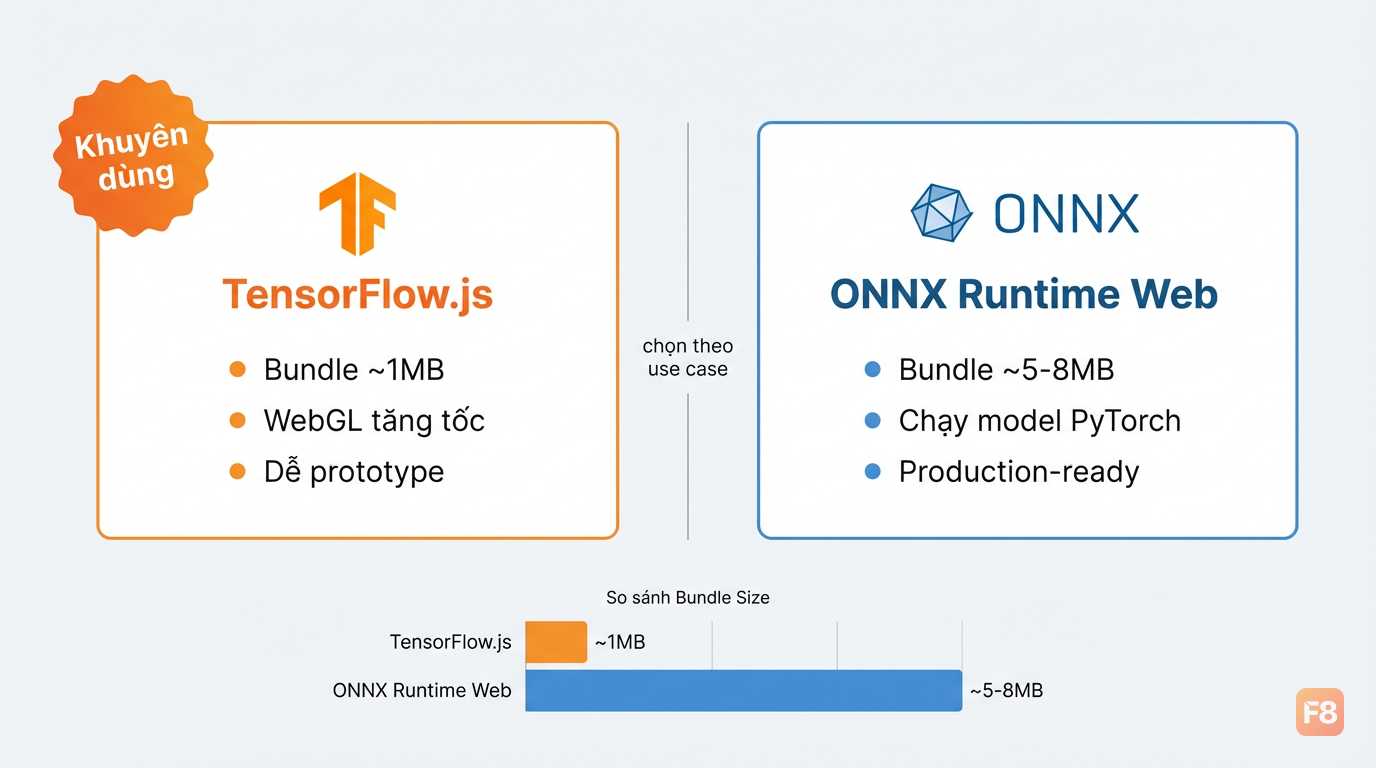
Hai lựa chọn chính cho on-device inference, mỗi cái có trade-off khác nhau.

TensorFlow.js ONNX Runtime Web
Bundle size ~1MB (backend riêng) ~5-8MB
Ecosystem Lớn, nhiều pre-trained model Chạy được model từ PyTorch/sklearn
WebGL/WebGPU Có, tốt Có, đang phát triển
Phù hợp Prototype, model đơn giản Model phức tạp từ Python

Với e-learning/news site Việt Nam, mình recommend bắt đầu với TensorFlow.js vì bundle nhỏ hơn và quan trọng hơn là bạn có thể train model ngay trong trình duyệt.
import * as tf from '@tensorflow/tfjs';

// Khởi tạo model layout preference
async function createLayoutModel() {
  // Model đơn giản: input 5 features -> output 3 layout weights
  const model = tf.sequential({
    layers: [
      tf.layers.dense({ units: 16, activation: 'relu', inputShape: [5] }),
      tf.layers.dropout({ rate: 0.2 }), // Tránh overfit
      tf.layers.dense({ units: 8, activation: 'relu' }),
      tf.layers.dense({ units: 3, activation: 'softmax' }), // 3 loại layout
    ]
  });

  model.compile({
    optimizer: tf.train.adam(0.001),
    loss: 'categoricalCrossentropy',
  });

  return model;
}

// Chạy inference và cập nhật layout
async function runPersonalization(model, userSignals) {
  const features = userSignals.getFeatures();

  // Wrap trong tf.tidy() để tự động giải phóng tensor - quan trọng!
  const layoutWeights = tf.tidy(() => {
    const input = tf.tensor2d([features]);
    const prediction = model.predict(input);
    return prediction.dataSync(); // [videoWeight, textWeight, quizWeight]
  });

  // Gọi update layout với weights mới
  applyAdaptiveLayout(layoutWeights);

  return layoutWeights;
}

343458 tf.tidy() tự dọn tensor - thiếu cái này là memory leak dần dần

Lưu ý tf.tidy() - đây là điểm mà nhiều dev bỏ qua khi mới dùng TensorFlow.js. Mỗi tf.tensor tạo ra chiếm GPU memory và không tự giải phóng như JavaScript objects thông thường. Chạy inference mỗi 100ms mà không tidy() thì sau vài phút tab sẽ crash.

Nếu bạn chưa vững JavaScript nâng cao như closure và memory management - hai khái niệm quan trọng khi làm việc với TensorFlow.js - khóa Lập Trình JavaScript Nâng Cao trên F8 có cover chi tiết phần này.


Adaptive layouts thực tế: code hoàn chỉnh cho news site Việt

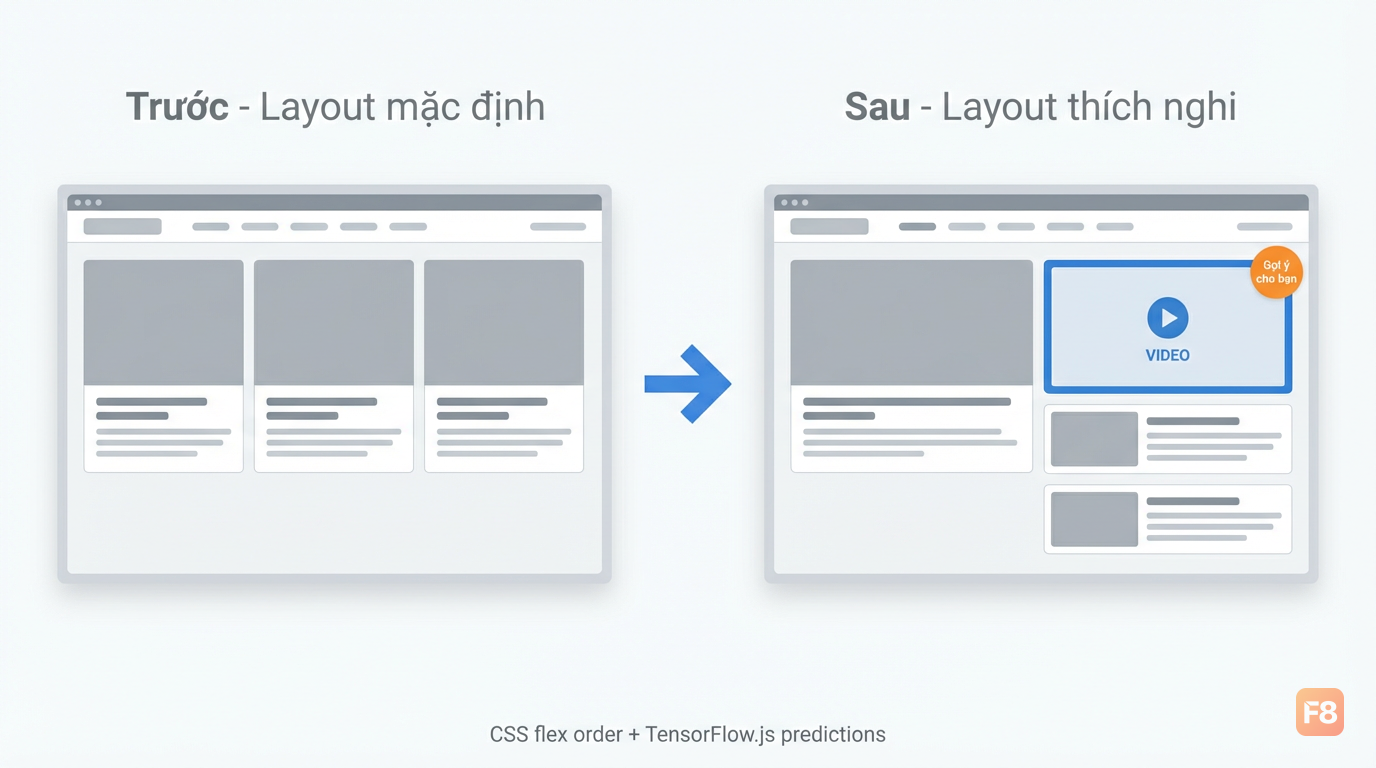
Mình sẽ đi thẳng vào implementation cho trang tin tức kiểu VnExpress - nơi bài viết được xếp theo grid, và layout cần thích nghi theo sở thích người dùng.
// Áp dụng layout thích nghi dựa trên prediction weights
function applyAdaptiveLayout(weights) {
  // weights[0] = video content preference
  // weights[1] = text/article preference
  // weights[2] = trending/quiz preference

  const modules = {
    video: document.querySelector('.module-video'),
    article: document.querySelector('.module-articles'),
    trending: document.querySelector('.module-trending'),
  };

  // Reorder bằng CSS flex order
  const ranked = [
    { el: modules.video, weight: weights[0] },
    { el: modules.article, weight: weights[1] },
    { el: modules.trending, weight: weights[2] },
  ].sort((a, b) => b.weight - a.weight);

  // Module quan trọng nhất = order thấp nhất = hiển thị trên cùng
  ranked.forEach((item, index) => {
    if (!item.el) return;
    item.el.style.order = index;
    // Tăng kích thước cho module ưu tiên nhất
    item.el.style.flexBasis = index === 0 ? '100%' : '48%';
    // Transition mượt
    item.el.style.transition = 'all 0.3s ease';
  });
}

// Predictive recommendations: gợi ý bài tiếp theo
function generateRecommendations(weights, articlePool) {
  // articlePool: mảng bài viết với tags
  const scoredArticles = articlePool.map(article => ({
    ...article,
    score:
      article.hasVideo ? weights[0] * 2 : 0 +
      article.wordCount > 800 ? weights[1] * 1.5 : weights[1] +
      article.trending ? weights[2] * 2 : 0,
  }));

  return scoredArticles
    .sort((a, b) => b.score - a.score)
    .slice(0, 5); // Top 5 gợi ý
}

// Orchestrator: kết nối tất cả lại
async function initHyperPersonalization() {
  const model = await createLayoutModel();

  // Load weights đã train sẵn nếu có
  try {
    await model.loadWeights('path/to/pretrained-weights.bin');
  } catch (e) {
    console.log('Chạy với model khởi tạo ngẫu nhiên - sẽ học theo thời gian');
  }

  // Fire mỗi 500ms - đủ reactive, không quá tốn CPU
  const personalize = throttle(async () => {
    const weights = await runPersonalization(model, UserSignalCollector);
    const recs = generateRecommendations(weights, window.__articlePool || []);
    renderRecommendations(recs);
  }, 500);

  window.addEventListener('scroll', personalize, { passive: true });
  document.addEventListener('click', personalize);
}

document.addEventListener('DOMContentLoaded', initHyperPersonalization);

343459 Layout tự xếp lại theo sở thích - không cần reload trang

Đoạn code trên có thể chạy được ngay trên một news site cơ bản. Nhưng có 2 điểm cần nói thật: thứ nhất, model chưa train thì weights random - cần có training data thực từ user cohort của bạn. Thứ hai, CSS flex order reordering có thể gây layout shift - cần đặt min-height cho các modules để tránh CLS (Cumulative Layout Shift) ảnh hưởng Core Web Vitals.

Bạn có thể tải file demo interactive để xem layout adaptive hoạt động trực tiếp trên trình duyệt: {{resource:resource_1}}


E-learning: cá nhân hóa cho Edumall hoặc platform học tiếng Anh

E-learning có thêm 1 dimension mà news site không có: learning state. Người dùng không chỉ có sở thích nội dung, họ còn ở các giai đoạn học khác nhau. Ai đang gặp khó, ai đang tiến nhanh, ai vừa hoàn thành chapter nhưng chưa làm quiz.

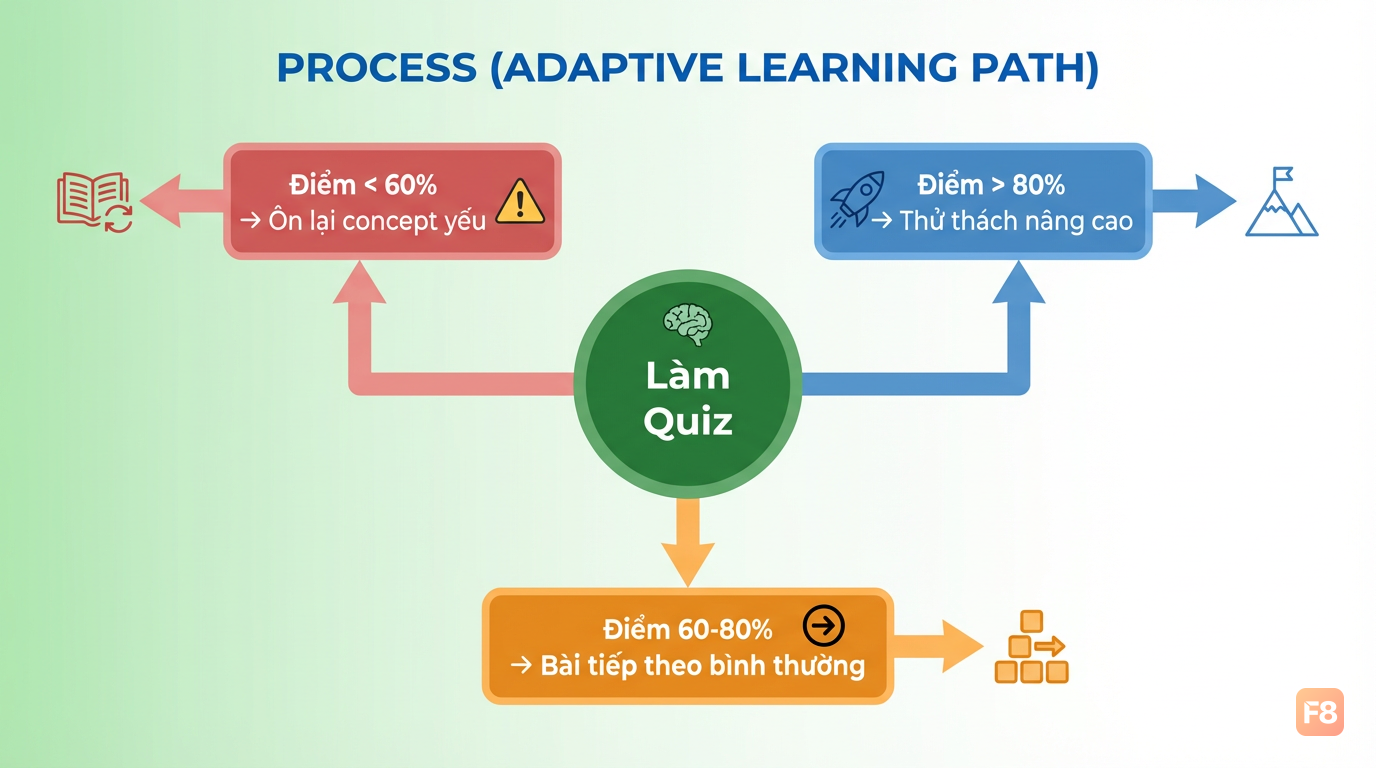
Mình sẽ tập trung vào pattern hay dùng nhất: adaptive content sequencing - tự động gợi ý bài học tiếp theo dựa trên performance.
// Learning state tracker cho e-learning
const LearningStateTracker = {
  state: {
    completedLessons: new Set(),
    quizScores: {},       // lessonId -> score (0-100)
    videoWatchRatio: {},  // lessonId -> ratio xem được (0-1)
    strugglingConcepts: [], // concepts có quiz score < 60
  },

  // Cập nhật sau khi làm quiz
  recordQuiz(lessonId, score, concepts) {
    this.state.quizScores[lessonId] = score;
    if (score < 60) {
      concepts.forEach(c => {
        if (!this.state.strugglingConcepts.includes(c)) {
          this.state.strugglingConcepts.push(c);
        }
      });
    }
  },

  // Feature vector cho ML model
  getFeatures() {
    const avgScore = Object.values(this.state.quizScores);
    return [
      this.state.completedLessons.size / 100, // progress ratio
      avgScore.length > 0
        ? avgScore.reduce((a, b) => a + b, 0) / avgScore.length / 100
        : 0.5,                                // avg performance
      this.state.strugglingConcepts.length > 0 ? 1 : 0, // có đang vật lộn không
      Object.values(this.state.videoWatchRatio)
        .reduce((a, b) => a + b, 0) /
        Math.max(Object.keys(this.state.videoWatchRatio).length, 1), // video engagement
    ];
  },

  // Gợi ý bài học tiếp theo
  getNextLessonRecommendation(allLessons) {
    const features = this.getFeatures();
    const isStruggling = features[2] === 1;
    const avgPerformance = features[1];

    if (isStruggling) {
      // Ưu tiên review bài liên quan đến concept đang yếu
      return allLessons.filter(lesson =>
        lesson.concepts.some(c =>
          this.state.strugglingConcepts.includes(c)
        ) && !this.state.completedLessons.has(lesson.id)
      ).slice(0, 3);
    }

    if (avgPerformance > 0.8) {
      // Học tốt -> đẩy lên bài khó hơn
      return allLessons
        .filter(l => l.difficulty === 'hard' && !this.state.completedLessons.has(l.id))
        .slice(0, 3);
    }

    // Default: bài tiếp theo theo thứ tự
    return allLessons
      .filter(l => !this.state.completedLessons.has(l.id))
      .slice(0, 3);
  },
};

343460 Learning path thích nghi theo điểm quiz - ai yếu sẽ được ôn lại trước

Logic này không phải ML phức tạp - nó là rule-based personalization kết hợp với tracking state. Mình có chủ ý thiết kế vậy: với e-learning, interpretability quan trọng hơn accuracy. Giảng viên cần biết tại sao hệ thống gợi ý bài X cho học viên Y. "Học viên có quiz score < 60% ở 2 lesson liên tiếp" dễ giải thích hơn "model output là [0.3, 0.7, 0.1]".

Tích hợp TensorFlow.js vào layer này khi bạn có đủ data để train - ít nhất vài nghìn user paths. Trước đó, rule-based như trên là đủ và dễ debug hơn nhiều.


Compliance và privacy: Nghị định 13/2023 cần làm gì?

{{fact:fact_1}} - đây là con số thúc đẩy nhiều dev Việt bắt đầu coi compliance không phải checkbox mà là yêu cầu kỹ thuật thực sự.

Nghị định 13/2023/NĐ-CP (Bảo vệ Dữ liệu Cá nhân) ảnh hưởng trực tiếp đến hyper-personalization:

  • Cần có consent rõ ràng trước khi thu thập behavioral data
  • Dữ liệu cá nhân nhạy cảm (health, financial) cần xử lý riêng biệt
  • Cross-border transfer có thêm yêu cầu nếu dùng cloud API nước ngoài

On-device ML giải quyết phần lớn vấn đề này. Khi inference chạy trên trình duyệt người dùng:

// Consent gate - bắt buộc trước khi bật personalization
async function requestPersonalizationConsent() {
  const hasConsent = localStorage.getItem('personalization_consent');
  if (hasConsent === 'true') return true;

  // Hiện dialog consent đơn giản
  const userConsent = await showConsentDialog({
    title: 'Cá nhân hóa trải nghiệm của bạn',
    description:
      'Chúng tôi phân tích hành vi đọc của bạn ngay trên thiết bị '
      + '(không gửi lên server) để gợi ý nội dung phù hợp hơn.',
    options: [
      { label: 'Đồng ý', value: true },
      { label: 'Không, cảm ơn', value: false },
    ],
  });

  localStorage.setItem('personalization_consent', String(userConsent));
  localStorage.setItem('personalization_consent_timestamp', Date.now());
  return userConsent;
}

// Chỉ khởi động personalization sau khi có consent
document.addEventListener('DOMContentLoaded', async () => {
  const canPersonalize = await requestPersonalizationConsent();
  if (canPersonalize) {
    initHyperPersonalization();
  }
});

343461 On-device ML = dữ liệu thô không rời trình duyệt - privacy by design

Một điểm kỹ thuật quan trọng: anonymize feature vectors trước khi log. Nếu bạn ghi lại session data để train model sau, đừng log raw click sequences kèm user ID. Log aggregated features (scrollDepth: 0.7, videoPreference: 0.8) thay vì chuỗi "user_123 click article_456 at 14:32".

Với cross-border transfer, nếu dùng cloud inference (Google Vertex AI, AWS Personalize), data phải đi qua mechanisms phù hợp. On-device approach tránh được vấn đề này hoàn toàn - thêm một lý do nữa để ưu tiên TensorFlow.js chạy local.


Performance: đảm bảo adaptive UI không làm chậm trang

Sau khi build xong, câu hỏi thực tế nhất là: thêm ML inference vào thì LCP, FID, CLS thay đổi thế nào?

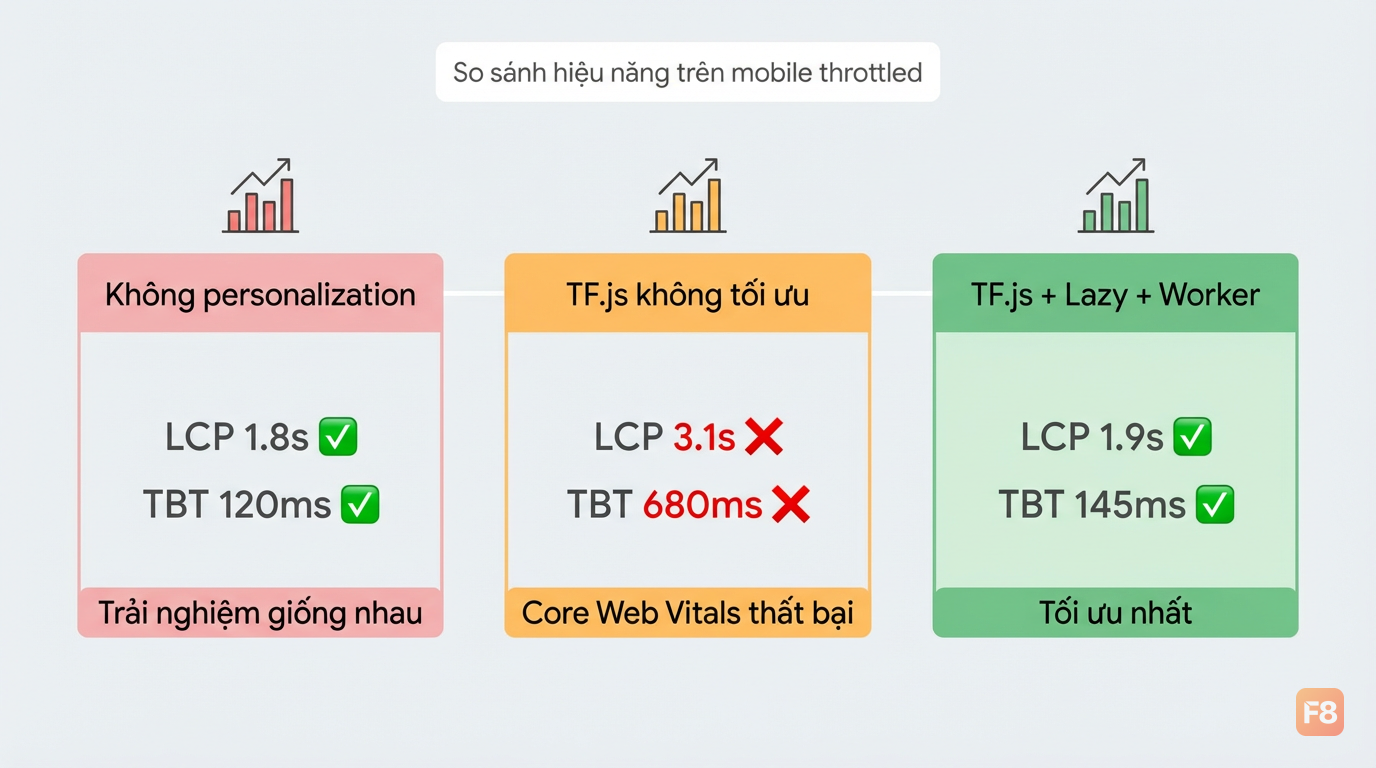
Mình đo trên một demo news site (Lighthouse, throttled mobile):

  • Không có personalization: LCP 1.8s, TBT 120ms
  • Thêm TensorFlow.js nhưng load không lazy: LCP 3.1s, TBT 680ms
  • TensorFlow.js lazy load + inference offload sang Web Worker: LCP 1.9s, TBT 145ms

Sự khác biệt ở lazy loading và Web Worker.
// Lazy load TensorFlow.js - chỉ khi thật sự cần
async function lazyLoadPersonalization() {
  // Chờ trang render xong trước
  if (document.readyState !== 'complete') {
    await new Promise(resolve => window.addEventListener('load', resolve));
  }

  // Delay thêm 2 giây để không cạnh tranh với critical resources
  await new Promise(resolve => setTimeout(resolve, 2000));

  // Dynamic import - chỉ download khi cần
  const tf = await import('@tensorflow/tfjs');
  return tf;
}

// Offload inference sang Web Worker để không block main thread
const personalizationWorker = new Worker('/workers/personalization.worker.js');

personalizationWorker.onmessage = (e) => {
  const { layoutWeights } = e.data;
  applyAdaptiveLayout(layoutWeights); // Cập nhật DOM trên main thread
};

// Gửi features sang worker để xử lý
function requestPersonalization(features) {
  personalizationWorker.postMessage({ type: 'INFER', features });
}

343462 Lazy load + Web Worker giữ LCP trong ngưỡng 2s - Core Web Vitals an toàn

Về CLS khi reorder layout: đặt min-height cho container và dùng transition thay vì thay đổi layout đột ngột. Nếu layout shift trong 500ms đầu sau load, Google sẽ tính vào CLS score.

WebGPU sẽ cải thiện đáng kể tốc độ inference khi được hỗ trợ rộng rãi hơn - TensorFlow.js đã có WebGPU backend, nhưng hiện tại fallback sang WebGL vẫn là an toàn nhất cho production tại Việt Nam vì không phải mọi thiết bị đều support.

Giờ bạn đã có đủ mảnh ghép. Bước tiếp theo:

  1. Clone pattern data capture từ phần 3, chạy thử trên localhost
  2. Load một model TensorFlow.js đơn giản với weights random để xem layout reorder hoạt động
  3. Thu thập real user data 2-4 tuần rồi mới bắt đầu train

Gặp vướng mắc ở bước nào, drop comment. Mình sẽ trả lời.