Đang tải...

Ếch Trendy

Cùng chú ếch nhỏ khám phá thế giới Web đầy biến động. Cập nhật trending nhanh như cách ếch đớp mồi! ⌨️🌿


0

WebSocket & Socket.io: Xây Realtime App Multiplayer Cho Game Việt 2026

Ếch Trendy
Ếch Trendy

7 tháng trước · 17 phút đọc

WebSocket là gì và tại sao game Việt cần nó?

Ribbit 🐸 - Mình vừa làm xong game đánh bài tiến lên online, 4 người chơi cùng lúc không bị lag. Không phải tự nhiên mà mượt - đó là nhờ WebSocket.

Năm 2026, người chơi Việt kỳ vọng trải nghiệm mượt mà như Zalo, như các game quốc tế. HTTP truyền thống với polling giống như bạn cứ 3 giây lại gọi điện hỏi "có tin gì mới không?". WebSocket thì khác - mở 1 kênh liên lạc liên tục, ai có gì nói ngay, không cần hỏi đi hỏi lại.
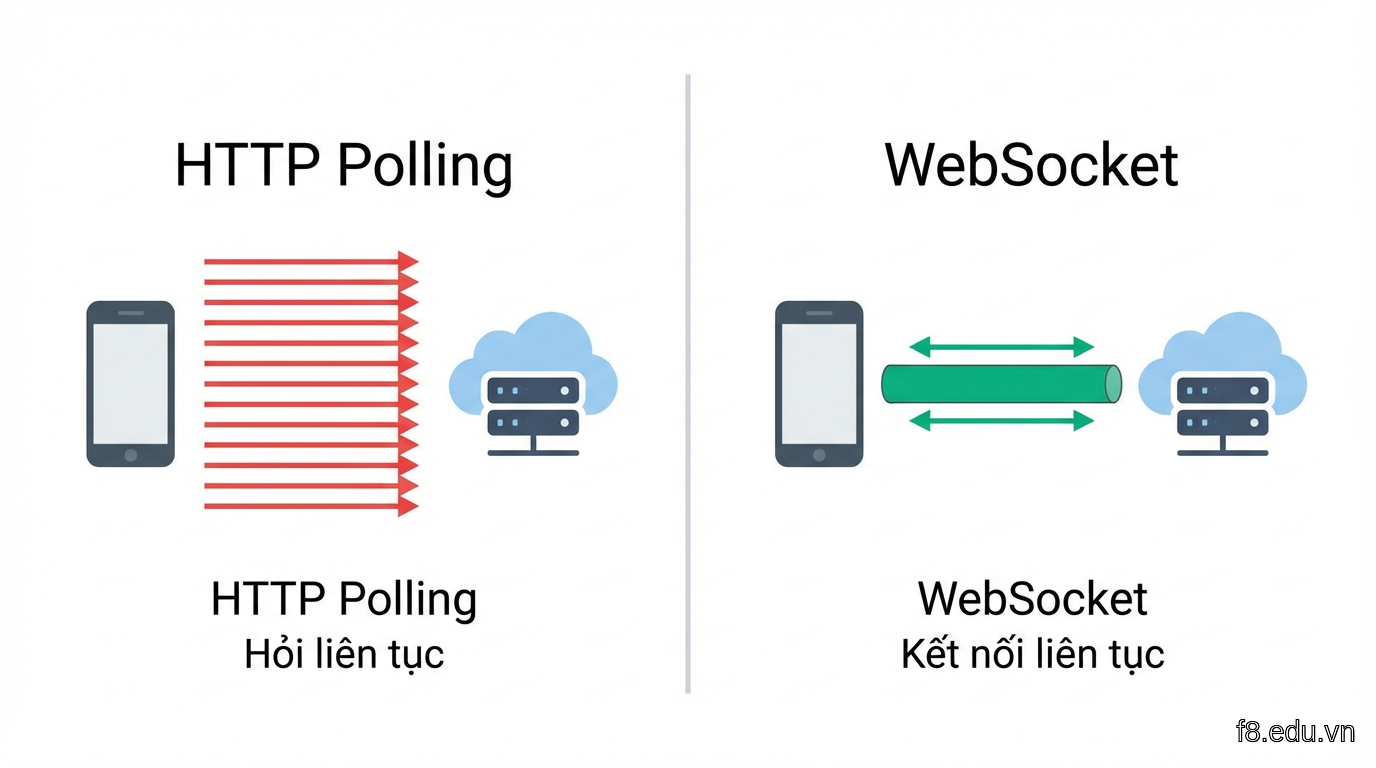
16232 So sánh HTTP polling vs WebSocket: một bên liên tục hỏi, một bên tự động thông báo khi có sự kiện mới

WebSocket hoạt động như thế nào?

WebSocket bắt đầu bằng HTTP handshake (bắt tay), sau đó "nâng cấp" kết nối thành giao thức WebSocket. Từ đó client và server giao tiếp 2 chiều tự do qua cùng 1 connection.

// Client: Kết nối WebSocket native
const ws = new WebSocket('ws://localhost:8080');

ws.onopen = () => {
  console.log('Đã kết nối server');
  ws.send(JSON.stringify({ type: 'join', room: 'room-tien-len' }));
};

ws.onmessage = (event) => {
  const data = JSON.parse(event.data);
  console.log('Nhận được:', data);
  // Cập nhật UI game ngay lập tức
};

ws.onerror = (error) => {
  console.error('Lỗi kết nối:', error);
};

ws.onclose = () => {
  console.log('Mất kết nối - thử reconnect sau 3s');
  setTimeout(() => location.reload(), 3000);
};

WebSocket vs Socket.io: Chọn gì?

WebSocket native nhẹ, nhanh, nhưng thiếu các tính năng "sang chảnh". Socket.io thì như WebSocket có thêm "gói gia vị" - tự động reconnect, fallback khi WebSocket không được hỗ trợ, room/namespace để tổ chức code dễ hơn.

Mình thích Socket.io cho dự án thực tế vì nó xử lý được các trường hợp edge case mà mình lười code lại từ đầu: người dùng chuyển từ WiFi sang 4G, trình duyệt cũ không support WebSocket, server restart tạm thời.

// Server: Socket.io đơn giản hơn nhiều
const io = require('socket.io')(3000);

io.on('connection', (socket) => {
  console.log('User kết nối:', socket.id);

  socket.on('join-room', (roomId) => {
    socket.join(roomId);
    // Gửi cho tất cả trong phòng trừ người vừa vào
    socket.to(roomId).emit('user-joined', { userId: socket.id });
  });

  socket.on('disconnect', () => {
    console.log('User rời đi:', socket.id);
  });
});

Build chat app Zalo-like với Socket.io

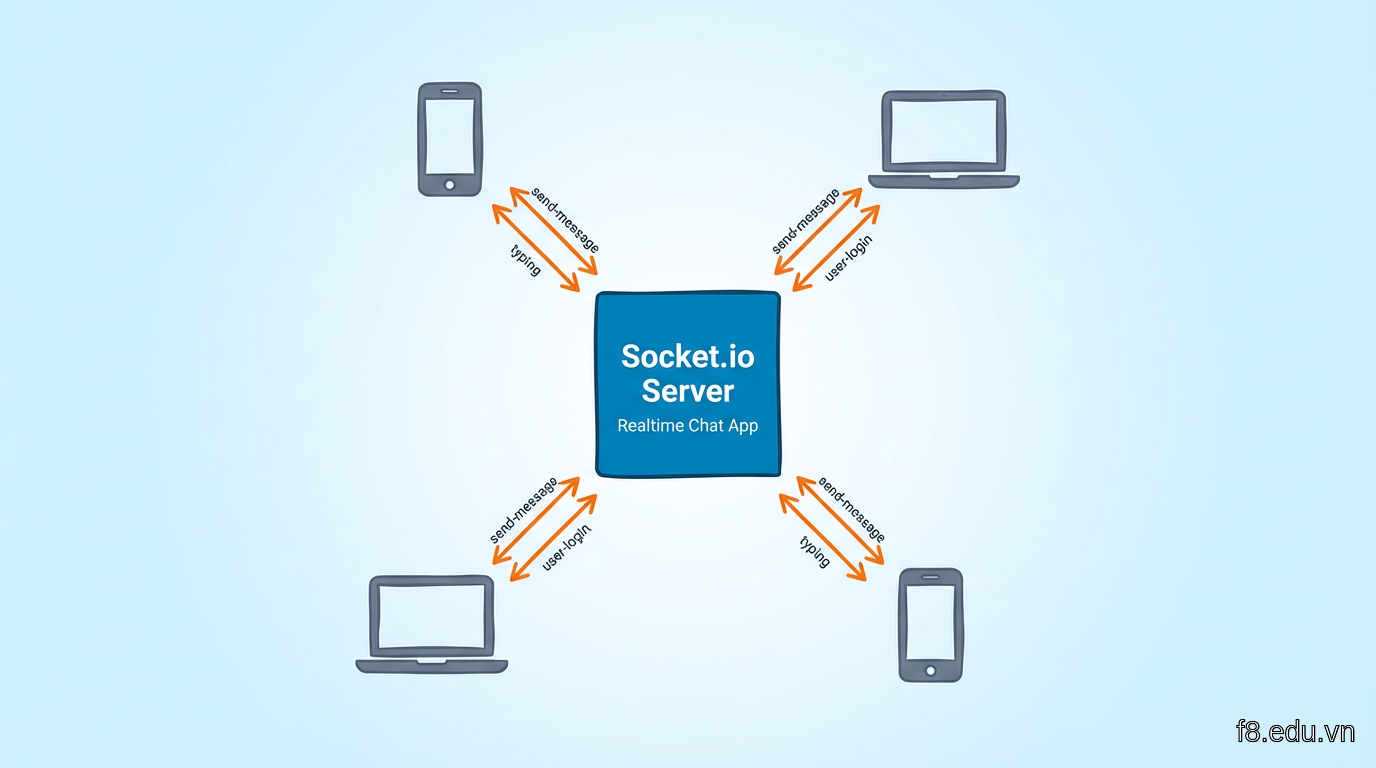
Xong phần lý thuyết, giờ làm thật. Mình sẽ build app chat đơn giản nhưng đầy đủ tính năng: gửi tin nhắn realtime, hiển thị "đang gõ...", đếm số người online.

Setup server Node.js

Đầu tiên cài đặt dependencies:

npm init -y
npm install express socket.io

Tạo file server.js:

const express = require('express');
const http = require('http');
const { Server } = require('socket.io');

const app = express();
const server = http.createServer(app);
const io = new Server(server, {
  cors: {
    origin: "*", // Production nên giới hạn domain cụ thể
    methods: ["GET", "POST"]
  }
});

let onlineUsers = new Map(); // Lưu user đang online

io.on('connection', (socket) => {
  console.log('User kết nối:', socket.id);

  // User tham gia chat
  socket.on('user-login', (username) => {
    onlineUsers.set(socket.id, username);
    io.emit('update-users', Array.from(onlineUsers.values()));
  });

  // Gửi tin nhắn
  socket.on('send-message', (data) => {
    io.emit('new-message', {
      username: data.username,
      message: data.message,
      timestamp: new Date().toISOString()
    });
  });

  // Đang gõ...
  socket.on('typing', (username) => {
    socket.broadcast.emit('user-typing', username);
  });

  socket.on('stop-typing', () => {
    socket.broadcast.emit('user-stop-typing');
  });

  // User disconnect
  socket.on('disconnect', () => {
    onlineUsers.delete(socket.id);
    io.emit('update-users', Array.from(onlineUsers.values()));
  });
});

server.listen(3000, () => {
  console.log('Server chạy ở port 3000');
});

16233 Kiến trúc client-server của chat app: client emit events, server broadcast cho tất cả người dùng

Client interface đơn giản

Tạo file index.html:

<!DOCTYPE html>
<html>
<head>
  <title>Chat Realtime</title>
  <style>
    body { font-family: Arial, sans-serif; max-width: 600px; margin: 50px auto; }
    #messages { border: 1px solid #ccc; height: 400px; overflow-y: scroll; padding: 10px; }
    .message { margin: 8px 0; padding: 8px; background: #f0f0f0; border-radius: 5px; }
    #typing-indicator { color: #888; font-style: italic; min-height: 20px; }
    #online-users { color: #10b981; font-weight: bold; }
  </style>
</head>
<body>
  <div id="online-users">Đang online: 0</div>
  <div id="messages"></div>
  <div id="typing-indicator"></div>
  <input id="username" placeholder="Tên của bạn" />
  <input id="message-input" placeholder="Nhập tin nhắn..." />
  <button onclick="sendMessage()">Gửi</button>

  <script src="https://cdn.socket.io/4.5.4/socket.io.min.js"></script>
  <script>
    const socket = io('http://localhost:3000');
    let currentUsername = '';
    let typingTimeout;

    document.getElementById('username').addEventListener('change', (e) => {
      currentUsername = e.target.value;
      socket.emit('user-login', currentUsername);
    });

    document.getElementById('message-input').addEventListener('input', () => {
      socket.emit('typing', currentUsername);
      clearTimeout(typingTimeout);
      typingTimeout = setTimeout(() => {
        socket.emit('stop-typing');
      }, 1000);
    });

    function sendMessage() {
      const message = document.getElementById('message-input').value;
      if (message && currentUsername) {
        socket.emit('send-message', { username: currentUsername, message });
        document.getElementById('message-input').value = '';
        socket.emit('stop-typing');
      }
    }

    socket.on('new-message', (data) => {
      const messagesDiv = document.getElementById('messages');
      const msgElement = document.createElement('div');
      msgElement.className = 'message';
      msgElement.innerHTML = `<strong>${data.username}:</strong> ${data.message}`;
      messagesDiv.appendChild(msgElement);
      messagesDiv.scrollTop = messagesDiv.scrollHeight;
    });

    socket.on('user-typing', (username) => {
      document.getElementById('typing-indicator').textContent = `${username} đang gõ...`;
    });

    socket.on('user-stop-typing', () => {
      document.getElementById('typing-indicator').textContent = '';
    });

    socket.on('update-users', (users) => {
      document.getElementById('online-users').textContent = `Đang online: ${users.length}`;
    });
  </script>
</body>
</html>

Chạy node server.js, mở nhiều tab trình duyệt và test. Bạn sẽ thấy tin nhắn hiện ngay lập tức ở tất cả các tab.


Multiplayer game: Bài tiến lên online

Phần này hơi sâu, bám chặt lá sen nhé. Mình sẽ làm logic cơ bản cho game đánh bài 4 người - đủ để bạn hiểu cách đồng bộ game state giữa nhiều client.

Game state management

Game realtime khác chat ở chỗ: game cần đồng bộ trạng thái phức tạp (ai đang đánh, bài gì, lượt ai) và phải xử lý cheat (client giả mạo dữ liệu).

Nguyên tắc vàng: Server là nguồn chân lý duy nhất. Client chỉ gửi hành động ("đánh bài X"), server validate rồi broadcast kết quả.

// Server: Quản lý game state
class TienLenGame {
  constructor(roomId) {
    this.roomId = roomId;
    this.players = []; // Tối đa 4 người
    this.currentTurn = 0;
    this.tableCards = []; // Bài đang trên bàn
    this.gameStarted = false;
  }

  addPlayer(socket, username) {
    if (this.players.length >= 4) return false;
    
    this.players.push({
      socketId: socket.id,
      username: username,
      cards: [],
      position: this.players.length
    });

    if (this.players.length === 4) {
      this.startGame();
    }
    return true;
  }

  startGame() {
    this.gameStarted = true;
    // Chia bài (52 lá / 4 người = 13 lá/người)
    const deck = this.shuffleDeck();
    this.players.forEach((player, index) => {
      player.cards = deck.slice(index * 13, (index + 1) * 13);
    });
    // Người có bài 3 bích đi trước
    this.currentTurn = this.findFirstPlayer();
  }

  shuffleDeck() {
    const suits = ['bich', 'tep', 'ro', 'co'];
    const ranks = ['3', '4', '5', '6', '7', '8', '9', '10', 'J', 'Q', 'K', 'A', '2'];
    let deck = [];
    
    suits.forEach(suit => {
      ranks.forEach(rank => {
        deck.push({ suit, rank });
      });
    });

    // Fisher-Yates shuffle
    for (let i = deck.length - 1; i > 0; i--) {
      const j = Math.floor(Math.random() * (i + 1));
      [deck[i], deck[j]] = [deck[j], deck[i]];
    }
    return deck;
  }

  playCards(socketId, cards) {
    const player = this.players.find(p => p.socketId === socketId);
    if (!player) return { valid: false, reason: 'Không tìm thấy người chơi' };
    
    // Kiểm tra có phải lượt của người này không
    if (this.players[this.currentTurn].socketId !== socketId) {
      return { valid: false, reason: 'Chưa đến lượt bạn' };
    }

    // Validate bài đánh có hợp lệ không (logic game cụ thể)
    if (!this.isValidMove(cards)) {
      return { valid: false, reason: 'Bài không hợp lệ' };
    }

    // Xóa bài khỏi tay người chơi
    cards.forEach(card => {
      const index = player.cards.findIndex(c => 
        c.suit === card.suit && c.rank === card.rank
      );
      if (index > -1) player.cards.splice(index, 1);
    });

    this.tableCards = cards;
    this.currentTurn = (this.currentTurn + 1) % 4;

    // Kiểm tra thắng
    if (player.cards.length === 0) {
      return { valid: true, winner: player.username };
    }

    return { valid: true };
  }

  isValidMove(cards) {
    // Logic kiểm tra bài hợp lệ (đơn, đôi, sảnh, tứ quý...)
    // Đơn giản hóa: chỉ check có bài không
    return cards && cards.length > 0;
  }

  findFirstPlayer() {
    // Tìm người có 3 bích
    return this.players.findIndex(p => 
      p.cards.some(c => c.suit === 'bich' && c.rank === '3')
    );
  }
}

// Quản lý các phòng game
const gameRooms = new Map();

io.on('connection', (socket) => {
  socket.on('join-game', ({ roomId, username }) => {
    if (!gameRooms.has(roomId)) {
      gameRooms.set(roomId, new TienLenGame(roomId));
    }

    const game = gameRooms.get(roomId);
    const joined = game.addPlayer(socket, username);

    if (!joined) {
      socket.emit('game-full');
      return;
    }

    socket.join(roomId);
    
    // Gửi state cho người vừa vào
    socket.emit('game-state', {
      players: game.players.map(p => ({
        username: p.username,
        cardCount: p.cards.length,
        position: p.position
      })),
      yourCards: game.players.find(p => p.socketId === socket.id).cards,
      currentTurn: game.currentTurn
    });

    // Thông báo cho phòng
    io.to(roomId).emit('player-joined', { username, playerCount: game.players.length });

    // Game bắt đầu khi đủ 4 người
    if (game.gameStarted) {
      io.to(roomId).emit('game-started', {
        currentTurn: game.currentTurn,
        firstPlayer: game.players[game.currentTurn].username
      });
    }
  });

  socket.on('play-cards', ({ roomId, cards }) => {
    const game = gameRooms.get(roomId);
    if (!game) return;

    const result = game.playCards(socket.id, cards);

    if (!result.valid) {
      socket.emit('invalid-move', { reason: result.reason });
      return;
    }

    // Broadcast cho tất cả trong phòng
    io.to(roomId).emit('cards-played', {
      player: game.players.find(p => p.socketId === socket.id).username,
      cards: cards,
      nextTurn: game.players[game.currentTurn].username
    });

    if (result.winner) {
      io.to(roomId).emit('game-over', { winner: result.winner });
      gameRooms.delete(roomId); // Xóa phòng
    }
  });
});

Flow xử lý lượt đánh bài: Client gửi action -> Server validate -> Broadcast kết quả cho tất cả

Tối ưu latency cho game

Game yêu cầu độ trễ thấp hơn chat. Mình đã thử vài trick:

1. Client-side prediction: Khi người chơi đánh bài, UI cập nhật ngay (giả định hợp lệ), đợi server confirm. Nếu server từ chối, rollback lại.

// Client
function playCards(cards) {
  // Cập nhật UI ngay (optimistic update)
  removeCardsFromHand(cards);
  displayCardsOnTable(cards);
  
  socket.emit('play-cards', { roomId, cards });
}

socket.on('invalid-move', ({ reason }) => {
  // Rollback nếu server từ chối
  alert(reason);
  addCardsBackToHand(lastPlayedCards);
  removeCardsFromTable();
});

2. Binary data thay vì JSON: Với game action tần suất cao, dùng ArrayBuffer hoặc MessagePack thay JSON giảm bandwidth 30-50%.

// Thay vì
socket.emit('move', { x: 100, y: 200, action: 'shoot' });

// Dùng binary (cần encode/decode)
const buffer = new ArrayBuffer(9);
const view = new DataView(buffer);
view.setUint8(0, ACTION_SHOOT); // 1 byte
view.setFloat32(1, 100); // 4 bytes - x
view.setFloat32(5, 200); // 4 bytes - y
socket.emit('move', buffer);

3. Throttle events: Không gửi mọi event ngay, gom lại gửi mỗi 50ms.

let pendingMoves = [];
setInterval(() => {
  if (pendingMoves.length > 0) {
    socket.emit('batch-moves', pendingMoves);
    pendingMoves = [];
  }
}, 50);

Troubleshooting latency và connection issues

Đây là phần mình mất nhiều thời gian nhất khi deploy production. Game chạy mượt trên localhost nhưng lên server thì lag, disconnect liên tục.

Đo latency thực tế

Đầu tiên, cần đo chính xác độ trễ. Mình thêm ping/pong mechanism:

// Server
io.on('connection', (socket) => {
  let pingInterval = setInterval(() => {
    const start = Date.now();
    socket.emit('ping');
    
    socket.once('pong', () => {
      const latency = Date.now() - start;
      socket.emit('latency', latency);
    });
  }, 5000); // Ping mỗi 5 giây

  socket.on('disconnect', () => {
    clearInterval(pingInterval);
  });
});

// Client
socket.on('ping', () => {
  socket.emit('pong');
});

socket.on('latency', (ms) => {
  document.getElementById('latency-display').textContent = `Ping: ${ms}ms`;
  
  // Cảnh báo nếu lag quá
  if (ms > 200) {
    console.warn('Kết nối chậm, trải nghiệm có thể bị ảnh hưởng');
  }
});

Dashboard hiển thị latency realtime giúp debug performance issues

Xử lý disconnect và reconnect

Người dùng Việt hay chuyển mạng (WiFi <-> 4G), vào hầm xe -> mất kết nối tạm thời. Socket.io có reconnection tự động nhưng cần handle game state:

// Client: Lưu state để restore
let gameState = null;

socket.on('game-state', (state) => {
  gameState = state;
  localStorage.setItem('lastGameState', JSON.stringify(state));
});

socket.on('disconnect', (reason) => {
  console.log('Mất kết nối:', reason);
  showReconnectingUI();
});

socket.on('connect', () => {
  console.log('Đã kết nối lại');
  hideReconnectingUI();
  
  // Restore state nếu có
  const savedState = localStorage.getItem('lastGameState');
  if (savedState) {
    const state = JSON.parse(savedState);
    socket.emit('rejoin-game', { roomId: state.roomId });
  }
});

// Server: Cho phép rejoin
socket.on('rejoin-game', ({ roomId }) => {
  const game = gameRooms.get(roomId);
  if (!game) {
    socket.emit('game-not-found');
    return;
  }

  // Tìm player cũ (dựa vào username hoặc token)
  const player = game.players.find(p => p.username === socket.handshake.auth.username);
  if (player) {
    player.socketId = socket.id; // Cập nhật socket ID mới
    socket.join(roomId);
    socket.emit('game-state', getCurrentGameState(game));
  }
});

Các nguyên nhân lag phổ biến

1. Emit trong vòng lặp:

// ❌ SAI: Gửi 1000 events riêng lẻ
for (let i = 0; i < 1000; i++) {
  socket.emit('update', { index: i, data: data[i] });
}

// ✅ ĐÚNG: Gom lại gửi 1 lần
socket.emit('batch-update', data);

2. Không dùng room: Broadcast cho tất cả clients thay vì chỉ room cụ thể.

// ❌ SAI: Gửi cho tất cả servers
io.emit('game-update', data); // 1000 người nhận dù chỉ 4 người liên quan

// ✅ ĐÚNG: Chỉ gửi trong phòng
io.to(roomId).emit('game-update', data);

3. Không validate dữ liệu client: Client hack gửi 100 requests/giây làm nghẽn server.

// Server: Rate limiting đơn giản
const rateLimiter = new Map();

socket.on('play-cards', (data) => {
  const now = Date.now();
  const lastAction = rateLimiter.get(socket.id) || 0;
  
  if (now - lastAction < 500) { // Tối đa 2 actions/giây
    socket.emit('rate-limited', { message: 'Đánh chậm lại bạn ơi' });
    return;
  }
  
  rateLimiter.set(socket.id, now);
  // Xử lý bình thường...
});

Monitor production

Mình dùng thư viện socket.io-admin để theo dõi realtime:

const { instrument } = require('@socket.io/admin-ui');

instrument(io, {
  auth: {
    type: 'basic',
    username: 'admin',
    password: '$2b$10$...' // Hash bcrypt
  },
  mode: 'development' // 'production' khi deploy
});

Truy cập https://admin.socket.io để xem dashboard: số connections, rooms, events/giây, latency trung bình. Cực kỳ hữu ích để spot bottlenecks.


Deploy lên Vercel và scale

Đến đây app đã chạy tốt local, giờ đưa lên production. Vercel miễn phí và dễ deploy, nhưng có vài lưu ý với WebSocket.

Cấu trúc project cho Vercel

Vercel chạy serverless functions, không phải long-running server truyền thống. Socket.io cần adapter để hoạt động:

npm install @socket.io/redis-adapter redis

Kiến trúc scale với Redis adapter: nhiều server instances chia sẻ state qua Redis

Cấu trúc thư mục:

/api
  /socket.js        # Serverless function
/public
  /index.html       # Client
vercel.json         # Config
package.json

File api/socket.js:

import { Server } from 'socket.io';
import { createAdapter } from '@socket.io/redis-adapter';
import { createClient } from 'redis';

const ioHandler = (req, res) => {
  if (!res.socket.server.io) {
    console.log('Khởi tạo Socket.io server...');
    
    const io = new Server(res.socket.server, {
      path: '/api/socket',
      addTrailingSlash: false,
      cors: { origin: '*' }
    });

    // Kết nối Redis cho multi-instance
    if (process.env.REDIS_URL) {
      const pubClient = createClient({ url: process.env.REDIS_URL });
      const subClient = pubClient.duplicate();

      Promise.all([pubClient.connect(), subClient.connect()]).then(() => {
        io.adapter(createAdapter(pubClient, subClient));
        console.log('Redis adapter kết nối thành công');
      });
    }

    io.on('connection', (socket) => {
      console.log('Client kết nối:', socket.id);
      
      // Logic game ở đây (copy từ phần trước)
      socket.on('join-game', (data) => { /* ... */ });
      socket.on('play-cards', (data) => { /* ... */ });
    });

    res.socket.server.io = io;
  } else {
    console.log('Socket.io server đã chạy');
  }
  res.end();
};

export const config = {
  api: {
    bodyParser: false
  }
};

export default ioHandler;

File vercel.json:

{
  "functions": {
    "api/socket.js": {
      "memory": 1024,
      "maxDuration": 60
    }
  },
  "rewrites": [
    {
      "source": "/socket.io/(.*)",
      "destination": "/api/socket"
    }
  ]
}

Client kết nối production

// Phát hiện môi trường
const socketURL = process.env.NODE_ENV === 'production' 
  ? 'https://your-app.vercel.app'
  : 'http://localhost:3000';

const socket = io(socketURL, {
  path: '/api/socket',
  transports: ['websocket', 'polling'], // Thử WebSocket trước, fallback polling
  reconnection: true,
  reconnectionAttempts: 5,
  reconnectionDelay: 1000
});

Scale với Redis

Khi traffic tăng, Vercel tự động scale thành nhiều instances. Vấn đề: user A kết nối instance 1, user B kết nối instance 2 -> không giao tiếp được.

Giải pháp: Redis adapter làm message broker. Tất cả instances publish/subscribe events qua Redis.

Bạn cần Redis server - dùng Upstash (có free tier, tích hợp tốt với Vercel):

  1. Tạo database tại upstash.com
  2. Copy REDIS_URL vào Vercel Environment Variables
  3. Redeploy

Boom - app giờ handle được hàng nghìn concurrent users.

Alternative: Railway hoặc Render

Nếu cần long-running server đơn giản hơn (không serverless), dùng Railway hoặc Render:

# Dockerfile
FROM node:18-alpine
WORKDIR /app
COPY package*.json ./
RUN npm install --production
COPY . .
EXPOSE 3000
CMD ["node", "server.js"]

Push lên GitHub, connect với Railway -> tự động deploy. Không cần config phức tạp như Vercel.

Monitoring production

Thêm logging để debug khi production gặp lỗi:

io.on('connection', (socket) => {
  console.log('[CONNECT]', {
    socketId: socket.id,
    timestamp: new Date().toISOString(),
    ip: socket.handshake.address
  });

  socket.on('error', (error) => {
    console.error('[ERROR]', {
      socketId: socket.id,
      error: error.message,
      stack: error.stack
    });
  });

  socket.on('disconnect', (reason) => {
    console.log('[DISCONNECT]', {
      socketId: socket.id,
      reason: reason,
      timestamp: new Date().toISOString()
    });
  });
});

Vercel tự động thu thập logs, xem trong dashboard Functions -> Logs.


Tối ưu bảo mật và chống cheat

Game multiplayer luôn có người cố cheat. Mình từng để lỗ hổng cho phép client tự khai báo điểm -> hàng loạt người "thắng" không tưởng.

Xác thực người dùng

Socket.io hỗ trợ middleware authentication:

// Server: Verify JWT token
const jwt = require('jsonwebtoken');

io.use((socket, next) => {
  const token = socket.handshake.auth.token;
  
  if (!token) {
    return next(new Error('Thiếu token xác thực'));
  }

  try {
    const decoded = jwt.verify(token, process.env.JWT_SECRET);
    socket.userId = decoded.userId;
    socket.username = decoded.username;
    next();
  } catch (err) {
    next(new Error('Token không hợp lệ'));
  }
});

// Client: Gửi token khi connect
const token = localStorage.getItem('authToken');
const socket = io('http://localhost:3000', {
  auth: { token: token }
});

socket.on('connect_error', (err) => {
  if (err.message === 'Token không hợp lệ') {
    // Redirect to login
    window.location.href = '/login';
  }
});

Validate mọi input từ client

Nguyên tắc: Never trust the client. Mọi dữ liệu client gửi đều phải validate.

socket.on('play-cards', ({ roomId, cards }) => {
  // 1. Kiểm tra roomId hợp lệ
  if (typeof roomId !== 'string' || !gameRooms.has(roomId)) {
    return socket.emit('error', { message: 'Phòng không tồn tại' });
  }

  // 2. Kiểm tra cards là array
  if (!Array.isArray(cards) || cards.length === 0) {
    return socket.emit('error', { message: 'Dữ liệu bài không hợp lệ' });
  }

  // 3. Validate từng lá bài
  const validSuits = ['bich', 'tep', 'ro', 'co'];
  const validRanks = ['3', '4', '5', '6', '7', '8', '9', '10', 'J', 'Q', 'K', 'A', '2'];
  
  for (const card of cards) {
    if (!card.suit || !card.rank || 
        !validSuits.includes(card.suit) || 
        !validRanks.includes(card.rank)) {
      return socket.emit('error', { message: 'Bài không hợp lệ' });
    }
  }

  // 4. Kiểm tra người chơi có bài này trong tay không
  const game = gameRooms.get(roomId);
  const player = game.players.find(p => p.socketId === socket.id);
  
  for (const card of cards) {
    const hasCard = player.cards.some(c => 
      c.suit === card.suit && c.rank === card.rank
    );
    if (!hasCard) {
      return socket.emit('error', { message: 'Bạn không có bài này' });
    }
  }

  // 5. Validate logic game (bài có đánh được không)
  if (!game.isValidMove(cards)) {
    return socket.emit('error', { message: 'Nước đi không hợp lệ' });
  }

  // Passed tất cả checks -> xử lý
  // ...
});

Rate limiting và anti-spam

const rateLimit = require('express-rate-limit');

// Giới hạn số lượng connections từ 1 IP
const limiter = rateLimit({
  windowMs: 15 * 60 * 1000, // 15 phút
  max: 100, // Tối đa 100 connections
  message: 'Quá nhiều kết nối từ IP này'
});

app.use('/socket.io', limiter);

// Giới hạn events per socket
const eventCounts = new Map();

function checkRateLimit(socket, eventName, limit = 10) {
  const key = `${socket.id}:${eventName}`;
  const now = Date.now();
  const record = eventCounts.get(key) || { count: 0, resetTime: now + 1000 };
  
  if (now > record.resetTime) {
    record.count = 0;
    record.resetTime = now + 1000;
  }
  
  record.count++;
  eventCounts.set(key, record);
  
  if (record.count > limit) {
    socket.emit('rate-limit-exceeded', { 
      message: 'Bạn đang thao tác quá nhanh' 
    });
    return false;
  }
  
  return true;
}

socket.on('send-message', (data) => {
  if (!checkRateLimit(socket, 'send-message', 5)) return;
  // Xử lý message...
});

Encrypt dữ liệu nhạy cảm

Đừng gửi raw data nhạy cảm qua WebSocket. Ví dụ điểm số, kết quả game nên hash để client không đọc/sửa được:

const crypto = require('crypto');

function signData(data, secret) {
  const hmac = crypto.createHmac('sha256', secret);
  hmac.update(JSON.stringify(data));
  return hmac.digest('hex');
}

function verifyData(data, signature, secret) {
  const expectedSignature = signData(data, secret);
  return signature === expectedSignature;
}

// Server gửi kết quả có chữ ký
const result = { winner: 'player1', score: 1500 };
const signature = signData(result, process.env.SECRET_KEY);

socket.emit('game-result', { data: result, signature });

// Client verify (nếu cần)
// Nhưng tốt nhất client chỉ hiển thị, không logic dựa vào data này

Kết luận

Realtime app không khó như tưởng tượng. WebSocket và Socket.io giải quyết phần networking, bạn chỉ cần tập trung vào logic game/app.

Những điểm chính cần nhớ:

  • WebSocket cho kết nối 2 chiều liên tục, Socket.io thêm features như reconnect, room, fallback
  • Server là nguồn chân lý - validate mọi input từ client, đừng tin tưởng gì cả
  • Optimize latency bằng client prediction, binary data, throttling events
  • Scale với Redis adapter khi có nhiều server instances
  • Monitor production bằng logging và admin dashboard
  • Security first - authentication, rate limiting, validate tất cả

Đầu tiên, làm prototype đơn giản chạy được đã. Sau đó mới tối ưu performance và bảo mật từng bước. Đừng cố làm mọi thứ hoàn hảo ngay từ đầu - mình từng mắc kẹt 2 tuần vì cố optimize app chưa có user nào.

Bắt đầu với chat app trong tutorial này, chạy thử local, rồi thêm features từ từ. Khi nào tự tin, nhảy sang làm game multiplayer đơn giản như cờ caro, xúc xắc. Kinh nghiệm xây thực tế quý hơn đọc 10 bài viết.

Có gì thắc mắc về WebSocket, Socket.io, hay gặp bug lạ cứ kêu quạ quạ ở comment. Mình sẽ nhảy vào trả lời 🐸