
WebSocket và Socket.IO: Xây dựng app realtime, multiplayer game và live dashboard

2 tháng trước · 12 phút đọc
WebSocket là gì và tại sao HTTP polling không đủ dùng
Mình nhớ hồi mới làm tính năng live notification, mình dùng setInterval gọi API mỗi 2 giây. Nó chạy được. Nhưng khi lên production với vài trăm người dùng cùng lúc, server bắt đầu kêu.
Vấn đề của HTTP polling rất đơn giản: client hỏi, server trả lời - dù có dữ liệu mới hay không. Mỗi request đều kèm HTTP headers (~500 bytes đến vài KB), TCP handshake, và thời gian chờ. Với 1000 users polling mỗi 2 giây, bạn đang xử lý 500 request/giây chỉ để trả về "chưa có gì mới".
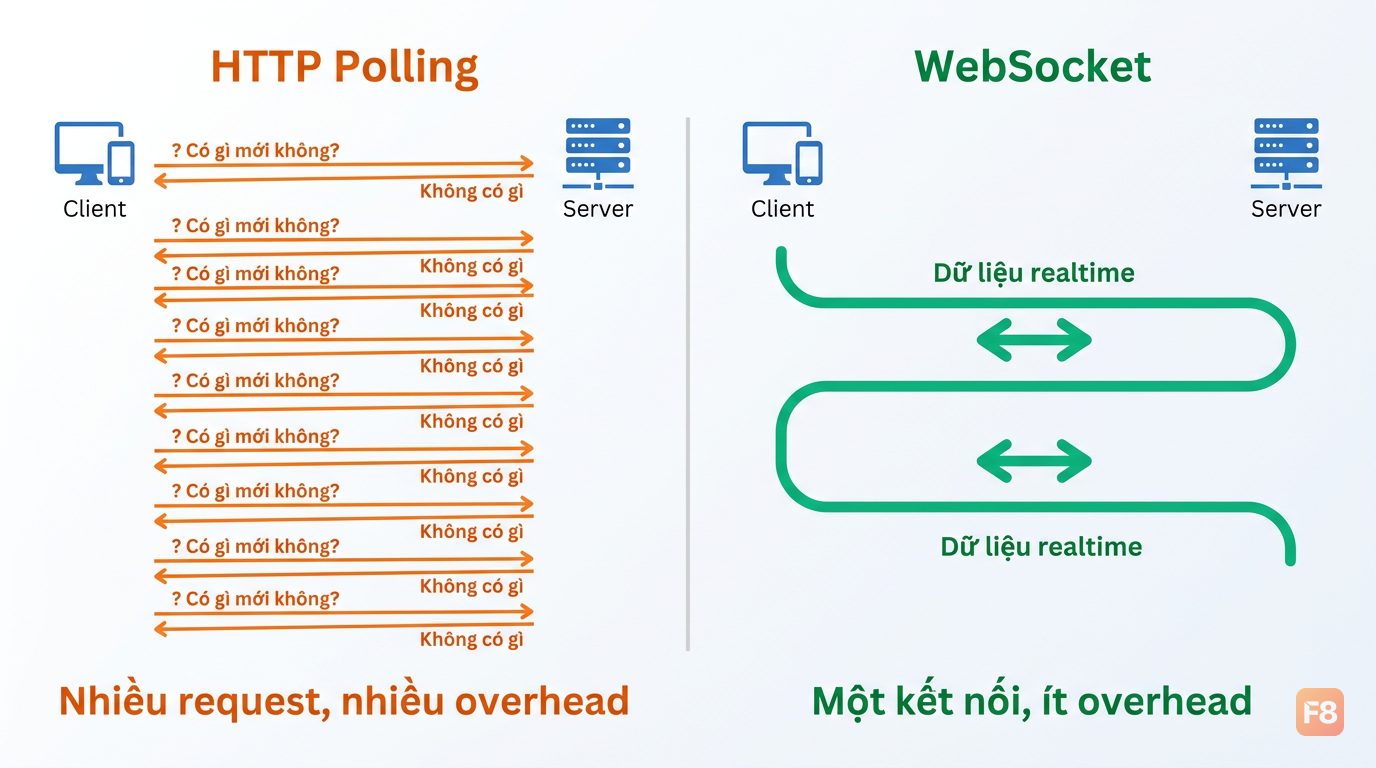 Polling tạo request liên tục dù server không có gì mới - lãng phí tài nguyên rõ ràng
WebSocket giải quyết vấn đề này bằng cách giữ một kết nối TCP duy nhất mở liên tục. Luồng hoạt động:
- Client gửi HTTP request với header
Upgrade: websocket - Server trả về
101 Switching Protocols - Từ đây, cả hai bên trao đổi frame nhị phân hai chiều trên cùng kết nối - không cần request mới
Kết quả? Server chủ động đẩy dữ liệu tới client ngay khi có. Latency giảm từ "chu kỳ polling" xuống còn vài milliseconds. Overhead từ headers HTTP biến mất.
Cái quan trọng hơn: mô hình tư duy thay đổi hoàn toàn. Thay vì "client hỏi → server trả lời", bạn làm việc với event stream hai chiều. Server có thể notify client bất cứ lúc nào mà không cần client hỏi trước.
Socket.IO là gì - và tại sao nó không phải WebSocket
Đây là nhầm lẫn mình thấy khá thường xuyên: dùng "WebSocket" và "Socket.IO" như thể chúng là một. Thực ra chúng khác nhau cơ bản.
WebSocket là giao thức chuẩn (RFC 6455) được browser và server hỗ trợ native. Socket.IO là thư viện với protocol riêng chạy trên Engine.IO - nó dùng WebSocket khi có thể, nhưng cũng có thêm nhiều thứ khác.
Một điểm nhiều bạn bỏ qua: kết nối đầu tiên của Socket.IO thường bắt đầu bằng HTTP long-polling, rồi mới upgrade lên WebSocket. Tức là message đầu tiên chậm hơn một round trip so với WebSocket thuần.
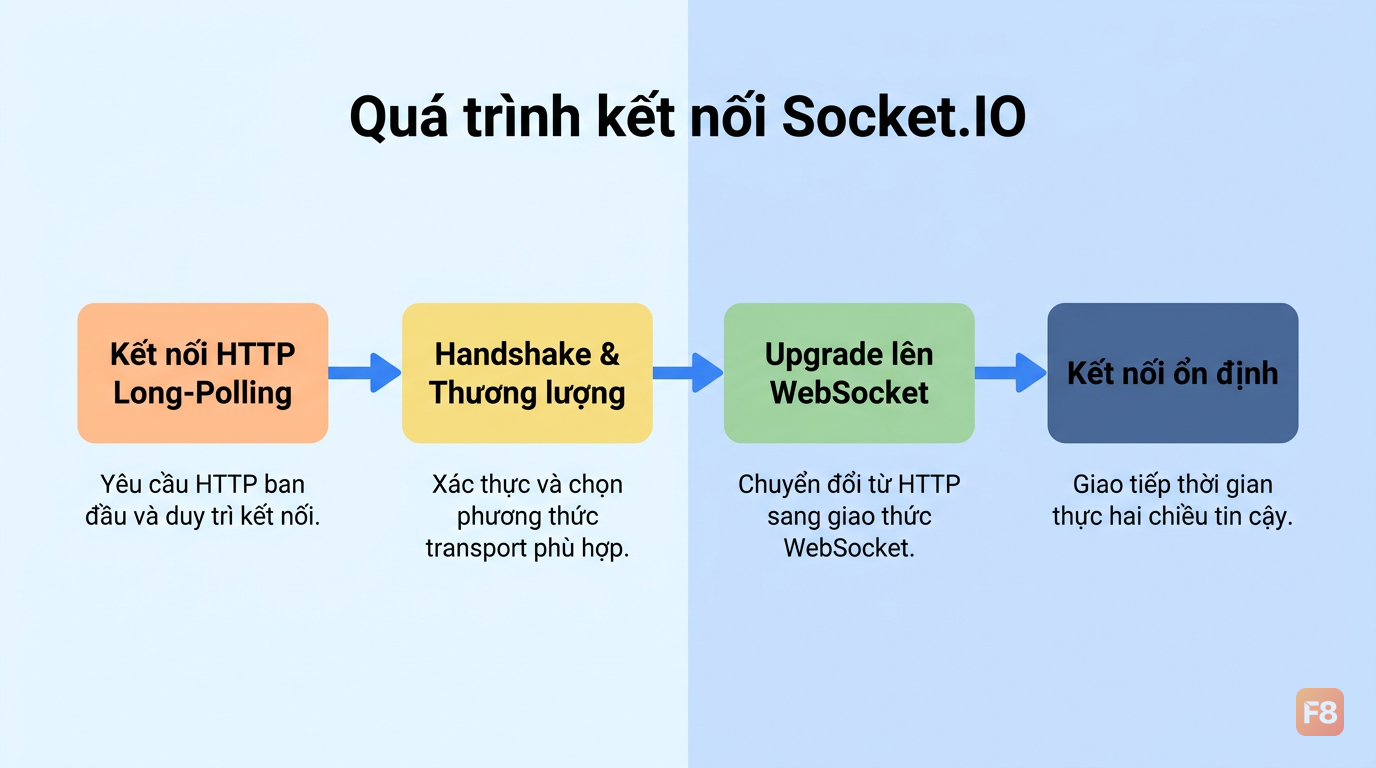 Socket.IO bắt đầu bằng HTTP polling rồi mới upgrade - đây là lý do đầu tiên kết nối hơi chậm
Nhưng đổi lại, Socket.IO cho bạn rất nhiều thứ miễn phí:
- Automatic reconnection với exponential backoff
- Fallback transport: nếu WebSocket bị chặn (firewall công ty, proxy), tự chuyển sang long-polling
- Rooms: broadcast cho nhóm người dùng cụ thể
- Namespaces: tách logic thành các kênh riêng
- Event model: gửi nhận theo tên event, không cần parse JSON thô thủ công
Bảng so sánh nhanh:
| WebSocket | Socket.IO | |
|---|---|---|
| Bản chất | Giao thức chuẩn | Thư viện + protocol riêng |
| Kết nối đầu | WebSocket ngay | HTTP polling → upgrade |
| Fallback | Tự xử lý | Có sẵn |
| Reconnect | Tự xử lý | Có sẵn |
| Rooms/Namespaces | Tự xây | Có sẵn |
| Overhead | Thấp | Cao hơn |
Chọn WebSocket thuần khi bạn cần throughput tối đa, kiểm soát chặt protocol, và không cần fallback hay room abstraction. Chọn Socket.IO khi bạn muốn development nhanh, có fallback, và cần tính năng như rooms/namespaces mà không muốn tự build.
Một điều cần nhớ: client WebSocket chuẩn không nói chuyện được với Socket.IO server vì họ nói hai protocol khác nhau. Nếu bạn dùng Socket.IO server thì client cũng phải dùng socket.io-client.
Setup Node.js + React với Socket.IO
Mình sẽ đi thẳng vào code. Ví dụ dưới đây build một live chat đơn giản - cấu trúc này dùng được cho cả multiplayer game lẫn live dashboard, chỉ thay đổi event names và payload.
Server side (Node.js + Express)
Cài package:
Client side (React)
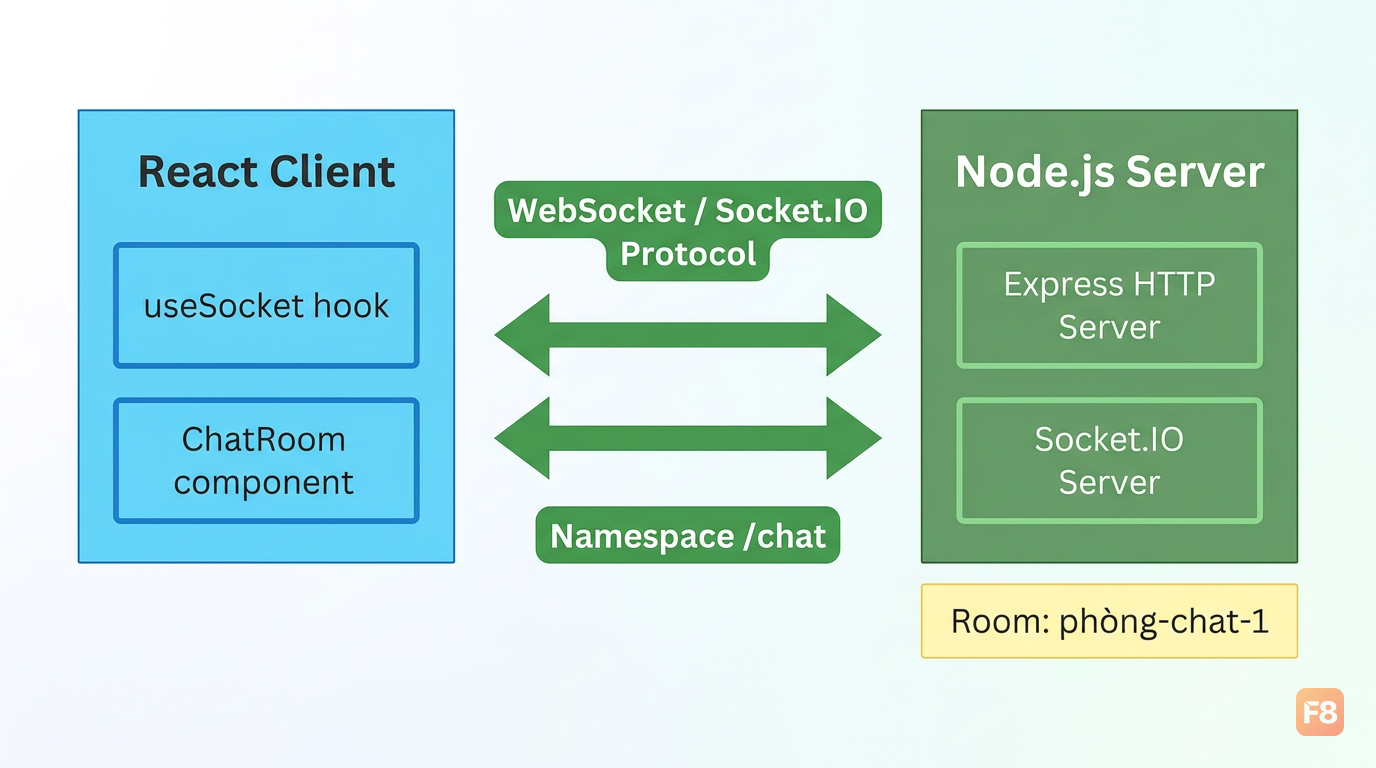 Pattern hook tách socket logic ra khỏi UI component - dễ test và tái sử dụng hơn nhiều
Một vài điểm quan trọng trong code trên:
socket.off('receive_message', handleMessage)trong cleanup - không làm điều này là nguyên nhân số 1 gây duplicate message handlers- Dùng
namespaceriêng (/chat) thay vì default namespace để tách logic transports: ['websocket', 'polling']- đặt WebSocket trước để socket cố dùng WebSocket ngay từ đầu thay vì bắt đầu bằng polling
Nếu bạn mới làm quen với React và muốn có nền tảng vững trước khi đụng vào Socket.IO, khóa Xây Dựng Website với ReactJS của F8 cover khá đầy đủ từ hooks đến useEffect - những thứ bạn cần để dùng socket đúng cách.
Reconnection, throttling và xử lý mạng kém
Socket.IO có reconnect tự động - nhưng nếu bạn chỉ bật nó lên và không làm gì thêm, bạn sẽ gặp vấn đề.
Reconnection storm
Khi server restart hoặc mạng bị ngắt, tất cả client cố reconnect cùng lúc. Với 10k users, đây là 10k request đập vào server ngay cùng thời điểm. Server có thể chết ngay từ bước reconnect trước khi kịp serve traffic thật.
Fix bằng jitter - thêm độ ngẫu nhiên vào delay reconnect:
Throttle event tần suất cao
Với multiplayer game hoặc collaborative tool, bạn có thể emit mousemove, cursor position, hoặc typing state rất thường xuyên. Gửi mỗi pixel di chuyển là không cần thiết.
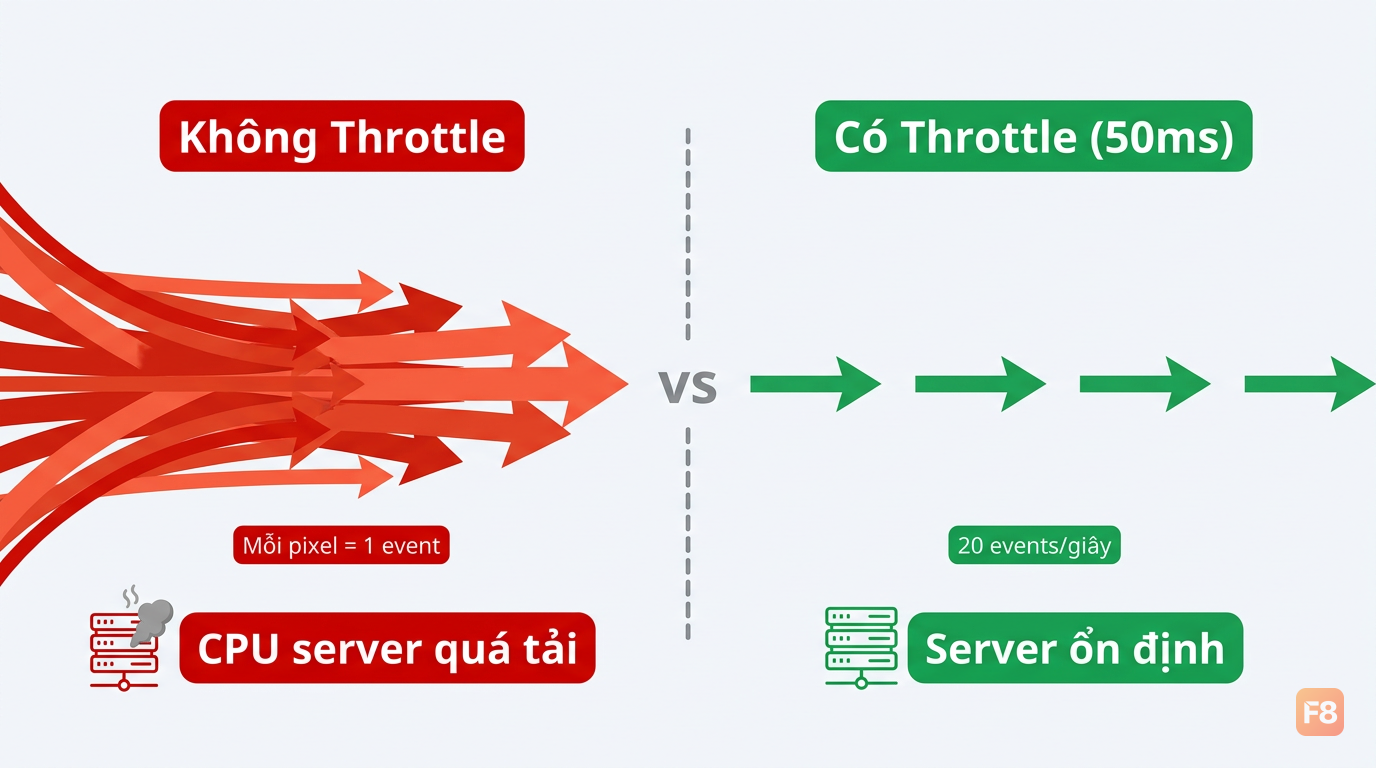 Throttle cursor ở 50ms (20fps) thay vì mỗi pixel - giảm đáng kể số events gửi lên server
Xử lý duplicate events sau reconnect
Khi client reconnect, có thể server đã emit event trong lúc client offline. Cách đơn giản nhất là dùng sequence ID:
Batching updates
Thay vì emit từng thay đổi nhỏ, gom lại và gửi theo batch:
Kỹ thuật này đặc biệt hiệu quả cho live dashboard - thay vì emit mỗi metric thay đổi, batch lại 200-500ms rồi gửi một lần.
Scaling lên 100k+ users với Socket.IO
Một instance Node.js với Socket.IO có thể handle khoảng 10,000-50,000 concurrent WebSocket connections per Node.js Socket.IO instance (2023-2024 benchmark), với điều kiện tối ưu hóa OS (ulimit, ephemeral port range) và tải nhẹ; mức an toàn thường là 10,000-30,000 connections (Socket.IO Official Documentation & Community Benchmarks 2023-2024) concurrent connections tùy hardware và workload. Lên 100k+ bạn cần scale horizontal.
Vấn đề của nhiều instance
Socket.IO là stateful - mỗi kết nối gắn với một instance cụ thể. Khi bạn chạy 3 instance Node.js phía sau load balancer, user A kết nối instance 1, user B kết nối instance 2. Nếu server emit broadcast, chỉ users trên cùng instance mới nhận được.
Sticky sessions: load balancer phải đảm bảo mỗi client luôn route về cùng một instance. Với nginx:
Redis Adapter
Sticky sessions chưa đủ - bạn vẫn cần broadcast cross-instance. Redis Adapter giải quyết điều này:
Với Redis Adapter, khi instance 1 emit tới room game-123, Redis pub/sub sẽ forward message đó tới tất cả instance khác đang có users trong room đó.
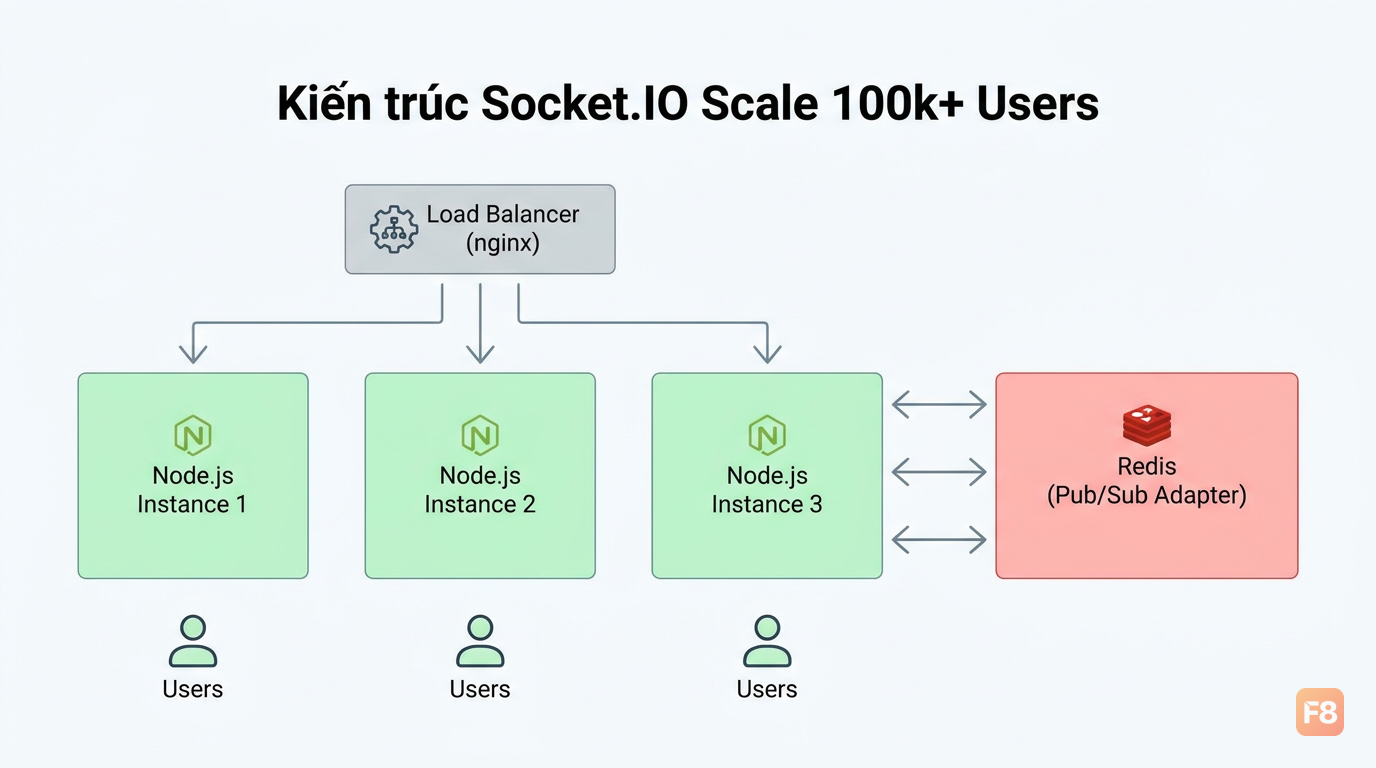 Redis adapter làm cầu nối giữa các Node.js instances - broadcast giờ hoạt động đúng kể cả khi scale
Chiến lược giảm tải
Scale không chỉ là thêm instance. Một số kỹ thuật giảm fan-out:
- Room partitioning: đừng có room với 100k users nhận cùng event. Chia nhỏ thành rooms 100-1000 users.
- Load shedding: khi server quá tải, giảm tần suất update (từ 100ms xuống 500ms) thay vì drop connection.
- Backpressure: nếu client xử lý chậm (slow consumer), giới hạn tốc độ emit cho client đó thay vì để queue phình to.
Một kiến trúc quan trọng cần nhớ: với quy mô lớn, kiến trúc và fan-out strategy quan trọng không kém code ứng dụng. Room quá lớn + broadcast quá thường = bottleneck cho dù server có mạnh đến đâu.
Performance tips và common pitfalls
Tips thực chiến
Gửi delta, không gửi full state. Đây là nguyên tắc quan trọng nhất. Thay vì emit toàn bộ game state mỗi frame:
Tách namespaces theo chức năng. Mixin tất cả vào default namespace là cách nhanh nhất để tạo chaos:
Live dashboard: update theo chu kỳ 200-1000ms thay vì mỗi metric thay đổi. Người dùng không đọc được số thay đổi nhanh hơn 500ms.
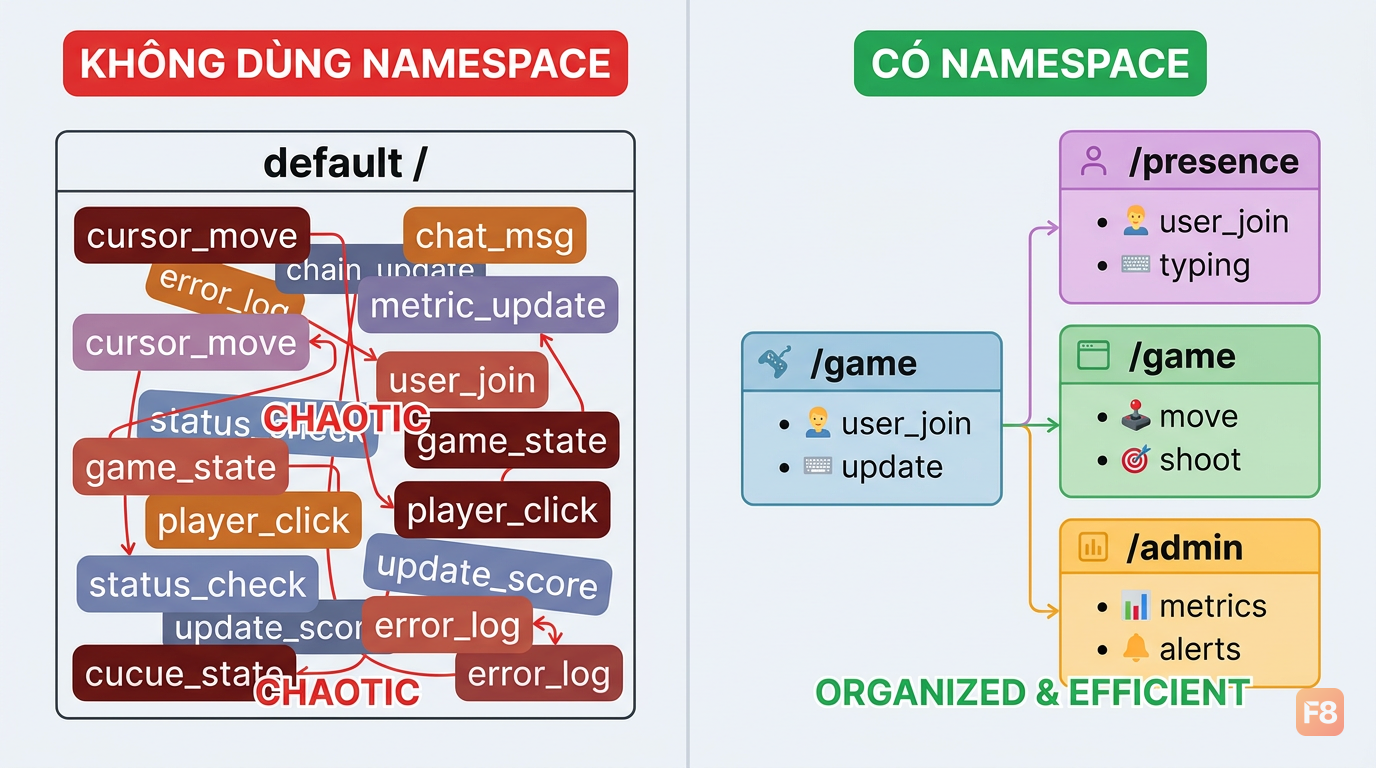 Namespace riêng cho từng chức năng giúp debug dễ hơn và giảm noise event
Common pitfalls
1. Quên cleanup listener trong React
2. Broadcast quá rộng
io.emit(event, data) gửi tới tất cả clients kết nối. Với 50k users, đây là 50k message đi ra cùng lúc. Luôn dùng io.to(roomId).emit() hoặc socket.to(userId).emit().
3. Nhầm Socket.IO với WebSocket chuẩn
Client WebSocket của browser không kết nối được với Socket.IO server. Nếu bạn muốn dùng WebSocket native:
4. Kỳ vọng connection state recovery bền vững
Socket.IO có tính năng connection state recovery, nhưng buffer này nằm trong memory server. Server restart = mất buffer. Đừng dùng nó như database.
5. Không dùng sticky sessions khi scale
Dùng nhiều instance mà không có sticky sessions + adapter: users thỉnh thoảng miss event hoặc không nhận được broadcast. Bug này cực khó reproduce vì chỉ xảy ra ở một tỷ lệ request nhất định.
Bạn đang build backend với Node.js lần đầu? Khóa Node & ExpressJS trên F8 cover phần nền tảng Node.js khá tốt trước khi bạn đi sâu vào Socket.IO.